Customer journey and WhatsApp: how to improve the user journey through WhatsApp
Content
Since 2018, medium-to-large companies have been able to interact with their customers through WhatsApp thanks to the use of the official APIs released by WhatsApp. We at Spoki have created a platform that allows interaction with the user, integration with automation systems, and the ability to create and activate autonomous automations within the platform, thus allowing automatic dialogue with the user.
Customer Journey and WhatsApp
Topic Overview:
- Premise
- Pre-purchase: Information acquisition
- Purchase: how to create an experience for the customer
- Post purchase
- The advantages of the customer journey
The average user navigates through images, information, data, and videos every day. Never has there been so much information in human history. This constant exposure to content inevitably reduces the user’s attention span, which they reserve for the few pieces of content that are relevant to them.
Today, for information to be relevant, it must be linked to the context, to the moment of the customer journey that the user is experiencing and, above all, it must be personalized.
This new need for speed is driving many companies to look for new ways and tools to make communications with customers faster, more personal and contextualized. One of the most used channels is certainly WhatsApp, which not only records much higher message opening rates than digital channels, but also proves to be an extremely effective tool in all phases of the customer journey.On WhatsApp, it is possible to create, through specific tools such as Spoki (a platform that uses the official WhatsApp Business APIs), real automations that follow the user in all phases of the purchase, providing them with relevant information based on the moment.
Let’s look at some examples.
Pre-purchase: Information acquisition
This is one of the most delicate phases of the process. Here, the user browsing the site is looking for relevant information about the product/service or the company. They may need detailed information that is missing within the page, or they may need assistance. At this moment, it is essential to be prompt in responding. If a user does not immediately receive the requested information, they tend to abandon the page.
With Spoki, you can insert a button on one or more pages of the site that allows the start of a One-to-One communication between the user and the company.
By clicking on the button, the user starts a conversation that can be free (i.e. followed by a customer care operator) or driven by automation.
This integration allows customer care to answer user questions quickly, directly and very personally, thus encouraging the purchase.
Purchase: how to create an experience for the user
During the purchase phase, it is essential that all key information such as cost, payment method, and delivery times are specified on the purchase page. But what happens if, for example, one of these pieces of information is not specified?
The user abandons the page.
In this case, the Spoki button allows the user to start a conversation with the company, thus reducing the abandonment rate.
But that’s not all: it is possible to plan an automation to remind the user that the chosen product is still in the cart, via a WhatsApp message on their phone number, thus encouraging them to continue the purchase.
Post purchase
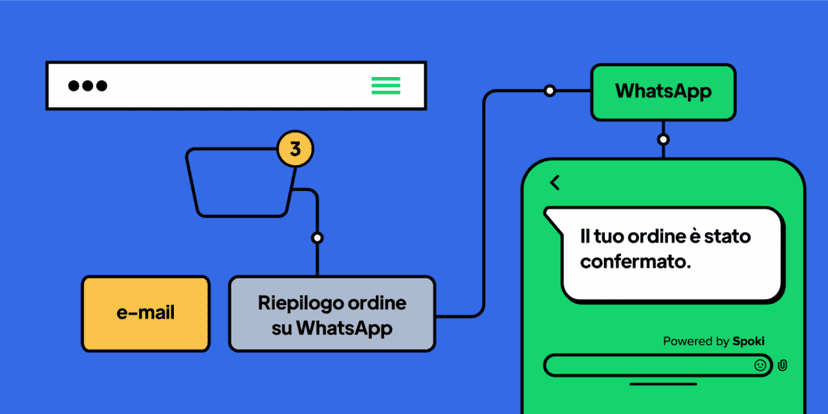
Once the purchase is complete, you can use Spoki to send purchase confirmation information to the customer’s personal number.
At this stage, the user usually receives transactional emails that update them on the purchase and order status. This is information that the user expects to receive and has a very high open rate. This information reassures the user and keeps them updated until delivery.
Using WhatsApp automations at this stage could be very relevant. Let’s assume a customer is not at the location where delivery is scheduled. Through automations, Spoki can instantly notify the user of the order’s arrival. In the case of cash on delivery, receiving a message about the imminent arrival of the courier reminds and prepares the customer for the delivery.
Automated WhatsApp can also be used to build customer loyalty or to answer other post-purchase customer questions. You can send a message three days after delivery to remind the user to submit a review, or send a questionnaire to gather user feedback after product use, and much more.
The advantages of integrating WhatsApp into the customer journey
As we mentioned earlier, using WhatsApp to follow customers during the different stages of the purchase can be a winning move.
As demonstrated by the Global Digital 2021 study by We Are Social, users are increasingly connected and using their smartphones more and more to access internet services. They expect to communicate with companies quickly and informally, and above all, via smartphone.
Integrating Spoki, which uses the official WhatsApp APIs, would help to further bridge the gap with customers and increase their satisfaction.
Another point in favor is the reliability of WhatsApp as it protects chat information, documents, photos and everything that is shared by the user is protected according to the end-to-end encryption system of the application.
Do you want to integrate WhatsApp Marketing into your business?
Start with a free account on Spoki and start your first campaigns with 5 € of included credit.
Or contact us to build your winning strategy together. We are waiting for you!