Advanced Inbound Call Routing: Never Miss a Customer Call with Sp
Content
In today’s fast-paced business environment, every customer interaction is an opportunity. For marketing managers, business owners, e-commerce operators, and SMBs leveraging WhatsApp Business for customer communication, missing an inbound call can mean a lost lead, a frustrated customer, or a missed sale. The challenge has always been ensuring that every incoming call is handled efficiently, directed to the right person, and never simply disappears into the void. This is precisely the problem Spoki’s latest update, Inbound Call Routing (v19.8.0), solves.
Spoki now offers unprecedented control over how your business manages incoming calls. This powerful new feature, accessible within the new Inbound Routing section, allows you to define precisely who answers calls and, critically, what happens when a call goes unanswered. This ensures that no customer call is ever lost, significantly improving your responsiveness and boosting customer satisfaction. With Spoki, you can transform inbound calls from a potential point of friction into a seamless, customer-centric experience.
Why Inbound Call Routing is Crucial for Your Business
Efficient inbound call routing is more than just a convenience; it’s a strategic imperative for businesses aiming to excel in customer service and operational efficiency. For SMBs and e-commerce businesses, where every customer interaction holds significant weight, a well-defined routing strategy can:
- Improve Customer Satisfaction: Customers appreciate quick, relevant responses. Being connected to the right person immediately or receiving a prompt follow-up message demonstrates that their time and query are valued.
- Increase Responsiveness: By ensuring calls are always directed or followed up on, you drastically reduce response times, a key factor in customer loyalty and conversion.
- Prevent Lost Leads: Unanswered calls often translate directly into lost business. Spoki’s routing rules ensure that even if a call isn’t picked up live, the lead is captured and nurtured.
- Optimize Team Productivity: Operators spend less time figuring out who should take a call and more time engaging with customers. Availability settings allow team members to manage their workload effectively.
- Enhance Professionalism: A structured approach to inbound calls projects an image of professionalism and reliability, building trust with your customer base.
Spoki’s Inbound Call Routing feature is designed to empower you with these benefits, making your customer communication more robust and reliable than ever before.
Setting Up Your Human Operators: Who Answers the Call?
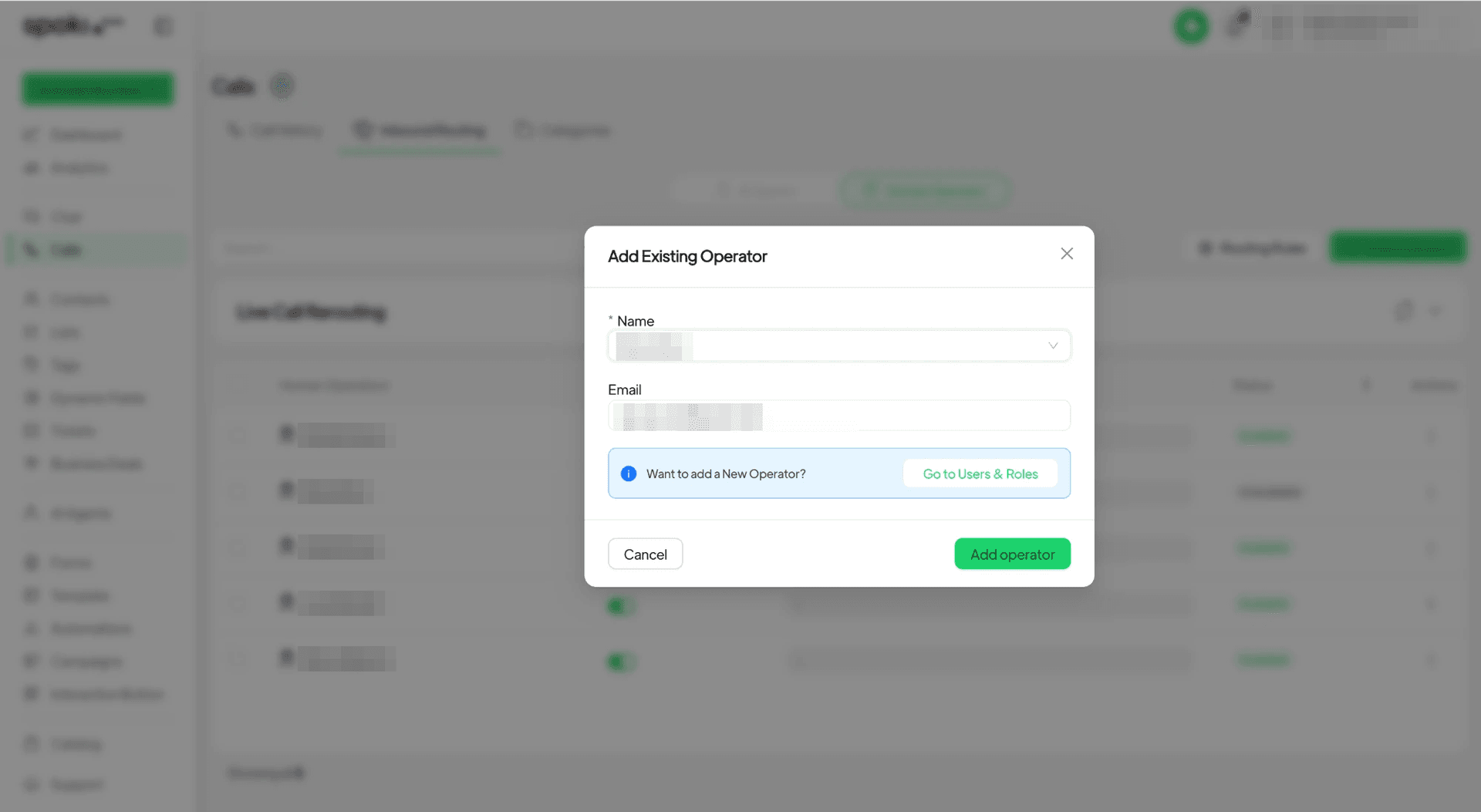
The first step in leveraging Spoki’s Inbound Call Routing is to define your human operators – the individuals within your team who are responsible for answering incoming calls. This process is straightforward and gives you granular control over your team’s availability.
Adding and Managing Operators
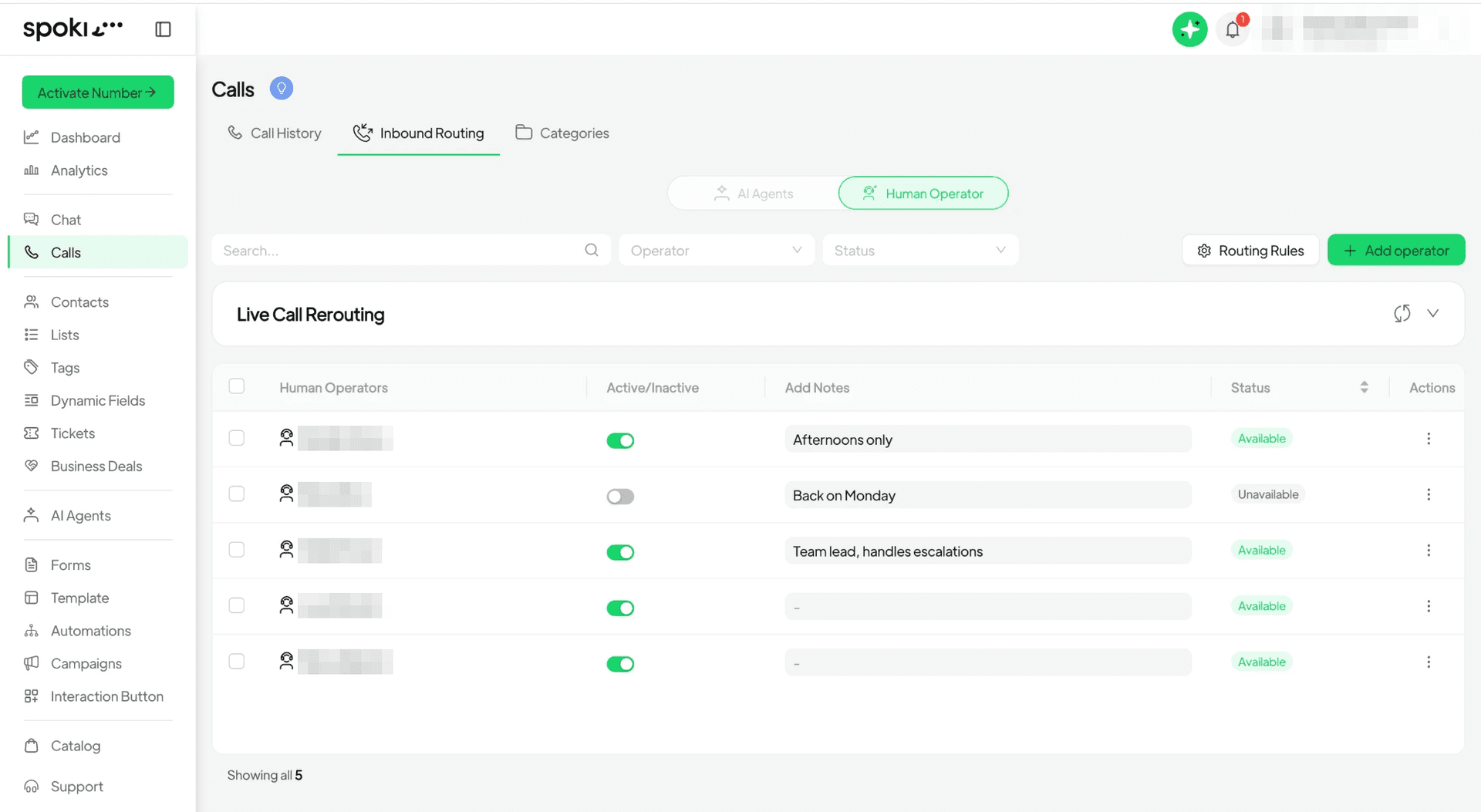
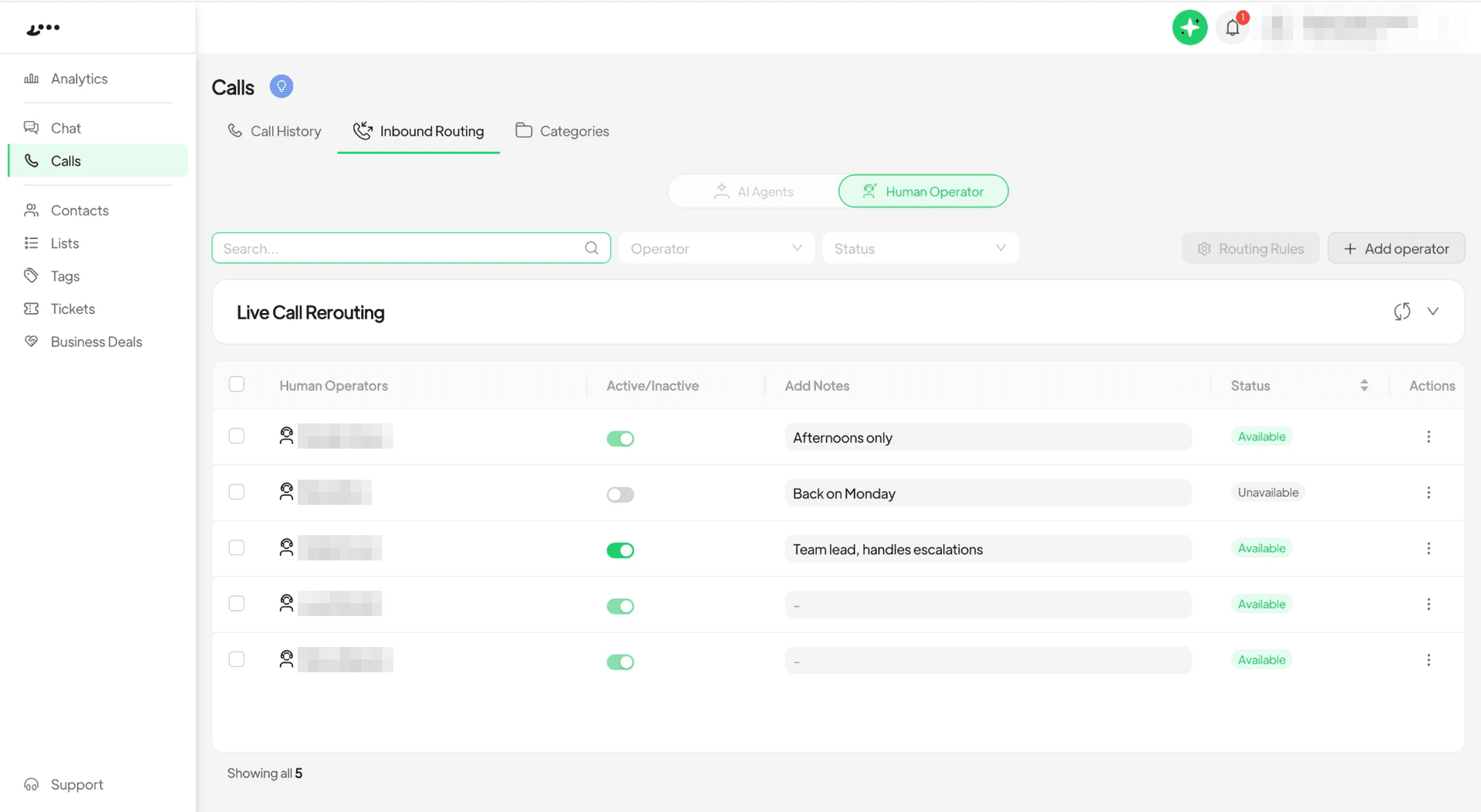
Within the ‘Calls → Inbound Routing’ section, you can easily add the people who should receive calls. This might include your sales team, customer support representatives, or even specific product specialists. Once added, you can switch each operator’s status between ‘Available’ and ‘Unavailable’ as needed. This flexibility is vital for managing shifts, breaks, or busy periods.
Practical Example: E-commerce Customer Support
Imagine you run an online clothing store. During peak hours, you might have three customer service agents available. You can add them all as operators in Spoki. If one agent goes on lunch break, you simply switch their status to ‘Unavailable’. This ensures that calls are only routed to agents who are ready to assist, preventing customers from waiting unnecessarily or being routed to an empty line.
Smart Routing for Known Contacts and New Numbers
Spoki’s Inbound Call Routing isn’t just about who’s available; it’s also about intelligent routing based on your customer relationships. Here’s how it works:
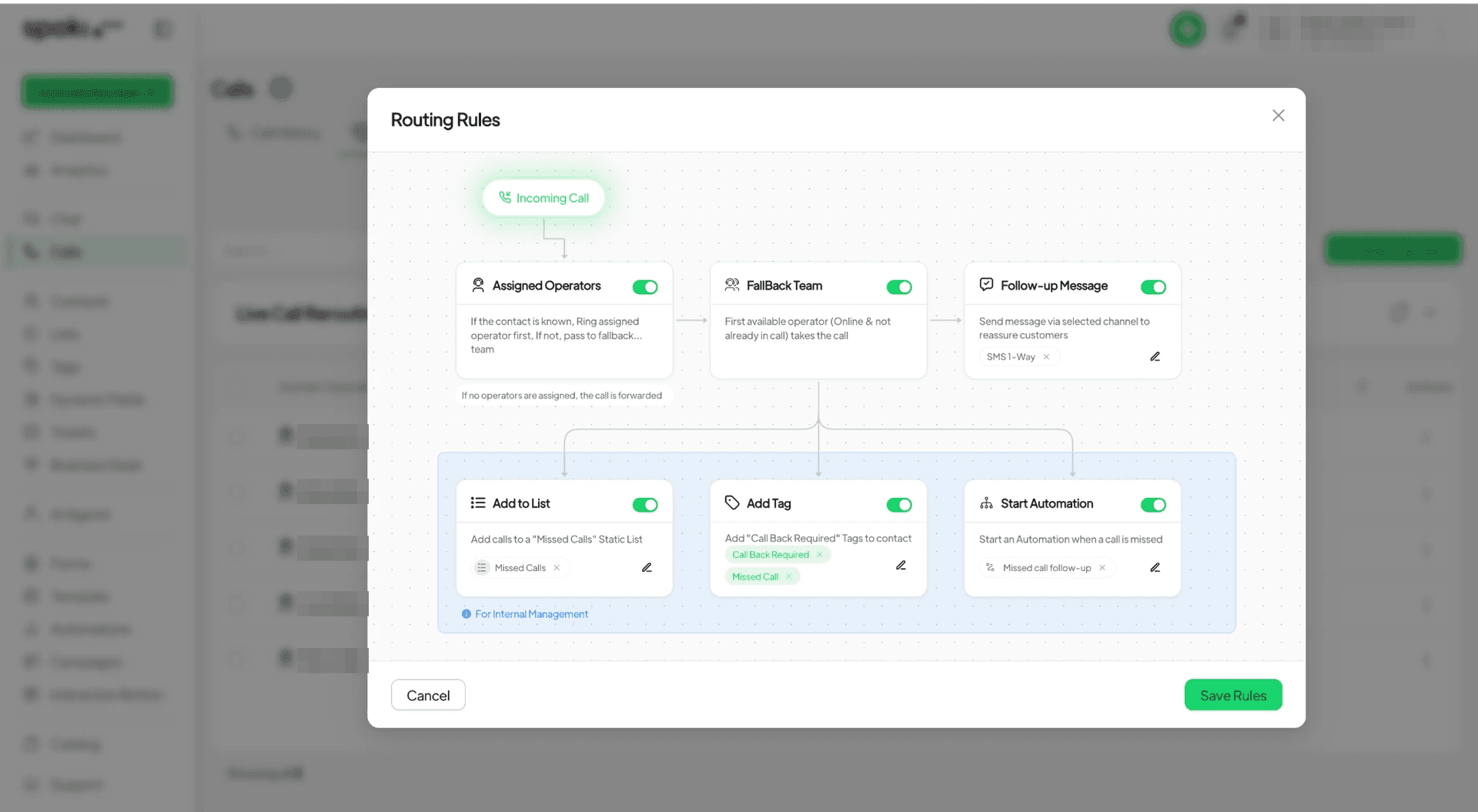
- Known Contacts: When a contact who is already in your Spoki system calls, Spoki intelligently rings the operator who is assigned to them first. This personalized approach ensures continuity and a better customer experience, as the customer is connected with someone already familiar with their history.
- Unavailable Assigned Operator: If the assigned operator is unavailable, or if the incoming call is from a new, unknown number, the call automatically passes to your designated fallback team.
- Fallback Team: The first free operator within the fallback team then takes the call. This two-tiered approach guarantees that every call is addressed, whether it’s from a loyal customer or a potential new lead.
Use Case: Marketing Campaign Follow-up
A marketing manager launches a new WhatsApp campaign promoting a limited-time offer. Leads generated from this campaign are assigned to specific sales representatives. When a lead calls back, Spoki ensures they are routed directly to their assigned rep, who has all the context of their previous interactions and the campaign they responded to. If that rep is busy, the call goes to the general sales team, ensuring no hot lead is missed.
Never Miss a Beat: What Happens When Nobody Picks Up?
One of the most significant advancements in Spoki’s Inbound Call Routing is its robust handling of unanswered calls. Calls that nobody picks up no longer simply disappear. Instead, you can define specific Routing Rules to ensure a proactive follow-up, maintaining customer engagement and capturing valuable lead information.
Configuring Follow-up Actions with Routing Rules
Spoki allows you to configure multiple actions for unanswered calls, ensuring that every interaction, even a missed one, contributes to your business objectives. You can choose to:
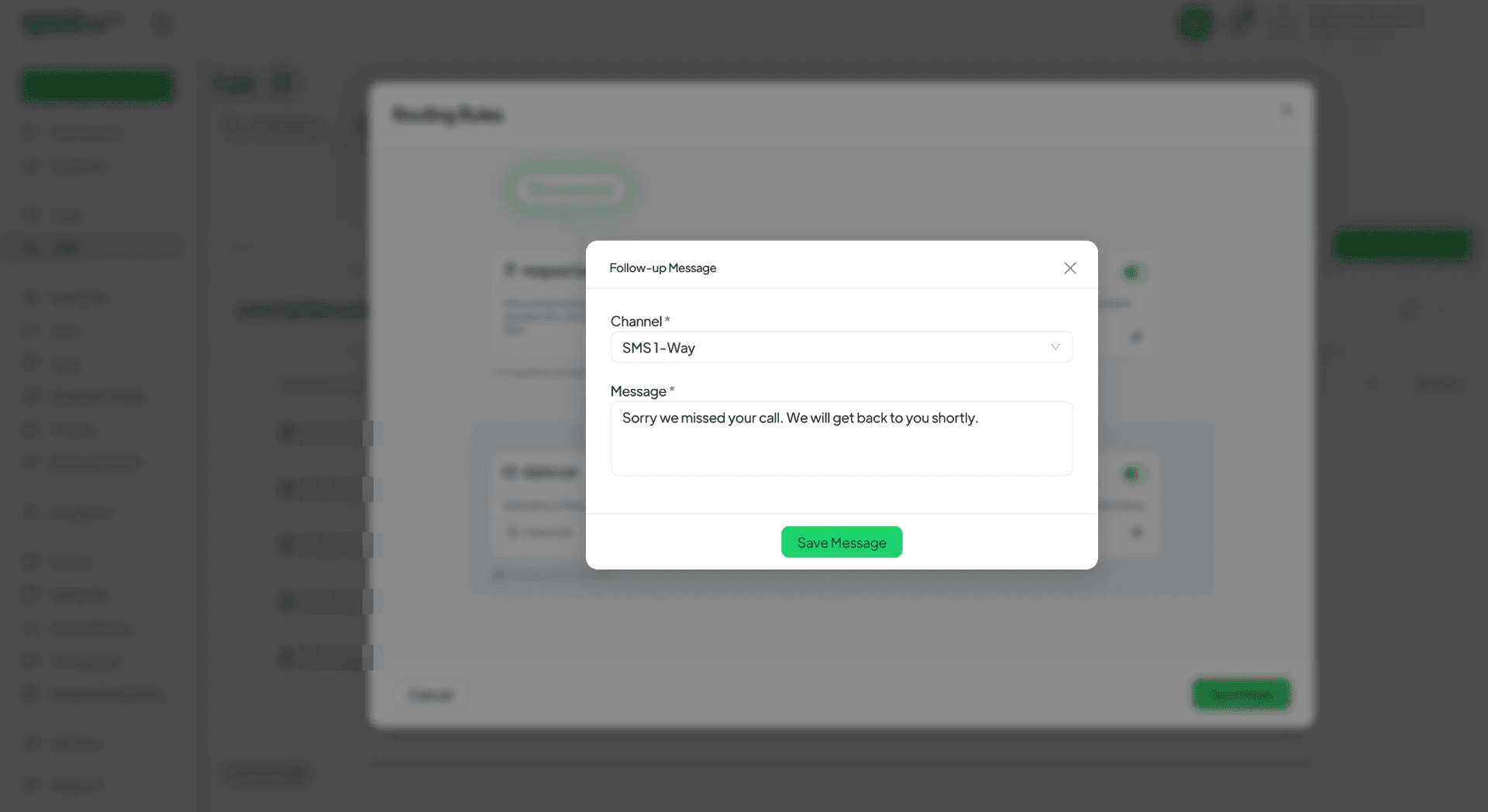
- Send a Follow-up Message: Automatically send a personalized message to the customer via WhatsApp, letting them know you saw their call and will get back to them. This simple act can significantly reduce customer frustration.
- Add the Contact to a List: Automatically add the caller to a specific list within Spoki, such as ‘Missed Calls – Urgent Follow-up’ or ‘New Leads – Call Back’. This helps segment your audience and prioritize follow-up actions.
- Tag Them for a Call Back: Apply a specific tag to the contact (e.g., ‘Callback Requested’, ‘High Priority Lead’). Tags are excellent for quick identification and filtering within your CRM.
- Start an Automation: Trigger a pre-defined WhatsApp automation flow. This could be anything from sending a series of informational messages to qualifying the lead further with a chatbot.
Crucially, you can pick more than one list, tag, or automation for each routing rule, creating highly customized and effective follow-up sequences.
Use Case: E-commerce Abandoned Cart Recovery
An e-commerce customer calls about an item in their abandoned cart but no operator is available. Spoki’s routing rules can be set to:
- Send an automated WhatsApp message acknowledging their call and offering a direct link to their cart.
- Add them to a ‘Abandoned Cart Callers’ list.
- Tag them as ‘High-Value Lead’.
- Initiate an automation that sends a discount code after 10 minutes if they haven’t completed the purchase.
This multi-pronged approach ensures the customer feels heard and is gently nudged towards completing their purchase, even without live interaction.
Who Controls What: Roles and Permissions
Spoki’s Inbound Call Routing is designed with team collaboration in mind, offering clear roles and permissions to maintain order and efficiency.
- Owners, Admins, and Chat Operator Managers: These roles have the authority to set up and modify the routing rules. This ensures that the overall strategy and critical configurations are managed by authorized personnel.
- Team Members: While other team members can view the routing rules, their primary control lies in managing their own availability. This empowers them to switch their ‘Available’ or ‘Unavailable’ status on and off as their workload or schedule dictates, without affecting the core routing logic.
This clear distinction of roles ensures that your inbound call strategy remains consistent while allowing individual team members the flexibility they need.
Integrating Inbound Call Routing with WhatsApp Automation and Your CRM
The true power of Spoki’s Inbound Call Routing is unleashed when integrated with its robust WhatsApp automation capabilities and your existing CRM. This synergy creates a holistic customer communication ecosystem.
WhatsApp Business API and Chatbots
Spoki leverages the WhatsApp Business API Documentation to enable advanced features like automated messaging and chatbots. When an unanswered call triggers an automation, it can activate a chatbot designed to:
- Gather Information: Ask qualifying questions to understand the customer’s needs better.
- Provide Instant Answers: Respond to frequently asked questions (FAQs) instantly, reducing the need for human intervention.
- Offer Self-Service Options: Direct customers to relevant resources, such as your FAQ page, product manuals, or order tracking.
- Schedule Callbacks: Allow customers to schedule a convenient time for a human operator to call them back, integrating directly with your team’s calendar.
This ensures that even when a human isn’t immediately available, the customer still receives a prompt, helpful, and engaging experience.
Seamless CRM Integration
When an unanswered call leads to a contact being added to a list or tagged, this information can seamlessly flow into your CRM (Customer Relationship Management) system. This integration allows your sales and support teams to:
- Prioritize Follow-ups: Easily identify and prioritize leads from missed calls.
- Maintain Customer History: Ensure that every interaction, including missed calls and automated follow-ups, is logged against the customer’s profile, providing a complete view of their journey.
- Personalize Future Interactions: Use the gathered data to tailor future communications and offers, improving conversion rates and customer loyalty.
By connecting your inbound call strategy with your CRM, Spoki helps you build richer customer profiles and more effective outreach campaigns.
Best Practices for Optimizing Your Inbound Call Routing
To get the most out of Spoki’s Inbound Call Routing, consider these best practices:
- Regularly Review Operator Availability: Encourage team members to keep their availability status updated to ensure calls are always routed efficiently.
- Refine Your Follow-up Messages: Craft clear, concise, and helpful automated follow-up messages. Personalization tokens can make these messages even more effective.
- Segment Your Missed Call Lists: Create specific lists for different types of missed calls (e.g., ‘Sales Inquiries’, ‘Support Requests’) to streamline follow-up efforts.
- Utilize Tags for Quick Identification: Implement a consistent tagging system to quickly identify the nature and priority of missed calls.
- Test Your Automations: Regularly test your automated follow-up sequences to ensure they are working as intended and providing a smooth customer experience.
- Analyze Performance: Monitor call volumes, response times, and follow-up success rates to continuously optimize your routing rules. Spoki’s analytics can provide valuable insights for this.
For more insights into maximizing your Spoki experience, explore the Spoki Blog and our Product Updates section.
Conclusion: Elevate Your Customer Communication with Spoki
Spoki’s Inbound Call Routing (v19.8.0) is a game-changer for businesses that rely on efficient customer communication. By providing advanced control over who answers calls and what happens when calls go unanswered, Spoki empowers you to eliminate missed opportunities, enhance customer satisfaction, and streamline your team’s operations. This feature is a testament to Spoki’s commitment to providing comprehensive tools that help marketing managers, business owners, e-commerce operators, and SMBs thrive in the digital age.
Don’t let another customer call slip through the cracks. Take control of your inbound communications and transform every interaction into a positive experience. Start for free with Spoki — no credit card required.