Silence Incoming Calls on WhatsApp Business: Spoki v19.5.4 Update
Content
In today’s fast-paced business environment, staying connected with customers is paramount. However, constant interruptions from incoming calls can severely disrupt your workflow, especially for marketing managers, business owners, e-commerce operators, and SMBs relying on WhatsApp Business for critical customer communication. Imagine being deep in strategizing a new campaign, analyzing sales data, or crafting a personalized customer message, only to be pulled away by a ringing phone. These interruptions, while seemingly minor, accumulate, breaking concentration and reducing overall efficiency. The challenge lies in maintaining accessibility without sacrificing focus.
Spoki understands this delicate balance. That’s why, with version 19.5.4, Spoki introduces a powerful new feature: the ability to always silence incoming calls. This enhancement empowers you to manage interruptions effectively, ensuring that you can keep inbound calls visible without the disruptive ringtone. This means you can maintain awareness of customer contact attempts without breaking your concentration, providing more control over your notifications and allowing you to manage your time and attention more effectively than ever before.
This update is a game-changer for anyone looking to optimize their WhatsApp Business operations. It’s about giving you the power to decide when and how you engage with incoming calls, transforming potential distractions into manageable notifications. Let’s dive into how this feature works and how it can revolutionize your daily operations.
How to Always Silence Incoming Calls with Spoki (v19.5.4)
The new ‘Always Silence Incoming Calls’ feature in Spoki (v19.5.4) is designed for intuitive control and seamless integration into your existing workflow. When an incoming call arrives, Spoki now offers you a choice that puts you in command of your notifications. No longer will you be forced to either answer immediately or completely miss the call. Instead, you gain a nuanced approach to managing your availability.
Your Options When an Incoming Call Arrives
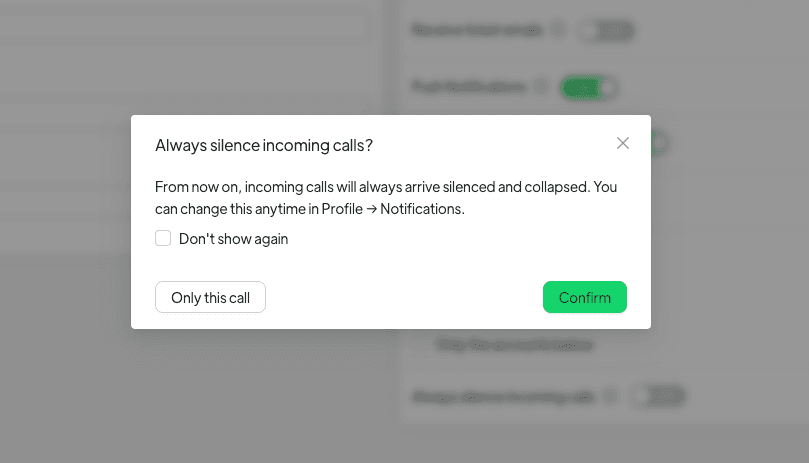
When you receive an incoming call through Spoki, you’ll notice a significant improvement in how you can handle it. Instead of an immediate, disruptive ring, you’ll have the option to ignore the call with a new set of choices:
- Confirm to turn always-silence on: This is the core of the new feature. By selecting this option, you instruct Spoki to automatically silence all future incoming calls. These calls will no longer ring but will instead arrive collapsed as an edge tab. This means they remain visible, a subtle indicator on the side of your screen, until you decide to reopen, answer, or dismiss them. This is perfect for periods when you need deep focus but still want to be aware of incoming communication.
- Only this call: For situations where you want to ignore a specific call without changing your default notification settings, this option provides a one-shot ignore. The current call will be silenced, but future calls will continue to ring as per your previous settings.
- Don’t show again (optional): When choosing ‘Only this call,’ you might also see an optional ‘Don’t show again’ checkbox. Selecting this will remember your choice for future single-call ignores, streamlining the process even further.
Changing Your Settings Anytime
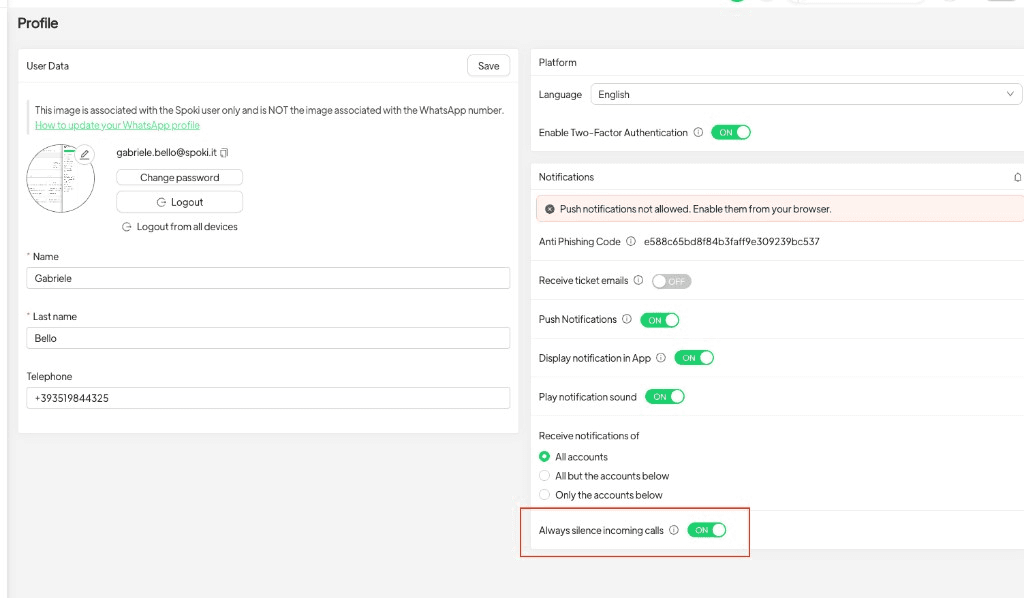
Spoki understands that your needs can change throughout the day. That’s why this setting is not permanent and can be adjusted whenever you need. To modify your incoming call preferences, simply navigate to Profile → Notifications within your Spoki account. This flexibility ensures that you always have control over how you receive and manage calls, adapting to your schedule and priorities.
Practical Examples: How Always Silencing Calls Benefits Your Business
The ability to silence incoming calls is more than just a convenience; it’s a strategic tool for enhancing productivity and customer experience across various business scenarios. Let’s explore some practical examples.
For Marketing Managers: Focused Campaign Execution
Marketing managers often juggle multiple campaigns, requiring intense focus on data analysis, content creation, and strategic planning. A ringing phone can derail a critical thought process, leading to errors or missed deadlines. By silencing incoming calls, you can:
- Deep Dive into Analytics: Analyze campaign performance metrics without interruption, ensuring data-driven decisions.
- Craft Compelling Content: Focus on writing engaging WhatsApp messages, ad copy, or blog posts, maintaining a consistent tone and message.
- Strategic Planning Sessions: Conduct virtual team meetings or solo strategy sessions without the distraction of a ringing phone, leading to more productive outcomes.
You’ll still see the incoming call as an edge tab, allowing you to quickly glance and decide if it’s an urgent matter that requires immediate attention or if it can wait until your current task is complete. This subtle notification ensures you remain aware without being interrupted.
For Business Owners: Uninterrupted Strategic Work
Business owners wear many hats, from high-level strategy to day-to-day operations. Time is their most valuable asset, and interruptions are costly. Silencing calls enables business owners to:
- Focus on Growth Initiatives: Dedicate uninterrupted blocks of time to business development, partnership negotiations, or financial planning.
- Manage Crisis Situations Calmly: If a critical issue arises, you can choose to address it without the added stress of a ringing phone, allowing for clearer thinking.
- Improve Work-Life Balance: Set specific times for focused work and specific times for active communication, creating healthier boundaries.
This feature helps business owners reclaim control over their schedules, ensuring that important strategic work gets the attention it deserves, ultimately driving long-term success.
For E-commerce Operators: Streamlined Order Processing and Customer Support
E-commerce businesses thrive on efficiency, especially when managing orders and providing timely customer support via WhatsApp Business. Interruptions can lead to delays, errors, and frustrated customers. By silencing calls, e-commerce operators can:
- Process Orders Flawlessly: Concentrate on order fulfillment, inventory management, and shipping logistics without being pulled away by a ringing phone.
- Deliver Proactive Customer Service: Focus on responding to customer inquiries through automated messages and chatbots, ensuring quick and consistent support.
- Manage Peak Sales Periods: During Black Friday or holiday sales, every second counts. Silencing calls helps maintain focus during high-volume periods, preventing backlogs.
The edge tab notification ensures that even when silenced, you’re aware of incoming calls, allowing you to prioritize and respond when it’s most convenient without disrupting your current task.
For SMBs: Enhanced Team Productivity and Customer Engagement
Small and medium-sized businesses often operate with lean teams, making productivity crucial. The ‘Always Silence Incoming Calls’ feature can significantly benefit SMBs by:
- Facilitating Focused Team Collaboration: Teams can work together on projects without constant phone interruptions, leading to more efficient brainstorming and problem-solving.
- Optimizing Customer Engagement: Agents can dedicate their full attention to crafting personalized responses and managing automated campaigns, improving customer satisfaction.
- Training and Onboarding: New employees can focus on learning Spoki’s features and best practices without the distraction of incoming calls, accelerating their ramp-up time.
This feature fosters a more productive work environment, allowing SMBs to maximize their resources and deliver exceptional customer experiences.
Integrating ‘Always Silence Incoming Calls’ with WhatsApp Automation
The true power of Spoki’s new feature is amplified when combined with its robust WhatsApp automation capabilities. For businesses leveraging the WhatsApp Business API Documentation, chatbots, and automated messaging, the ability to silence calls adds another layer of control and efficiency.
Seamless Chatbot Management
Chatbots are designed to handle routine inquiries, freeing up human agents for more complex tasks. When you’re configuring or monitoring your chatbots, an unexpected call can break your concentration. By silencing calls, you can:
- Develop and Test Chatbot Flows: Dedicate uninterrupted time to building intricate chatbot conversation flows, ensuring they are logical and effective.
- Monitor Chatbot Performance: Analyze chatbot metrics and customer interactions without distraction, allowing for quick identification and resolution of issues.
- Update Automated Responses: Easily update FAQs and automated replies, ensuring your chatbots always provide the most current information.
The silenced call appears as a subtle edge tab, allowing you to acknowledge its presence without interrupting your focus on chatbot optimization.
Optimizing Automated Messaging Campaigns
Automated messaging campaigns are crucial for lead nurturing, promotional offers, and customer re-engagement. Crafting and scheduling these campaigns requires precision and attention to detail. Silencing incoming calls allows you to:
- Design Targeted Campaigns: Focus on segmenting your audience and tailoring messages for maximum impact without interruptions.
- Schedule Messages Accurately: Ensure messages are sent at optimal times, avoiding errors that could diminish campaign effectiveness.
- Review Campaign Performance: Analyze open rates, click-through rates, and conversion metrics without distraction, leading to better future campaigns.
This feature ensures that your automated messaging strategy remains sharp and effective, driving better results for your business.
Enhanced CRM Integration and Data Management
Many businesses integrate Spoki with their CRM systems to centralize customer data and streamline communication. Managing this integration and ensuring data accuracy is a critical task. With silenced calls, you can:
- Configure CRM Syncs: Set up and test seamless data synchronization between Spoki and your CRM without interruption.
- Update Customer Profiles: Accurately update customer information, notes, and interaction history, ensuring a comprehensive view of each customer.
- Generate Reports: Focus on generating detailed reports on customer interactions and sales pipelines, providing valuable insights for strategic decisions.
The ability to work without constant auditory interruptions means you can maintain data integrity and leverage your CRM more effectively, ultimately improving customer relationships and sales processes.
Conclusion: Reclaim Your Focus with Spoki’s New Feature
The ‘Always Silence Incoming Calls’ feature in Spoki (v19.5.4) is a testament to Spoki’s commitment to providing tools that empower marketing managers, business owners, e-commerce operators, and SMBs to work smarter, not harder. By offering a nuanced approach to managing incoming calls, Spoki helps you maintain focus, enhance productivity, and deliver superior customer experiences through WhatsApp Business.
This update is more than just a new setting; it’s an invitation to reclaim your valuable time and attention. Whether you’re deep in strategic planning, optimizing automated campaigns, or managing customer support, Spoki ensures that you remain in control of your workflow, transforming potential distractions into manageable notifications. It’s about achieving that perfect balance between being always available and always productive.
Ready to experience the difference? Start for free with Spoki — no credit card required.