Spoki Pixel: Spent Time Website Triggers for WhatsApp Automation
Content
In today’s competitive digital landscape, capturing and converting highly engaged website visitors is paramount for business growth. Marketing managers, business owners, e-commerce operators, and SMBs often struggle to identify and act on strong purchase intent signals in real-time. Traditional methods can be slow, leading to missed opportunities with leads who are actively showing interest but might not be ready to fill out a form or make an immediate purchase. The challenge lies in bridging the gap between website engagement and proactive, personalized communication.
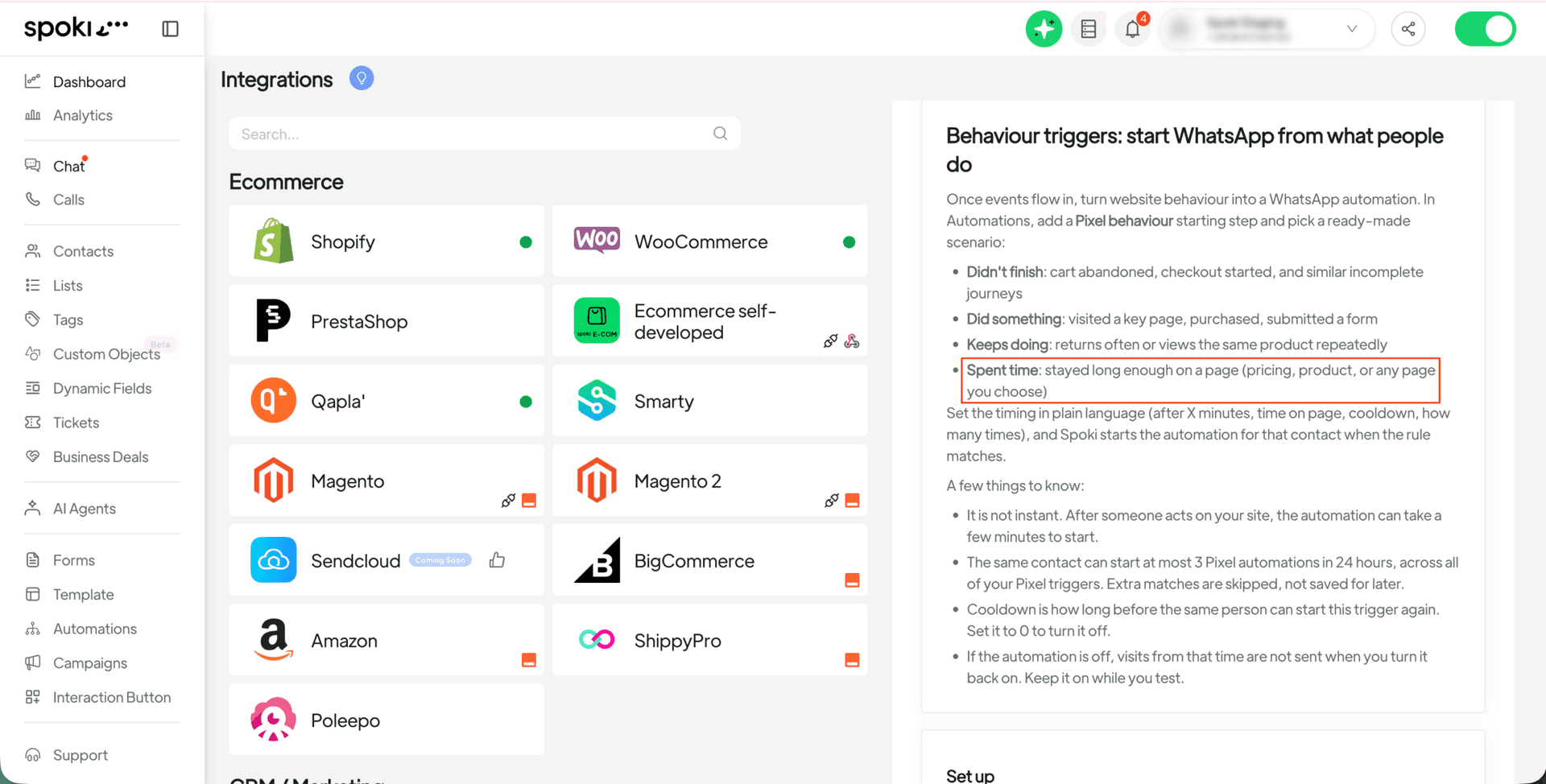
Spoki understands this critical need, which is why it is excited to introduce a powerful new feature: Spoki Pixel Spent Time Website Triggers (v19.25.14). This innovation allows businesses to initiate a WhatsApp automation precisely when a user spends a specific, predefined amount of time on any page of their website. Imagine being able to engage with a potential customer the moment their on-page engagement signals strong intent, such as lingering on a pricing page or deeply exploring a product description. This capability transforms passive website visits into active, conversion-focused conversations, ensuring that no valuable lead is left unengaged.
Understanding the Power of Spent Time Triggers
The Spoki Pixel is a sophisticated tracking tool that provides invaluable insights into user behavior on your website. With the latest update, its capabilities are significantly expanded, allowing for more nuanced and timely engagement. The ‘Spent Time’ trigger is a game-changer because it focuses on a clear indicator of interest: sustained attention. Unlike a quick scroll or a single click, spending a significant amount of time on a specific page demonstrates a deeper level of consideration and intent.
How Spent Time Triggers Work
The mechanism behind Spoki Pixel’s Spent Time triggers is straightforward yet incredibly powerful. When a user visits your website, the Spoki Pixel begins tracking their activity. If that user remains on a particular page for a duration that meets your pre-set criteria, it acts as a signal to Spoki. This signal then automatically initiates a pre-configured WhatsApp automation, delivering a personalized message directly to the user.
This means you can now:
- Identify High-Intent Leads: Pinpoint visitors who are genuinely interested in specific products or services.
- Engage at the Right Moment: Reach out when the user is most receptive and actively considering their options.
- Personalize Interactions: Tailor your WhatsApp messages based on the specific page they spent time on.
- Boost Conversions: Guide interested leads further down the sales funnel with timely assistance and offers.
Setting Up Your First WhatsApp Automation with Spent Time Triggers
Implementing this new feature is designed to be intuitive and efficient. Here’s a step-by-step guide to help you get started:
Step 1: Access Your Automations
Navigate to the ‘Automations’ section within your Spoki dashboard. This is where you manage all your automated messaging sequences.
Step 2: Add a Trigger
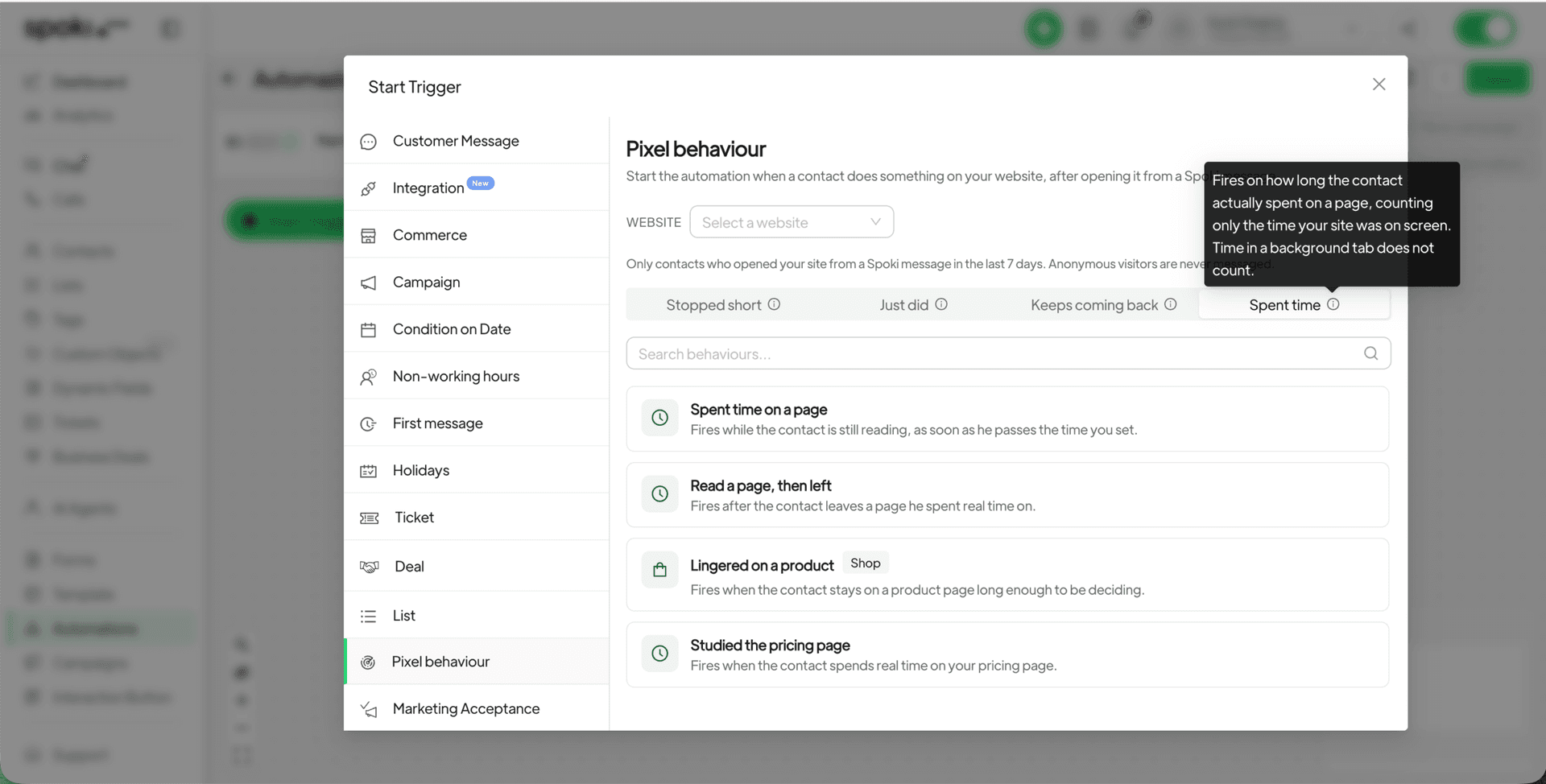
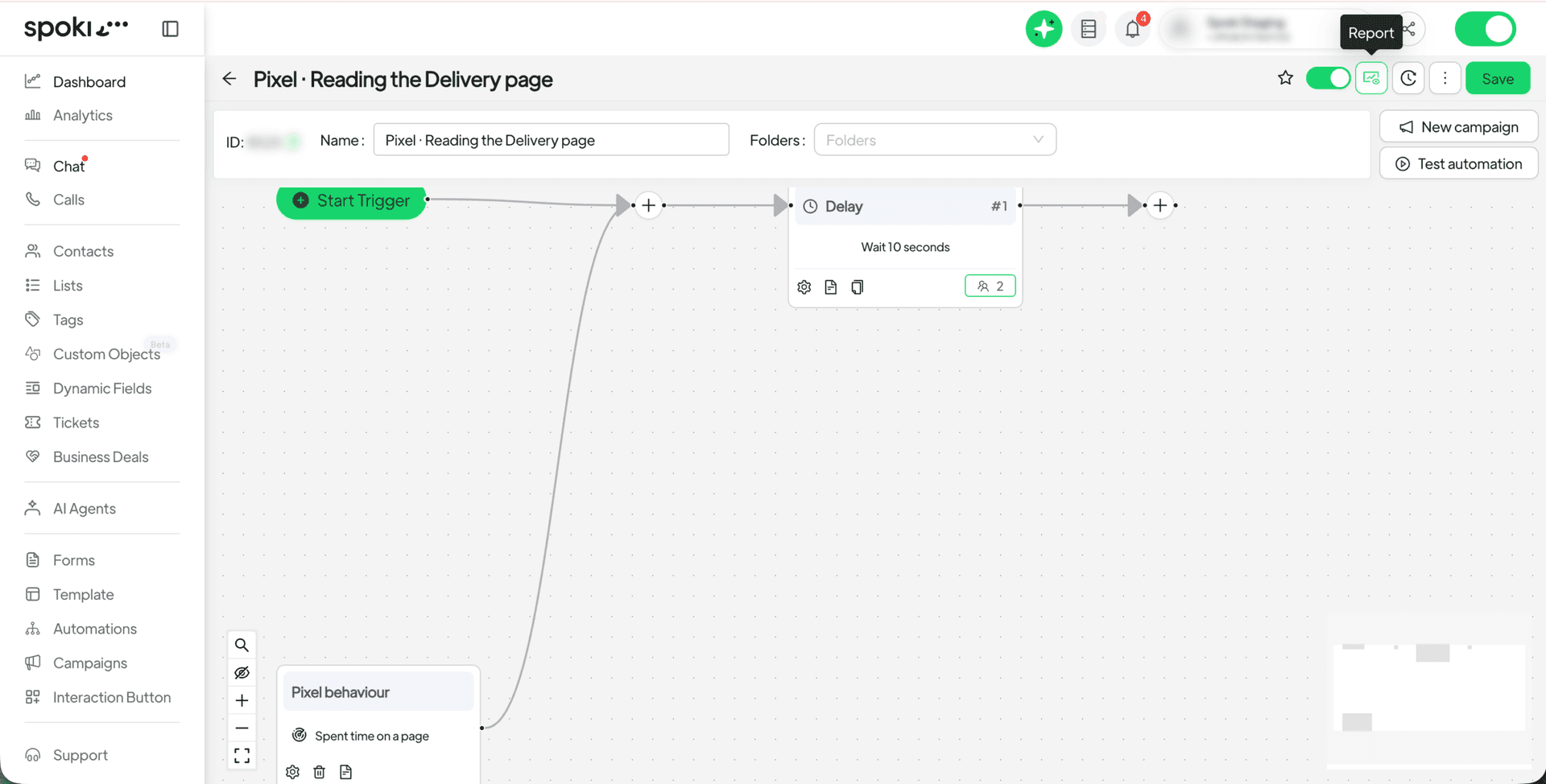
When creating a new automation or editing an existing one, you’ll need to define the starting condition. Select ‘Add a trigger’ and then choose ‘Pixel behaviour’.
Step 3: Select ‘Spent Time’ Scenario
Under the ‘Pixel behaviour’ options, you will now find a new scenario: ‘Spent time’. Select this option to configure your trigger based on user engagement duration.
Step 4: Define the Duration and Page
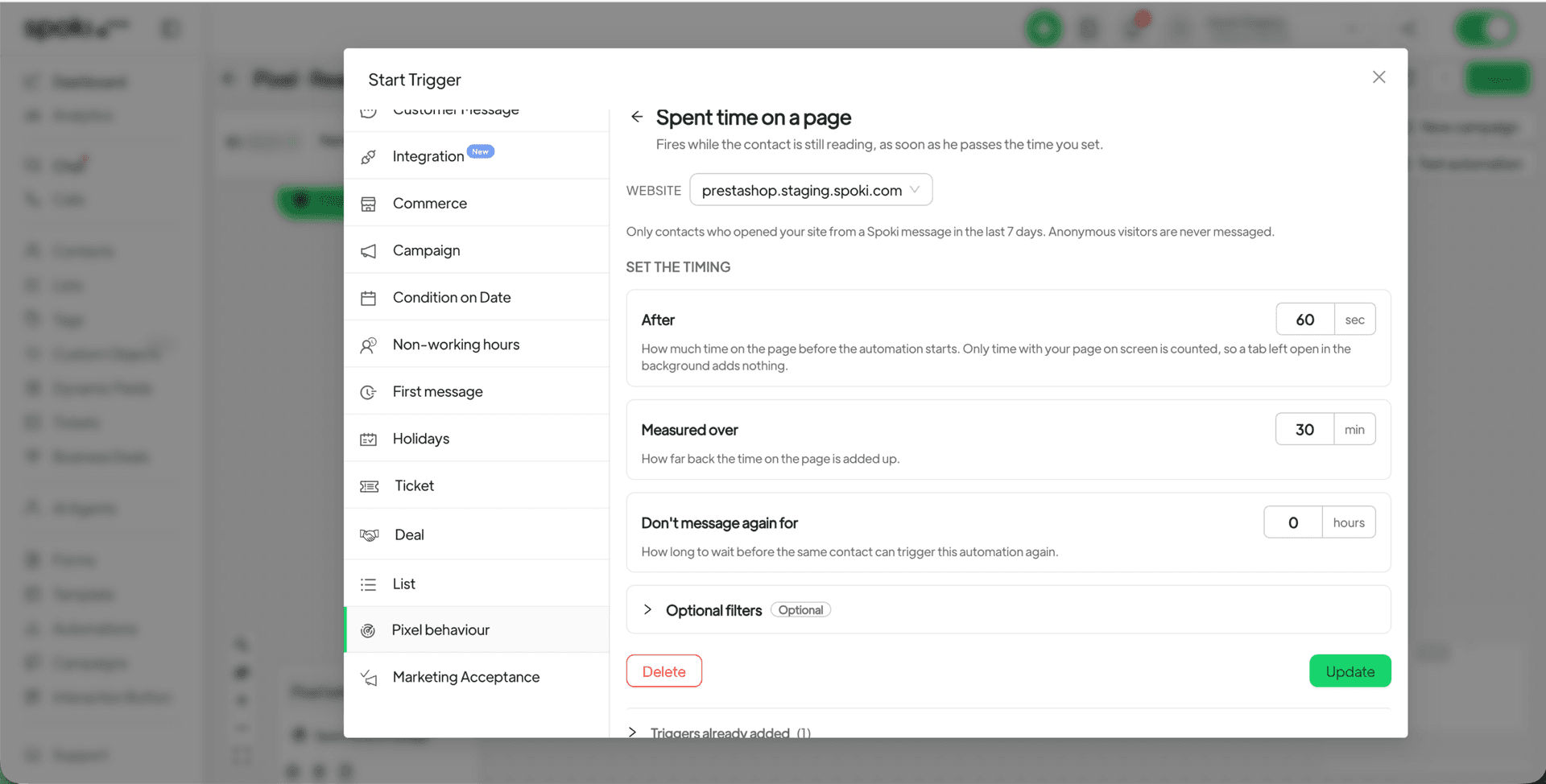
This is where you specify the exact conditions for your trigger. You will set:
- Required Duration: How long a user needs to stay on a page for the automation to trigger. Spoki only counts time when your page is actively on screen, ensuring accurate engagement measurement.
- Target Page(s): Which specific page(s) on your website this trigger should apply to. This could be a single product page, your pricing page, a category page, or any other URL you deem important.
Step 5: Configure Your WhatsApp Automation
Once the trigger is set, you can then build out the WhatsApp automation sequence. This could involve:
- Sending a personalized welcome message.
- Offering assistance or answering common questions via a chatbot.
- Providing a special offer or discount related to the product they were viewing.
- Connecting them with a sales representative.
Practical Use Cases for Marketing Managers and Business Owners
The versatility of Spoki Pixel’s Spent Time triggers opens up a world of possibilities for businesses across various sectors. Here are some practical examples:
E-commerce: Recovering Abandoned Intent
Imagine a customer browsing a specific product page on your online store for several minutes, comparing features, and reading reviews, but ultimately not adding it to their cart. This is a clear signal of high interest, but perhaps they got distracted or had a lingering question.
Spoki Solution: Set a Spent Time trigger for product pages (e.g., 60 seconds). If a user meets this criterion, an automated WhatsApp message can be sent, asking if they need help, offering a quick link to FAQs, or even providing a small, time-sensitive discount to encourage conversion. This proactive engagement can significantly reduce cart abandonment rates and boost sales.
SaaS & Service Businesses: Nurturing Pricing Page Visitors
For SaaS companies or service providers, the pricing page is often a critical decision point. Visitors spending considerable time here are likely evaluating your offerings and comparing them to competitors.
Spoki Solution: Implement a Spent Time trigger for your pricing page (e.g., 90 seconds). An automated WhatsApp message can then offer a direct link to a demo booking, provide a concise summary of key benefits, or invite them to a live chat with a sales expert. This immediate follow-up can clarify doubts and accelerate the sales cycle.
Lead Generation: Engaging with High-Value Content Viewers
If your website features in-depth articles, whitepapers, or case studies that are crucial for educating potential leads, tracking engagement on these pages is vital.
Spoki Solution: Configure a Spent Time trigger for your high-value content pages (e.g., 120 seconds). When a user demonstrates deep engagement, Spoki can send a WhatsApp message offering to send them a related resource, invite them to a webinar, or connect them with an expert for a personalized consultation. This helps move leads from informational consumption to active consideration.
Real Estate: Following Up on Property Viewings
Real estate agents can leverage this feature to engage with potential buyers who show strong interest in specific properties listed on their website.
Spoki Solution: Set a Spent Time trigger for individual property listing pages (e.g., 45 seconds). An automated WhatsApp message can then offer to schedule a viewing, provide more detailed property information, or connect them directly with an agent to discuss financing options. This ensures immediate follow-up on hot leads.
Education & Online Courses: Guiding Prospective Students
Educational institutions or online course providers can use this to engage with prospective students who are exploring specific course curricula or program details.
Spoki Solution: Apply a Spent Time trigger to course description pages (e.g., 75 seconds). Spoki can then send a WhatsApp message offering a free consultation with an admissions advisor, a link to student testimonials, or information about upcoming enrollment deadlines. This personalized touch can significantly influence enrollment decisions.
Leveraging WhatsApp Business API for Enhanced Engagement
The Spoki Pixel’s Spent Time triggers are built to seamlessly integrate with the power of the WhatsApp Business API Documentation. This means your automated messages are delivered through a secure, reliable, and officially supported channel, ensuring high deliverability and compliance with WhatsApp’s policies. Spoki ensures that all communications are opt-in based, respecting user privacy and building trust.
The Role of Chatbots and Automated Messaging
Within your Spoki automations, you can incorporate sophisticated chatbots and automated messaging flows. When a Spent Time trigger activates, the initial WhatsApp message can be a simple, friendly greeting. From there, the chatbot can guide the user through a series of questions, provide instant answers, or collect information, all without requiring human intervention. This significantly reduces response times and allows your team to focus on more complex inquiries.
Benefits for Customer Communication
- Instant Gratification: Customers receive immediate responses, improving their experience.
- 24/7 Availability: Automations work around the clock, capturing leads even outside business hours.
- Scalability: Handle a large volume of inquiries without increasing staff overhead.
- Consistent Messaging: Ensure brand voice and information are uniform across all interactions.
Integrating Spoki with Your Existing Ecosystem
Spoki is designed to be a central hub for your WhatsApp business communication. While the Spoki Pixel provides powerful website insights, the true strength lies in how it integrates with your broader marketing and sales ecosystem. Consider how Spoki’s capabilities can complement your CRM, email marketing platforms, and other tools to create a unified customer journey.
Internal Linking for Deeper Understanding
To further enhance your understanding of Spoki’s capabilities and how to maximize its value, explore these resources:
- For a comprehensive overview of Spoki’s features and how they can transform your business communication, visit the Spoki Blog.
- Stay updated with the latest enhancements and new features by checking out Product Updates.
- Discover flexible options tailored to your business needs on our Spoki Pricing Plans page.
Conclusion: Engage with Intent, Convert with Spoki
The introduction of Spoki Pixel’s Spent Time Website Triggers (v19.25.14) marks a significant leap forward in proactive customer engagement. By enabling businesses to initiate WhatsApp automations based on real-time, on-page engagement, Spoki empowers you to connect with highly interested leads at their moment of strongest intent. This feature is not just about sending messages; it’s about initiating meaningful conversations that drive conversions, build stronger customer relationships, and ultimately fuel business growth. Stop letting valuable website engagement go unnoticed. With Spoki, you can transform passive visitors into active customers.
Ready to revolutionize your customer engagement strategy and convert more website visitors into loyal customers? Start for free with Spoki — no credit card required.