Website Behaviour in Automations | Spoki Pixel Trigger
Content
In today’s competitive digital landscape, understanding and reacting to customer behavior on your website is paramount for driving conversions and fostering loyalty. Many businesses struggle to bridge the gap between website activity and proactive customer engagement, often missing critical opportunities to connect with interested prospects or re-engage abandoning customers. Imagine a scenario where a potential customer adds items to their cart but leaves your site without completing the purchase. Without an immediate, personalized follow-up, that sale is likely lost. This is where the power of website behaviour in automations, specifically with the new Spoki Pixel Trigger (v19.25.3), transforms your customer engagement strategy. Spoki now empowers marketing managers, business owners, and e-commerce operators to initiate WhatsApp automations based on precise user actions on their website, ensuring you engage with customers at the most opportune moment. This innovative feature allows for timely, relevant communication that can significantly impact your bottom line.
Revolutionizing Customer Engagement with Website Behaviour in Automations
The ability to trigger WhatsApp automations based on website behavior marks a significant leap forward in personalized customer communication. Spoki’s latest update, the Pixel Trigger (v19.25.3), enables businesses to move beyond generic messaging and create highly targeted interactions. By integrating your website’s user data with Spoki’s powerful WhatsApp automation platform, you can now automatically initiate conversations with customers who show specific intent or interest.
How the Spoki Pixel Trigger Works
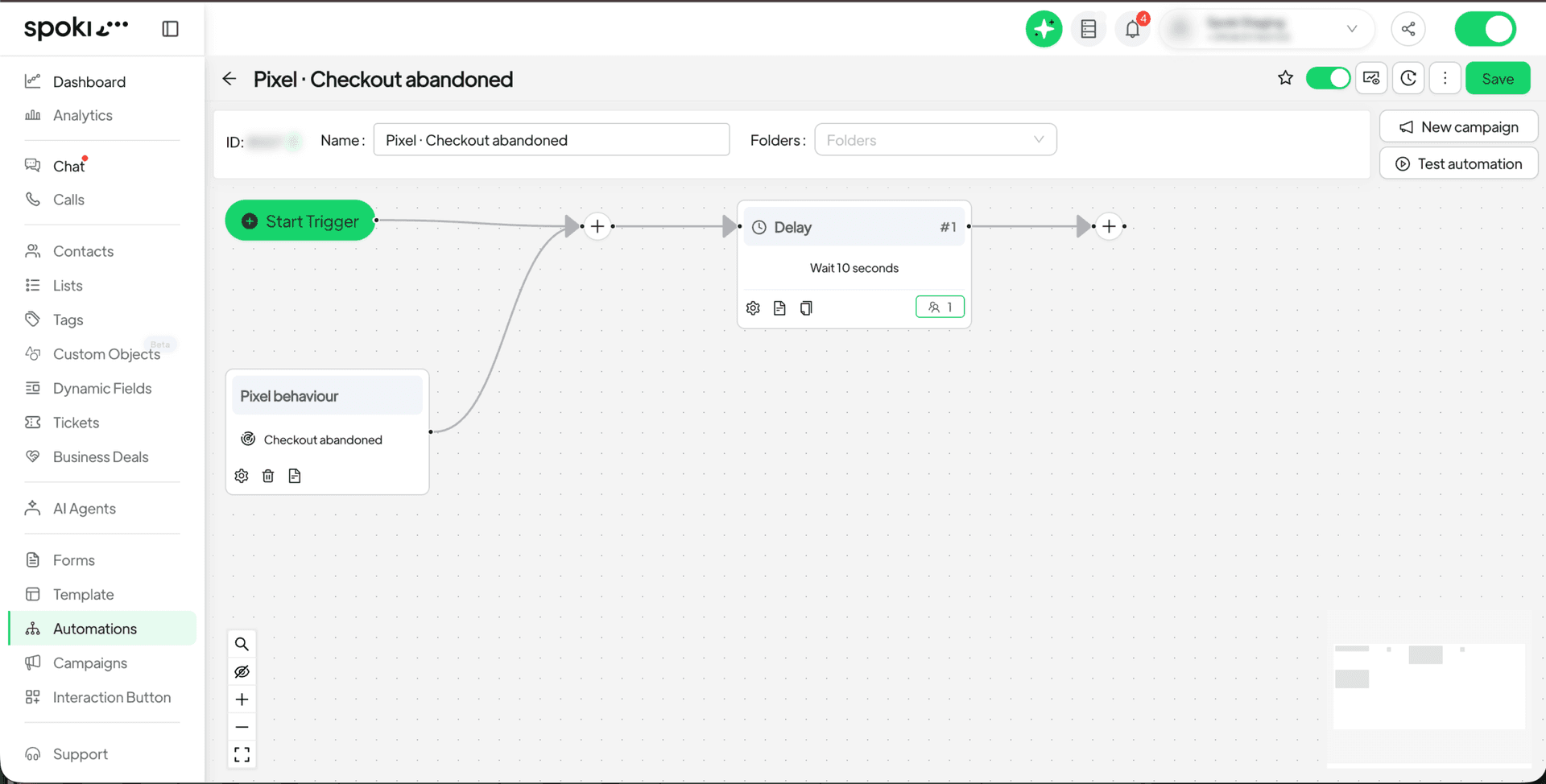
Implementing the Spoki Pixel Trigger is straightforward. First, ensure the Spoki Pixel is correctly installed on your website. Once active, it begins tracking user actions. When a predefined action occurs, such as an abandoned cart or a visit to a specific product page, Spoki can automatically trigger a WhatsApp automation. This means you can open a conversation at precisely the right moment, offering assistance, incentives, or further information.
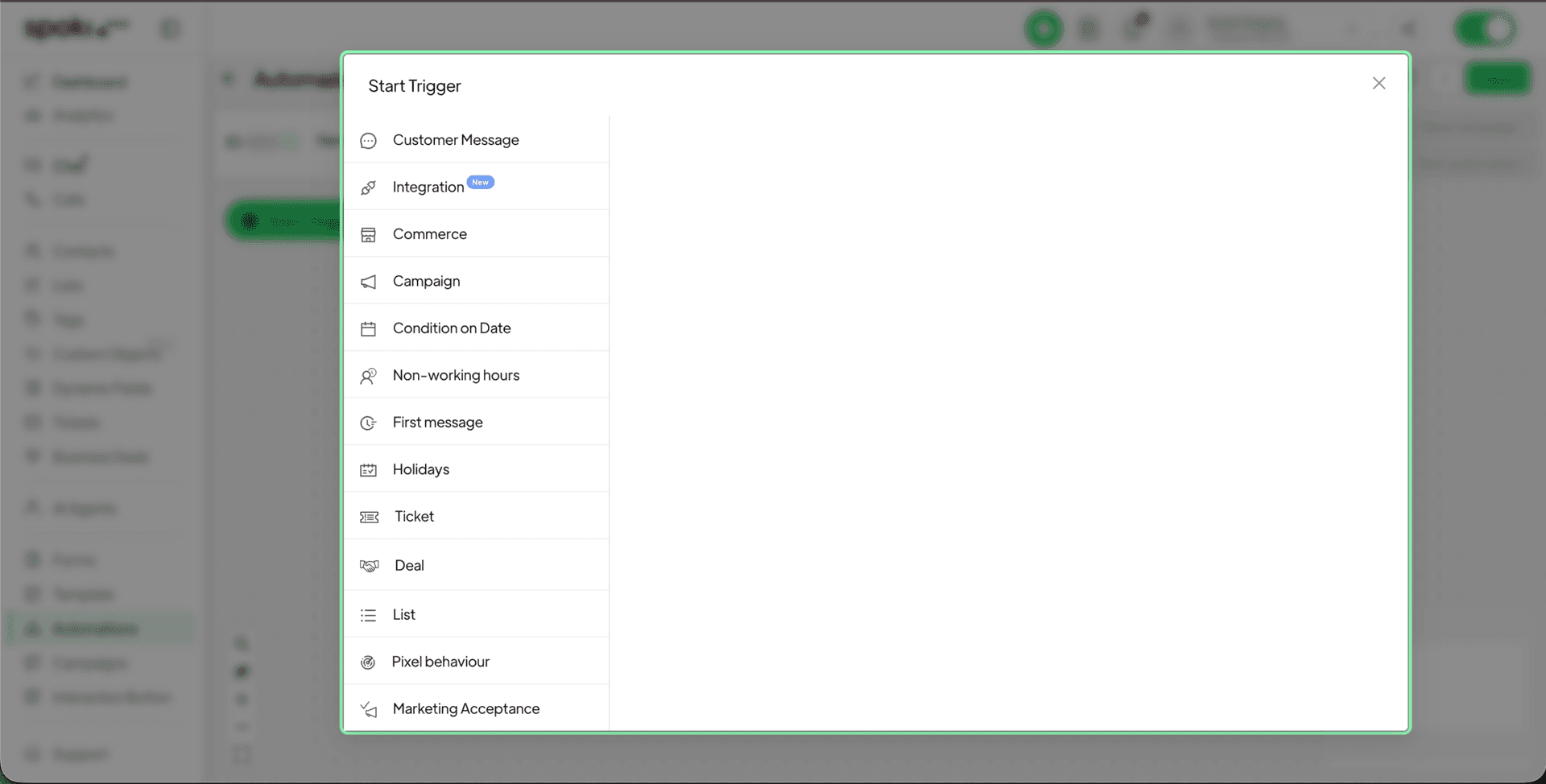
To set up an automation using website behavior:
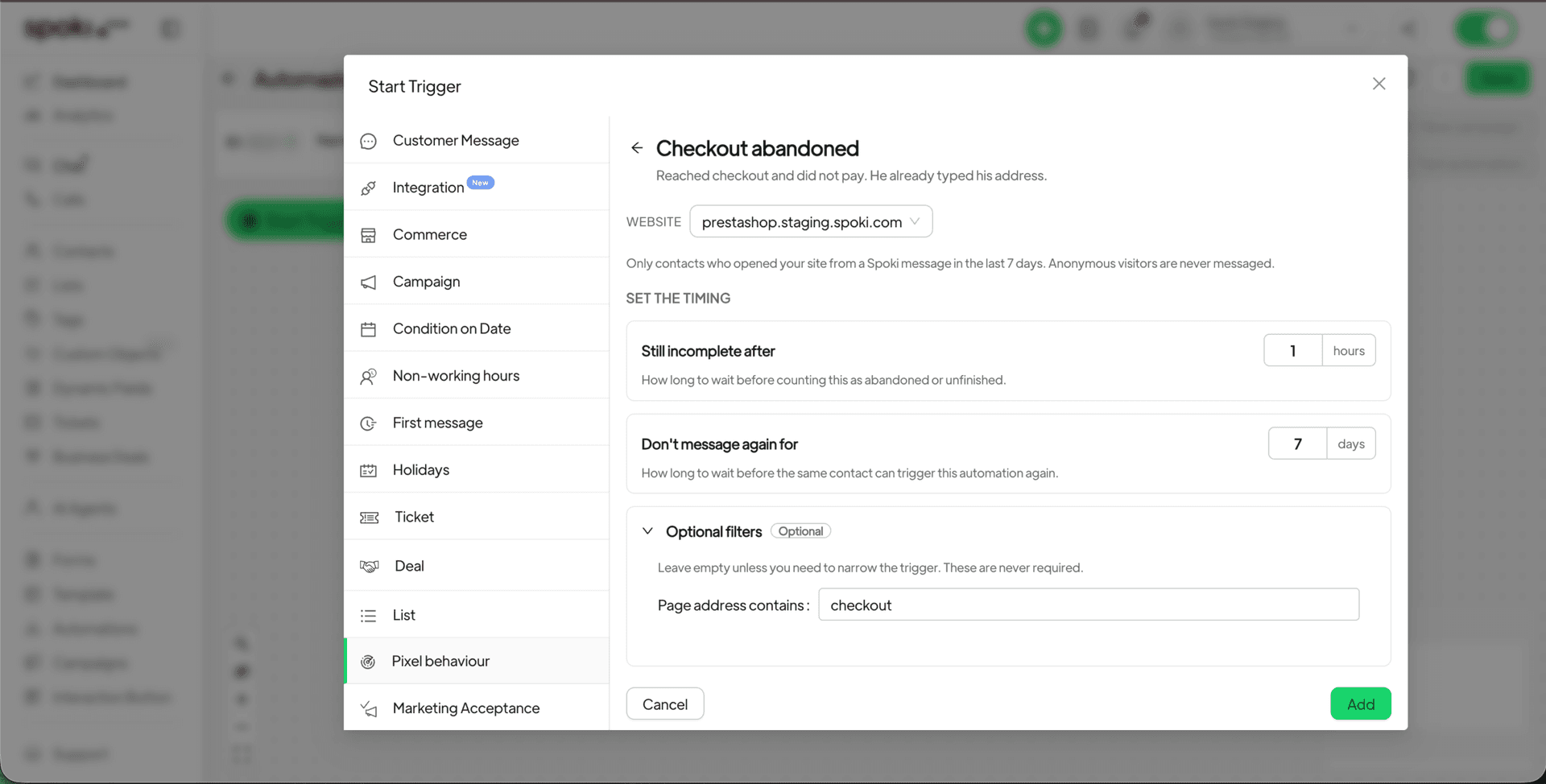
- Open an existing automation or create a new one in Spoki.
- Add a starting step to your automation workflow.
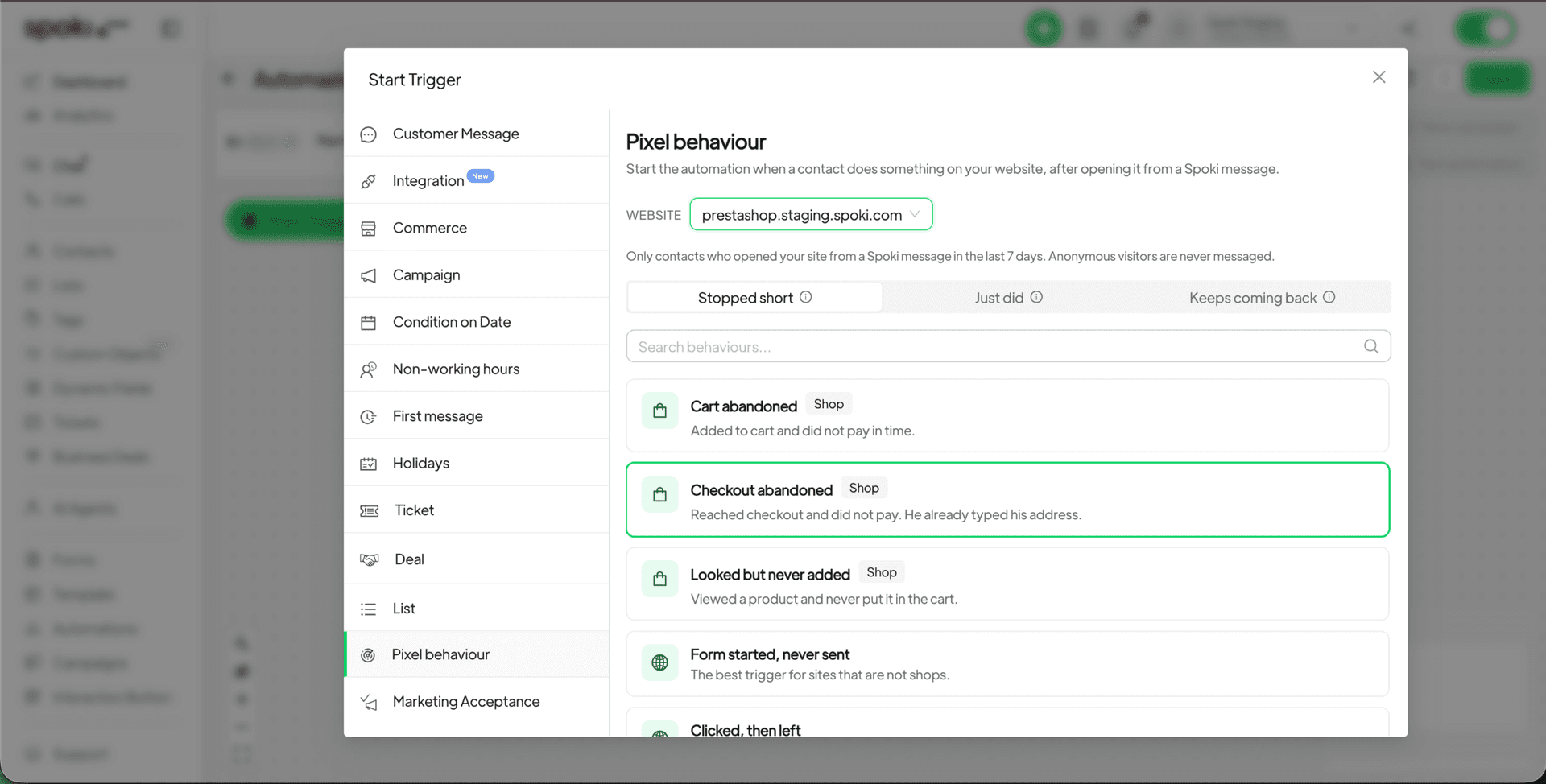
- Choose ‘Pixel behaviour’ as the trigger type.
- Select a ready-made scenario that aligns with your marketing objective (e.g., ‘Abandoned Cart’, ‘Visited Key Page’, ‘Frequent Visitor’).
- Customize the timing for the automation to fire after the website visit.
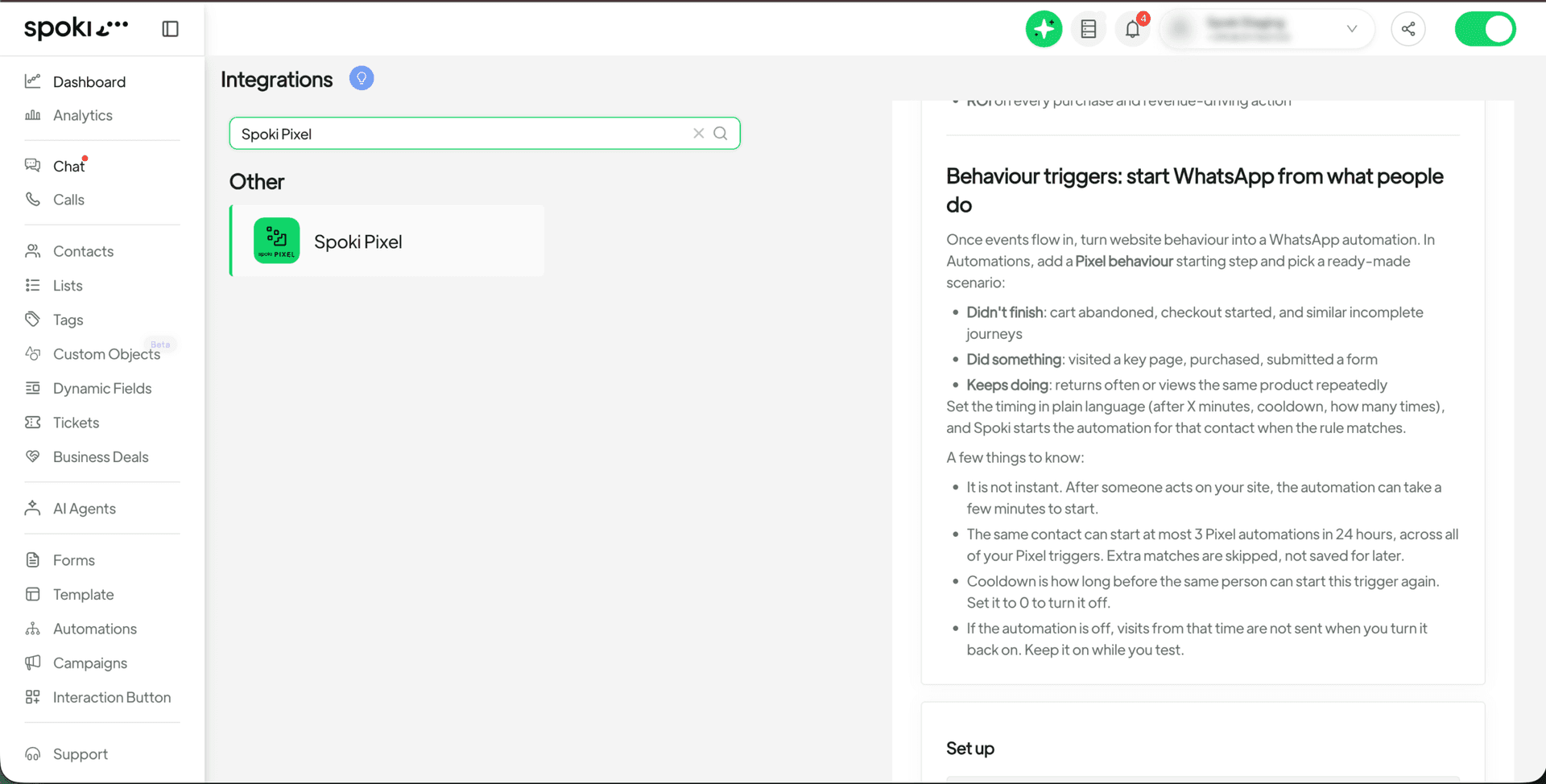
It’s important to note that there will be a few minutes delay after the website visit before the automation is triggered; it is not instantaneous. Also, if the automation is turned off, any website visits occurring during that period will not be processed later. This emphasizes the importance of keeping your automations active to capture all relevant user behavior.
Practical Use Cases for WhatsApp Automations Triggered by Website Behavior
The applications for website behavior-triggered WhatsApp automations are vast and can significantly enhance various aspects of your business, from sales and marketing to customer support.
1. Recovering Abandoned Carts
Abandoned carts are a persistent challenge for e-commerce businesses. With the Spoki Pixel Trigger, you can now automatically send a personalized WhatsApp message to customers who leave items in their cart without completing the purchase. This timely reminder can include a link back to their cart, an offer for free shipping, or a discount code, significantly increasing your chances of recovering lost sales.
- Scenario: Customer adds products to cart but exits the website.
- WhatsApp Automation: Send a message after 30 minutes: “Hey [Customer Name], noticed you left some great items in your cart! Complete your order now and get 10% off: [Link to cart]”
- Benefit: Direct, personalized re-engagement leading to higher conversion rates for abandoned carts.
2. Engaging Visitors on Key Pages
Identify high-intent visitors by tracking their activity on crucial pages like pricing pages, product feature pages, or demo request forms. If a user spends a significant amount of time on a specific product page or visits your Spoki Pricing Plans page multiple times, it indicates strong interest. You can then trigger an automation to offer assistance or provide more information.
- Scenario: User visits a specific high-value product page multiple times within an hour.
- WhatsApp Automation: Send a message after 15 minutes: “Hi [Customer Name], we noticed your interest in [Product Name]! Do you have any questions we can help with? Our team is here to assist.”
- Benefit: Proactive customer service, guiding interested leads down the sales funnel.
3. Nurturing Frequent Visitors and Loyal Customers
Recognize and reward your most engaged customers. If a user frequently returns to your website, it’s an excellent opportunity to deepen their loyalty or offer exclusive content. This can be particularly useful for businesses offering subscription services or repeat purchases.
- Scenario: A customer visits your blog or product updates page regularly.
- WhatsApp Automation: Send a message after their third visit in a week: “Welcome back, [Customer Name]! We appreciate your continued interest. Here’s an exclusive sneak peek at our upcoming [new feature/product]: [Link].”
- Benefit: Builds customer loyalty, encourages repeat engagement, and provides value to your most active users.
4. Following Up on Form Submissions or Downloads
After a user fills out a form (e.g., for a lead magnet, webinar registration, or contact request) or downloads a resource, a WhatsApp automation can provide instant confirmation, deliver the content, or initiate a follow-up sequence.
- Scenario: User downloads an e-book from your website.
- WhatsApp Automation: Send a message immediately: “Thanks for downloading our e-book, [Customer Name]! We hope you find it useful. Let us know if you have any questions.”
- Benefit: Enhances user experience, confirms actions, and keeps the conversation open for further engagement.
5. Re-engaging Dormant Users
If a user hasn’t visited your site in a while but then returns, it’s a prime opportunity to re-engage them. A personalized welcome back message can remind them of your offerings or highlight new products/services.
- Scenario: A previously active customer returns to your website after 60 days of inactivity.
- WhatsApp Automation: Send a message after 10 minutes: “Welcome back, [Customer Name]! We’ve missed you. Check out our latest arrivals and special offers: [Link].”
- Benefit: Revives dormant customer relationships and drives repeat business.
The Power of WhatsApp Business API and Chatbots in Automations
Spoki leverages the robust capabilities of the WhatsApp Business API Documentation to power these advanced automations. This means businesses can send structured, templated messages that comply with WhatsApp’s policies, ensuring high deliverability and a professional appearance. Integrating website behavior with WhatsApp chatbots allows for even more dynamic and interactive engagement.
Automated Messaging for Enhanced Customer Journeys
Automated messaging, when triggered by website behavior, creates seamless and highly relevant customer journeys. Instead of generic email blasts, customers receive timely WhatsApp messages that directly address their recent actions or interests. This personalized approach significantly improves open rates and engagement compared to traditional marketing channels.
For marketing managers, this translates to more efficient campaigns and better ROI. Business owners can see direct improvements in sales and customer satisfaction. E-commerce operators gain a powerful tool to combat cart abandonment and nurture leads effectively. SMBs can compete with larger enterprises by offering a highly personalized and responsive customer experience.
Integrating Spoki with Your Existing Ecosystem
Spoki is designed to integrate smoothly with your existing CRM and other business tools, ensuring that your customer data is unified and actionable. This holistic approach allows for even more sophisticated automations and a comprehensive view of your customer interactions.
For further insights and best practices on maximizing your WhatsApp marketing efforts, explore the Spoki Blog, which offers a wealth of resources on customer engagement, automation strategies, and the latest product updates.
Conclusion: Engage Smarter with Spoki’s Pixel Trigger
The new Spoki Pixel Trigger (v19.25.3) for website behaviour in automations is a game-changer for businesses looking to elevate their customer engagement strategy. By allowing you to initiate WhatsApp automations based on precise user actions on your website, Spoki empowers you to engage with customers at the perfect moment, turning interest into conversions and fostering lasting relationships. Whether it’s recovering abandoned carts, nurturing leads on key pages, or rewarding loyal customers, this feature provides the tools to create highly effective, personalized communication workflows. Embrace the future of customer engagement and transform your website visitors into loyal customers with Spoki.
Start for free with Spoki — no credit card required.