Ask About Your Website in a Chat: Instant Insights with Spoki
Content
As a marketing manager, business owner, or e-commerce operator, you know the critical importance of understanding your website’s performance. Traditionally, this meant sifting through complex analytics dashboards, generating reports, and spending valuable time interpreting data. What if you could get instant answers to your most pressing website questions, simply by asking in plain language? The new Spoki v20.6.0 update revolutionizes how you monitor your online presence, allowing you to ask about your website in a chat and receive immediate, actionable insights. This innovative feature transforms data analysis from a chore into a seamless conversation, empowering you to make faster, more informed decisions about your digital strategy and Spoki campaigns.
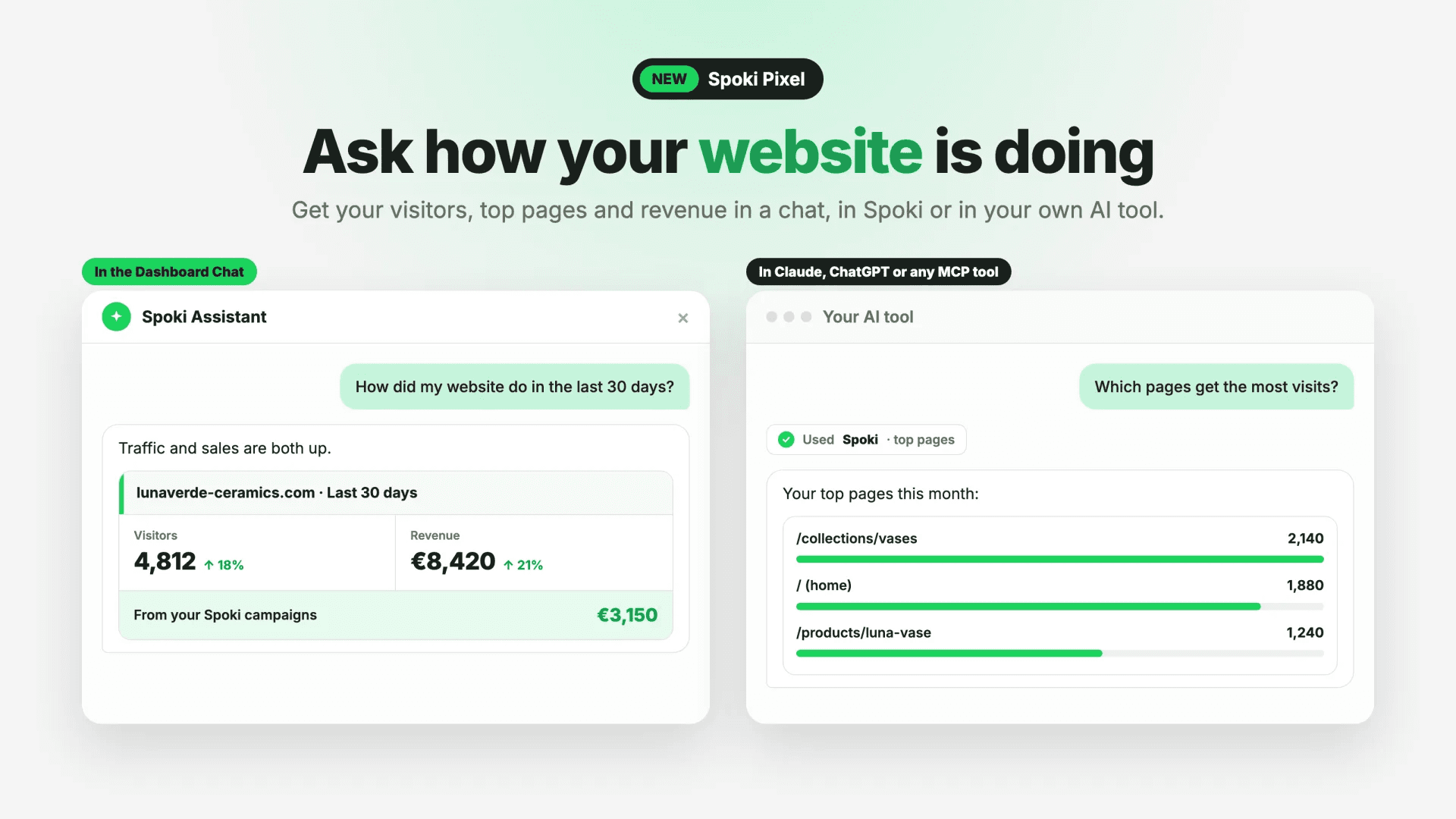
Gone are the days of navigating convoluted menus to find specific metrics. With Spoki, you can now effortlessly monitor your website’s performance by simply asking questions within the Spoki Dashboard Chat or other AI tools connected to Spoki MCP. Get instant insights into visitors, page views, top pages, traffic sources, purchases, and revenue, including contributions from your Spoki campaigns. This feature requires the Spoki Pixel on your website and is available to account owners and admins in the Dashboard Chat.
Unlock Website Insights with Conversational AI
The core of this new Spoki feature is its ability to translate natural language queries into powerful data retrievals. Instead of configuring filters and date ranges, you simply type your question, just as you would in a conversation with a colleague. This approach significantly lowers the barrier to entry for website analytics, making it accessible to anyone who needs quick answers, regardless of their technical expertise.
What Can You Ask About Your Website?
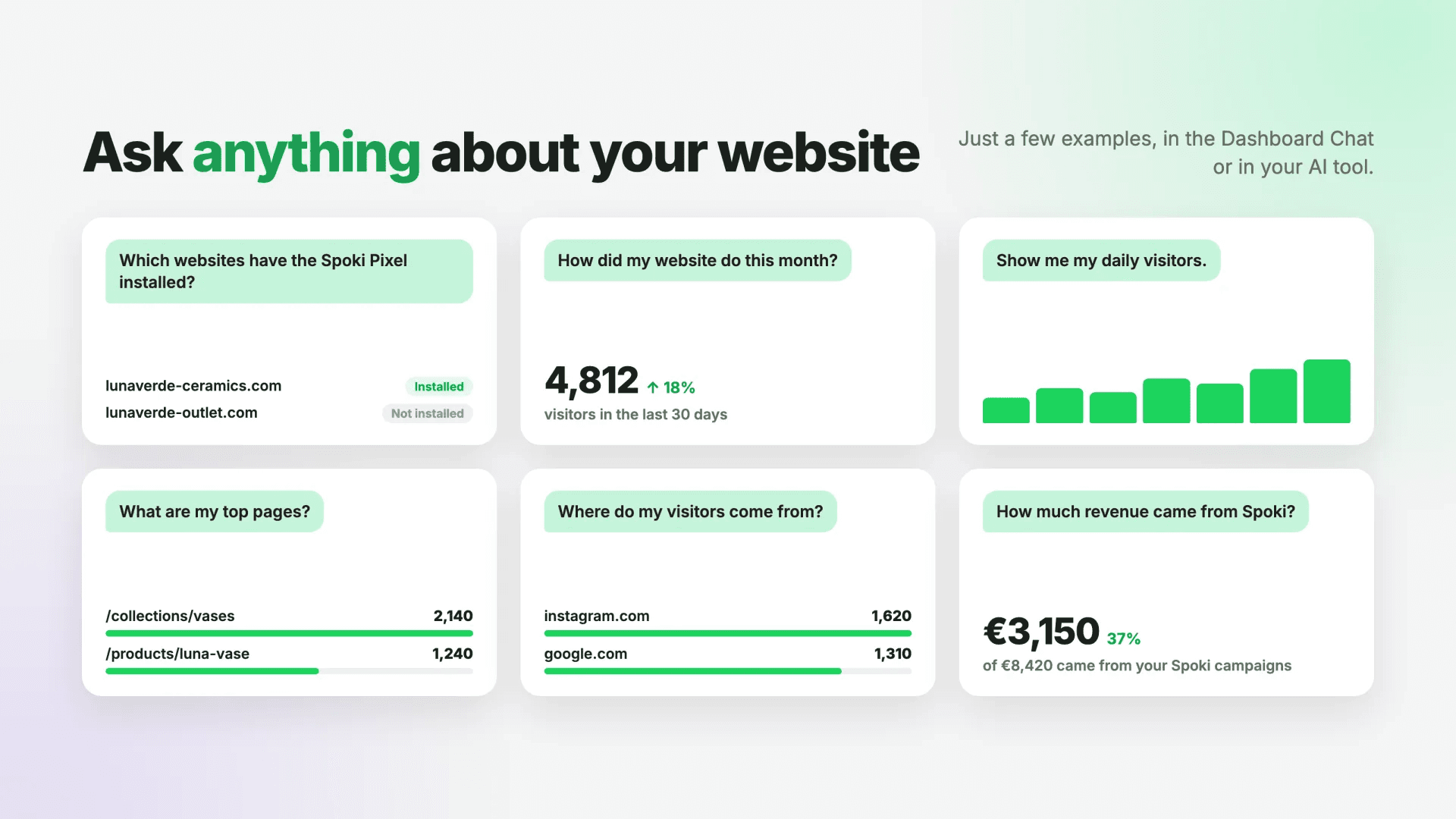
Spoki’s conversational AI can provide a wide range of essential website metrics. Here are some examples of what you can inquire about:
- Overall Performance: “How is my website doing today?” or “Show me my website’s performance last week.”
- Visitor Metrics: “How many visitors did I have yesterday?” or “What’s the trend in unique visitors this month?”
- Page Views: “How many page views did my website get last month?” or “Which pages are getting the most views?”
- Top Pages: “What are my top 5 most visited pages?” or “Which landing pages performed best last quarter?”
- Traffic Sources: “Where are my visitors coming from?” or “What are my main traffic sources for the past 30 days?”
- E-commerce Performance: “How many purchases did I get this week?” or “What was my total revenue last month?”
- Spoki Campaign Impact: “How much revenue came from my Spoki campaigns?” or “What’s the conversion rate for visitors from Spoki messages?”
Practical Examples: How Marketing Managers Use This Feature
Imagine you’re a marketing manager overseeing several campaigns. Time is of the essence, and you need quick data to optimize your strategies. Here’s how the new Spoki chat feature can streamline your workflow:
Scenario 1: Daily Performance Check
Problem: You need a quick overview of your website’s health first thing in the morning without logging into multiple tools.
Your Question in Spoki Chat: “How many visitors did my website have yesterday, and what were the top 3 pages?”
Spoki’s Instant Answer: “Yesterday, your website had 1,250 visitors. The top 3 pages were: /product-category-A (500 views), /blog/latest-post (350 views), and /contact-us (200 views).”
Benefit: Immediate insight allows you to spot anomalies or successes early, informing your daily priorities.
Scenario 2: Campaign Performance Analysis
Problem: You just launched a new Spoki WhatsApp campaign for a product, and you want to see its immediate impact on purchases and revenue.
Your Question in Spoki Chat: “What was the revenue from Spoki campaigns this week, and how many purchases resulted from them?”
Spoki’s Instant Answer: “This week, Spoki campaigns generated $7,500 in revenue from 150 purchases. This represents a 20% increase from the previous week.”
Benefit: Directly attribute revenue and purchases to your Spoki efforts, demonstrating ROI and guiding future campaign adjustments.
Scenario 3: Identifying Traffic Source Effectiveness
Problem: You’re planning your next ad budget and need to understand which channels are driving the most valuable traffic.
Your Question in Spoki Chat: “What are my top traffic sources for the last 30 days, and which one has the highest conversion rate for purchases?”
Spoki’s Instant Answer: “Your top traffic sources for the last 30 days are Organic Search (40%), Paid Ads (30%), and Direct (20%). Paid Ads currently have the highest purchase conversion rate at 3.5%.”
Benefit: Optimize your marketing spend by focusing on high-performing channels, improving overall efficiency.
Seamless Integration with Spoki MCP and AI Tools
The power of asking about your website in a chat extends beyond the Spoki Dashboard. This feature is also accessible through other AI tools connected to Spoki MCP, such as Claude and ChatGPT. This means you can leverage your preferred AI environment to query your website data, integrating Spoki’s insights into your broader AI-driven workflows.
This integration is particularly beneficial for businesses already utilizing these AI platforms for content generation, customer service, or data analysis. You can now pull real-time website performance metrics directly into your AI conversations, enriching your analysis and decision-making processes without switching between applications.
The Spoki Pixel: Your Foundation for Data-Driven Decisions
To harness the full potential of this new feature, the Spoki Pixel must be correctly installed on your website. The Spoki Pixel is a small piece of code that collects crucial data about visitor behavior, page views, conversions, and more. It’s the engine that powers these conversational insights, ensuring that Spoki has the necessary data to answer your questions accurately and in real-time.
If you haven’t installed the Spoki Pixel yet, it’s a straightforward process that unlocks a wealth of analytical capabilities, not just for this chat feature but for optimizing your Spoki WhatsApp campaigns as well. The data collected by the pixel is essential for tracking the effectiveness of your automated messages, understanding customer journeys, and refining your communication strategies.
Who Can Access This Feature?
For security and data integrity, the ability to ask website questions in the Spoki Dashboard Chat is available to account owners and administrators. This ensures that only authorized personnel can access sensitive website performance data, maintaining control and compliance within your organization.
Leveraging WhatsApp Automation with Website Insights
The true synergy of this feature comes when combined with Spoki’s robust WhatsApp automation capabilities. By understanding your website’s performance, you can create more targeted, effective, and timely WhatsApp campaigns. Here are some use cases:
Use Case 1: Abandoned Cart Recovery Optimization
Website Insight: You notice a high abandoned cart rate on your e-commerce site through a quick chat query: “What’s my abandoned cart rate for the last 7 days?”
WhatsApp Automation Action: Based on this insight, you can refine your Spoki WhatsApp Business API automated messages for abandoned cart recovery. Perhaps you test different message timings, offer incentives, or personalize messages based on cart value. Monitoring the impact of these changes on your website’s purchase rate via chat queries allows for continuous optimization.
Use Case 2: Post-Purchase Engagement
Website Insight: You identify your top-selling products using the chat feature: “What were my top 3 selling products last month?”
WhatsApp Automation Action: For customers who purchased these top products, you can set up automated WhatsApp messages offering related product recommendations, asking for reviews, or providing usage tips. By tracking repeat purchases and engagement metrics through website queries, you can gauge the effectiveness of your post-purchase WhatsApp strategy.
Use Case 3: Content Promotion and Lead Generation
Website Insight: You discover that a particular blog post or landing page is generating significant traffic but has a low conversion rate for newsletter sign-ups: “Which blog posts had the most visitors last month, and what’s their lead conversion rate?”
WhatsApp Automation Action: For visitors who engage with that content but don’t convert, you could implement a Spoki chatbot to proactively engage them via WhatsApp, offering a lead magnet or answering common questions. You can then monitor the impact on lead generation directly through your chat queries, optimizing your content and WhatsApp funnel.
Use Case 4: Customer Support Efficiency
Website Insight: You notice a sudden spike in visits to your FAQ page or contact page: “How many visits did my FAQ page get today compared to yesterday?”
WhatsApp Automation Action: This insight could indicate a new customer query trend. You can quickly update your Spoki automated WhatsApp responses or chatbot flows to address these emerging questions, reducing the load on your customer service team and improving customer satisfaction. Monitoring website traffic to support pages helps you anticipate and respond to customer needs proactively.
The Future of Website Analytics is Conversational
Spoki’s new feature marks a significant step towards making website analytics more intuitive and integrated into your daily workflow. By enabling you to ask about your website in a chat, Spoki empowers marketing managers, business owners, and e-commerce operators to:
- Save Time: Get answers in seconds, not minutes or hours.
- Make Faster Decisions: Act on real-time data to optimize campaigns and strategies.
- Improve Accessibility: Democratize data access across your team.
- Enhance Spoki Campaign Effectiveness: Directly link website performance to your WhatsApp automation efforts.
- Boost ROI: Optimize your digital presence and communication for better results.
This conversational approach to data retrieval aligns perfectly with the modern business need for agility and efficiency. It allows you to focus on strategy and execution, rather than getting bogged down in data extraction.
Conclusion: Get Instant Website Answers with Spoki
The ability to ask about your website in a chat is more than just a new feature; it’s a paradigm shift in how businesses interact with their own data. Spoki continues to innovate, providing powerful tools that simplify complex tasks and empower you to achieve your marketing and sales goals. By integrating website analytics directly into a conversational interface, Spoki ensures that critical insights are always just a question away.
Ready to experience the future of website monitoring and supercharge your WhatsApp automation? Start for free with Spoki — no credit card required.