Day of Week Conditions: Smarter WhatsApp Automation (v19.19.0)
Content
In today’s fast-paced digital landscape, businesses need every advantage to connect with customers effectively. For marketing managers, business owners, e-commerce operators, and SMBs leveraging WhatsApp Business for customer communication, efficiency and precision are paramount. Have you ever struggled to set up automation flows that respond specifically to certain days of the week without complex, error-prone configurations? Or perhaps you’ve encountered situations where your early morning automations triggered incorrectly due to timezone discrepancies? These common challenges can lead to missed opportunities, frustrated customers, and wasted resources. Spoki understands these pain points, and with the latest update, version 19.19.0, Spoki introduces enhanced Day of Week Conditions, revolutionizing how you build and manage your WhatsApp automation workflows.
This powerful new feature simplifies the creation of time-sensitive campaigns, ensuring your messages are always delivered at the most opportune moment. No more intricate range comparisons or guesswork; Spoki’s intuitive interface allows you to define your automation logic with unprecedented ease and accuracy. This update is designed to empower you to create more sophisticated, yet simpler, automation flows, ultimately boosting your customer engagement and operational efficiency. Let’s dive into how these new Day of Week Conditions can transform your WhatsApp Business strategy.
Streamlined Automation Logic: Say Goodbye to Complex Ranges
Previously, setting up an If/Else step to trigger on specific days of the week often involved creating complex logical ranges (e.g., ‘Day of week is greater than Monday AND Day of week is less than Friday’). This approach, while functional, was cumbersome and prone to errors, especially when dealing with multiple non-consecutive days. Spoki’s new Day of Week Conditions eliminate this complexity entirely.
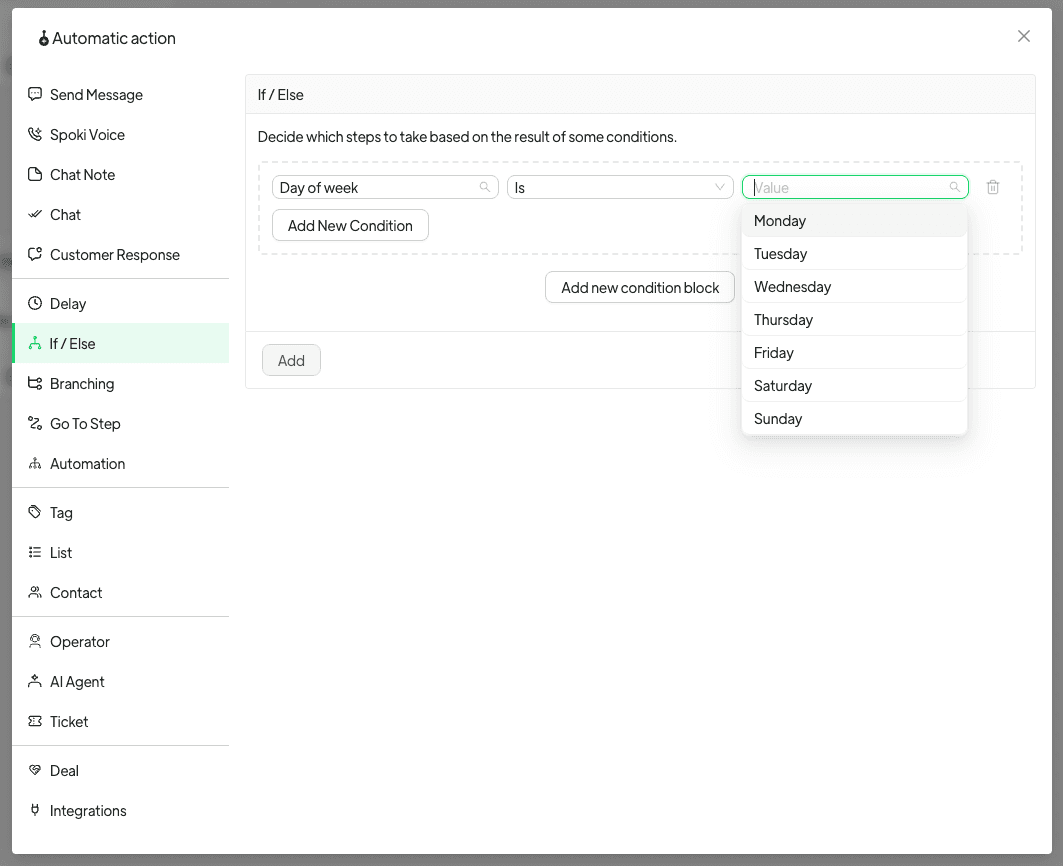
With version 19.19.0, an If/Else step can now match the days of the week by name directly. Instead of building intricate range comparisons, you simply select ‘Is’ or ‘Is not’ and then tick the specific days you want your automation to consider. This intuitive selection process makes building automation flows significantly faster and more reliable.
How it Works: Simple Selection for Multiple Days
One of the most significant advantages of this update is the ability for a single condition to hold as many days as you need. For instance, you can easily set up a condition to trigger on ‘Monday and Thursday,’ or ‘both weekend days,’ all within a single If/Else step. This dramatically simplifies your automation logic, making your workflows cleaner and easier to manage. The old comparison method is still available for existing automations, ensuring a smooth transition for all users.
Where to find it:
- Open an If/Else step in your Spoki automation builder.
- Choose ‘Day of week’ as your condition type.
- Select ‘Is’ or ‘Is not’.
- Tick the specific days you want to include or exclude.
This straightforward approach means less time spent configuring and more time focusing on what truly matters: engaging with your customers.
Corrected Timezone Reading: Ensuring Accuracy for Early Morning Automations
Another critical enhancement in version 19.19.0 addresses a long-standing challenge: timezone discrepancies. Until now, the day was read in UTC (Coordinated Universal Time). This meant that an automation running in the first hours of the morning (e.g., 1 AM in your local timezone) could look at the previous day in UTC, potentially causing the automation to take the wrong path.
For example, an automation scheduled to run on Monday morning might have incorrectly identified the day as Sunday if your local timezone was several hours behind UTC. This could lead to delayed messages, irrelevant promotions, or missed customer interactions.
With this update, the day is now read in your account’s timezone. This crucial correction ensures that your automations always reference the correct day, regardless of when they run. This applies to existing automations as well, including those using the day of the month, providing immediate benefits across your entire Spoki setup. You can trust that your early morning campaigns will now execute precisely as intended, aligning perfectly with your local business hours and customer expectations.
Practical Examples and Use Cases for WhatsApp Automation
The enhanced Day of Week Conditions open up a world of possibilities for businesses using Spoki for WhatsApp Business API communication. Let’s explore some practical examples and use cases that demonstrate the power and flexibility of this new feature.
1. Weekend-Specific Promotions and Offers
Scenario: An e-commerce store wants to run special promotions exclusively on Saturdays and Sundays to boost weekend sales.
Old way: You’d need to set up a condition like ‘Day of week is greater than Friday AND Day of week is less than Monday,’ or separate conditions for Saturday and Sunday, potentially with complex OR logic.
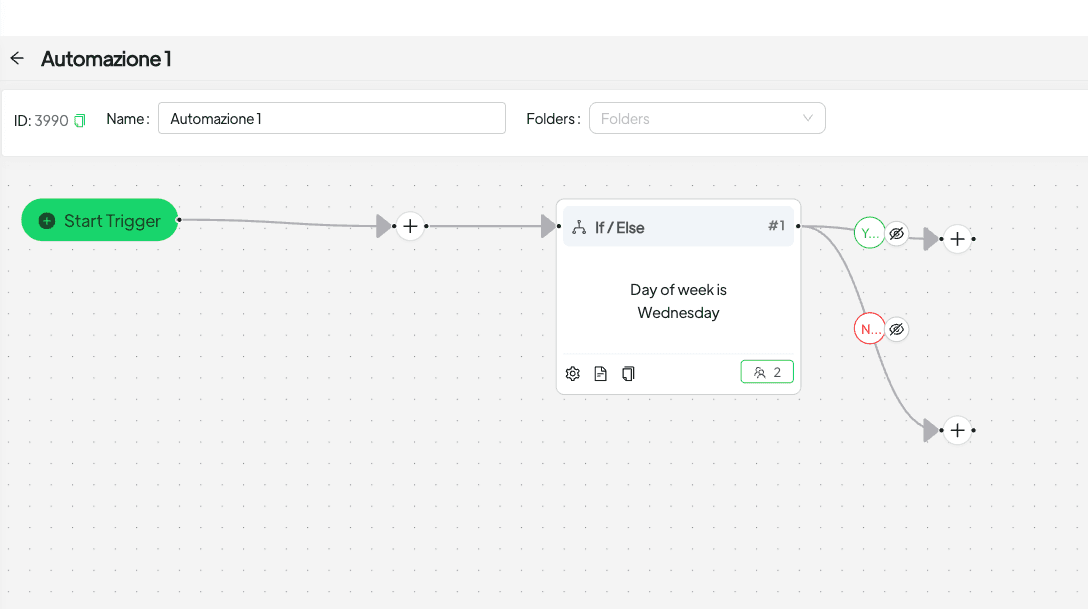
New way with Spoki: Create an If/Else step, choose ‘Day of week,’ select ‘Is,’ and simply tick ‘Saturday’ and ‘Sunday.’ If the condition is met, the automation sends a message with a weekend-exclusive discount code. This ensures your promotional messages only reach customers when the offer is valid, maximizing impact and minimizing confusion.
2. Business Hours and Customer Service Availability
Scenario: A service-based business wants to inform customers about their operating hours and direct inquiries appropriately, especially outside of standard business days.
Old way: Multiple conditions to check if the day is Monday OR Tuesday OR… and then another set for weekend days.
New way with Spoki: Set up an automation that checks the ‘Day of week.’ If ‘Is not’ ‘Saturday’ and ‘Sunday,’ the automation can direct customers to live chat support during business hours. If ‘Is’ ‘Saturday’ or ‘Sunday,’ it can send an automated message confirming that the office is closed and provide alternative contact methods or FAQs. This improves customer experience by setting clear expectations and guiding them efficiently.
3. Scheduled Content Delivery and Reminders
Scenario: A marketing manager wants to send out a weekly newsletter summary every Monday morning and a mid-week tip every Wednesday afternoon.
Old way: Separate automations or very complex nested conditions to handle different days.
New way with Spoki: Create an automation flow that includes an If/Else step for ‘Day of week.’ If ‘Is’ ‘Monday,’ send the newsletter summary. If ‘Is’ ‘Wednesday,’ send the mid-week tip. This allows for precise scheduling of content, ensuring your audience receives timely and relevant information without manual intervention.
4. Event Reminders and Follow-ups
Scenario: An organization hosts webinars or events and wants to send reminders on specific days leading up to the event, and follow-up messages on the day after.
Old way: Requires careful manual scheduling or complex date calculations.
New way with Spoki: For an event on a Friday, you can set up an automation to send a reminder on ‘Wednesday’ and ‘Thursday’ using the new Day of Week conditions. Then, another branch can send a follow-up survey on ‘Saturday’ (the day after the event). This ensures attendees are well-informed and engaged throughout the event lifecycle.
5. Staffing and Resource Management Notifications
Scenario: An SMB needs to send automated notifications to staff about daily tasks or shift reminders, but only on weekdays.
Old way: Exclude weekend days using greater than/less than logic.
New way with Spoki: An automation can check if the ‘Day of week’ ‘Is not’ ‘Saturday’ and ‘Sunday.’ If true, it sends the daily task list or shift reminder to relevant staff groups via WhatsApp. This streamlines internal communication and ensures operational efficiency during working days.
6. Targeted Campaigns Based on Customer Behavior and Day
Scenario: An e-commerce business observes that customers are more likely to respond to abandoned cart reminders on weekdays and special flash sales on Fridays.
Old way: Difficult to combine day-specific logic with other behavioral triggers effectively.
New way with Spoki: Combine Day of Week conditions with other triggers. For instance, if a customer abandons a cart AND the ‘Day of week’ ‘Is not’ ‘Saturday’ or ‘Sunday,’ send a standard reminder. If the ‘Day of week’ ‘Is’ ‘Friday,’ send a special flash sale offer to those who abandoned carts. This allows for highly targeted and effective campaigns based on both user behavior and optimal timing.
Enhancing Your WhatsApp Business API Strategy with Spoki
These new Day of Week Conditions, combined with Spoki’s robust WhatsApp Business API Documentation, empower you to create highly sophisticated yet user-friendly automation flows. By leveraging the power of automated messaging and chatbots, businesses can:
- Save Time and Resources: Automate repetitive tasks, freeing up your team to focus on more complex customer interactions.
- Improve Customer Satisfaction: Deliver timely, relevant messages that meet customer expectations, leading to higher engagement and loyalty.
- Increase Conversions: Implement targeted campaigns that guide customers through the sales funnel more effectively.
- Ensure Compliance: Spoki helps you maintain compliance with WhatsApp Business API policies, ensuring a customer-first approach with opt-in messaging.
The ability to define conditions based on specific days of the week, coupled with accurate timezone readings, means your WhatsApp automation strategy can be more precise and effective than ever before. Whether you’re sending promotional messages, customer service updates, or internal notifications, Spoki provides the tools you need to communicate intelligently and efficiently.
Conclusion: Build Smarter Automations Today
The introduction of enhanced Day of Week Conditions in Spoki v19.19.0 marks a significant step forward in simplifying and optimizing your WhatsApp automation workflows. By offering an intuitive way to select specific days and ensuring accurate timezone readings, Spoki empowers marketing managers, business owners, and e-commerce operators to build more effective, precise, and reliable communication strategies.
No more wrestling with complex range comparisons or worrying about early morning timezone errors. With Spoki, you can design sophisticated automation flows that align perfectly with your business schedule and customer expectations, leading to improved engagement, operational efficiency, and ultimately, business growth. Explore the latest Product Updates to see how Spoki is continuously evolving to meet your needs.
Ready to experience the power of smarter WhatsApp automation? Start for free with Spoki — no credit card required.