Filter by Channel: Streamline Spoki WhatsApp Automation (v19.28.0
Content

In today’s fast-paced digital landscape, businesses often juggle multiple communication channels to connect with their customers. Whether it’s managing several WhatsApp Business accounts, different SMS sender IDs, or various email addresses, the complexity can quickly escalate. Marketing managers, business owners, and e-commerce operators using WhatsApp Business for customer communication frequently face the challenge of maintaining clarity and efficiency across these diverse touchpoints. How do you ensure that your automations and campaigns are aligned with the correct channel, and how can you quickly locate specific forms without sifting through endless lists?
Spoki understands these challenges. That’s why, with the release of v19.28.0, Spoki introduces a powerful new feature: Filter by Channel. This enhancement is designed to provide unparalleled visibility and control, allowing you to quickly view items associated with a specific WhatsApp number, SMS sender, or email address. This streamlines management, reduces errors, and helps you focus precisely on the relevant communications for each channel. For businesses operating with multiple WhatsApp Business accounts, this update is a game-changer, simplifying the management of your automated messaging and customer engagement strategies.
Enhanced Visibility for Multi-Channel Management
Managing multiple communication channels doesn’t have to be a headache. Spoki’s new Filter by Channel feature brings clarity and efficiency to your daily operations. This update is particularly beneficial for businesses that leverage the power of WhatsApp automation through the WhatsApp Business API, alongside traditional SMS and email marketing.
Automations and Campaigns: Focus Your Efforts
Imagine you’re running several marketing campaigns across different WhatsApp Business accounts, each targeting a distinct customer segment. Previously, finding a specific automation or campaign related to a particular WhatsApp number might have involved careful naming conventions or extensive scrolling. With the new Channel filter, this process is dramatically simplified.
When you navigate to your Automations or Campaigns section within Spoki, you’ll now find a new filter option. This filter allows you to select a specific WhatsApp number, an SMS sender, or an email address. Once selected, the list instantly updates to display only the automations or campaigns that are configured to send from that chosen channel.
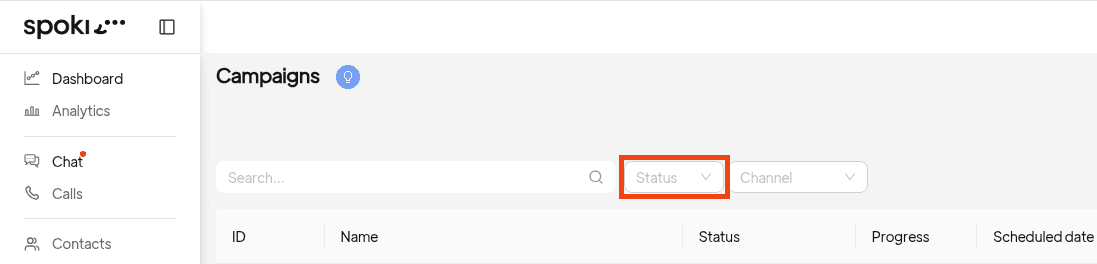
Practical Example: E-commerce Promotions
- Scenario: An e-commerce business uses one WhatsApp Business account for customer support and order updates, and another for promotional campaigns and abandoned cart reminders.
- Challenge: The marketing manager needs to review all active promotional campaigns for the second WhatsApp account without seeing support-related automations.
- Solution with Filter by Channel: The manager simply goes to ‘Campaigns’, applies the ‘Channel’ filter, and selects the WhatsApp number associated with promotional activities. Instantly, only the relevant campaigns appear, allowing for quick review and optimization.
This level of focused visibility is crucial for maintaining organized workflows and ensuring that your messaging strategies are executed flawlessly across all your channels. It reduces the risk of errors, saves valuable time, and empowers you to manage complex communication ecosystems with ease.
Forms: Effortless Location of Account-Specific Data
Forms are essential for lead generation, customer feedback, and opt-in management. For businesses utilizing multiple WhatsApp Business accounts, each potentially linked to different forms for various purposes (e.g., product inquiries, event registrations, newsletter sign-ups), locating a specific form can be cumbersome.
Spoki’s v19.28.0 update extends the Channel filter functionality to Forms. Now, within the Forms section, you’ll find a dedicated WhatsApp Business account filter. This allows you to effortlessly locate forms linked to particular accounts, streamlining your data collection and management processes.
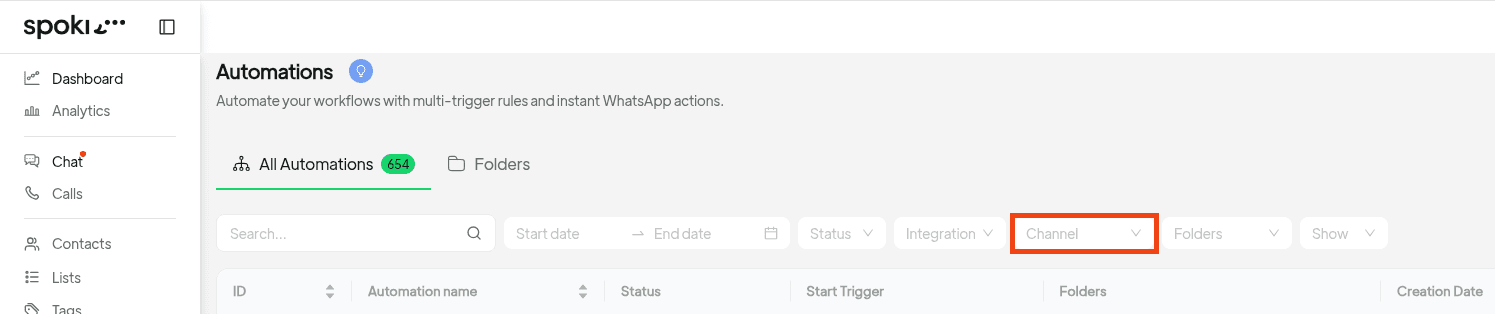
Practical Example: Event Registration Management
- Scenario: A marketing agency manages event registrations for two different clients, each using their own WhatsApp Business account and dedicated Spoki forms.
- Challenge: The agency needs to quickly access and analyze the registration forms for Client A’s upcoming webinar.
- Solution with WhatsApp Business Account Filter: The agency navigates to ‘Forms’, applies the ‘WhatsApp Business account’ filter, and selects Client A’s WhatsApp number. All forms associated with Client A immediately become visible, allowing for efficient management of registrations and follow-up automations.
This feature ensures that you can maintain clear segregation of data and easily manage forms relevant to specific business units or client accounts, enhancing overall operational efficiency.
Use Cases: Revolutionizing WhatsApp Automation with Spoki
The Filter by Channel feature significantly amplifies the power of Spoki’s WhatsApp automation capabilities, especially for businesses leveraging the WhatsApp Business API for advanced customer engagement.
1. Segmented Customer Support with Multiple WhatsApp Numbers
Many larger organizations or businesses with diverse product lines opt for multiple WhatsApp Business numbers to segment their customer support. For instance, one number for technical support, another for sales inquiries, and a third for order tracking.
- Before: Managing automations for each support channel could lead to a cluttered view, making it hard to quickly identify and modify specific chatbot flows or automated responses for, say, technical support.
- With Filter by Channel: A support manager can now filter automations by the ‘Technical Support’ WhatsApp number. This instantly displays all chatbots, automated FAQs, and routing rules specific to technical queries, allowing for rapid updates and performance monitoring. This ensures that each customer segment receives highly relevant and efficient support without cross-channel confusion.
2. Multi-Brand or Franchise Management
Businesses operating multiple brands or a franchise model often require separate communication strategies for each entity. Each brand or franchise might have its own WhatsApp Business account, SMS sender, and email address.
- Before: A marketing team overseeing multiple brands would have a single, long list of campaigns and automations, making it challenging to isolate and manage initiatives for ‘Brand X’ versus ‘Brand Y’.
- With Filter by Channel: The marketing team can easily filter campaigns by ‘Brand X’s WhatsApp number’ or ‘Brand Y’s email address’. This enables them to review, launch, or pause campaigns specific to a single brand, ensuring brand consistency and targeted messaging without accidentally affecting other brands. This is particularly useful for A/B testing different offers across brands or managing localized promotions.
3. Targeted Marketing Campaigns Across Regions
International businesses or those with strong regional presences often tailor marketing campaigns to specific geographical locations, using local WhatsApp numbers or SMS senders to build trust and relevance.
- Before: A global marketing manager would struggle to quickly see all active campaigns for the ‘European Region’ WhatsApp number versus the ‘APAC Region’ WhatsApp number.
- With Filter by Channel: The manager can now filter campaigns by the WhatsApp number designated for the ‘European Region’. This allows them to focus solely on European-specific promotions, analyze their performance, and make data-driven decisions for localized marketing efforts, optimizing conversion rates for each region.
4. Streamlined Onboarding and Opt-in Management
Collecting customer opt-ins for WhatsApp communication is crucial for compliance and effective engagement. Businesses might use different forms for various opt-in purposes (e.g., newsletter, promotional alerts, service updates), each potentially linked to a specific WhatsApp channel.
- Before: Finding all opt-in forms related to a particular WhatsApp number could be time-consuming, especially when managing multiple opt-in strategies.
- With Filter by Channel: A compliance officer can quickly filter forms by the WhatsApp Business account used for ‘Promotional Alerts’. This provides an immediate overview of all forms collecting opt-ins for that specific purpose, simplifying audits and ensuring adherence to WhatsApp’s policies and local regulations. This also helps in managing customer preferences more effectively through CRM integration.
5. A/B Testing and Performance Analysis by Channel
Optimizing automated messages and campaigns often involves A/B testing different creatives, calls to action, or timing. When running tests across various channels, clear segmentation is vital.
- Before: Comparing the performance of an A/B test on one WhatsApp number against another could be confusing without a clear way to separate the data.
- With Filter by Channel: A marketing analyst can filter automations or campaigns by a specific WhatsApp number to review the A/B test results for that channel in isolation. This allows for precise performance analysis and informed decisions on which strategies are most effective for each communication channel, leading to continuous improvement in customer engagement and conversion rates.
Where to Find It
The new Channel filter is intuitively placed within the Automations, Campaigns, and Forms sections of your Spoki account, right next to your other existing filters. It automatically appears when your account is configured with more than one channel (i.e., multiple WhatsApp numbers, SMS senders, or email addresses). This ensures that the interface remains clean and uncluttered for users who only operate a single channel.
For more in-depth guidance on leveraging Spoki’s features, including advanced WhatsApp automation strategies and product updates, be sure to explore the Spoki Academy.
Conclusion
Spoki’s Filter by Channel feature (v19.28.0) is more than just an update; it’s a significant step towards empowering businesses with unparalleled control and clarity over their multi-channel communication strategies. By allowing you to quickly filter and view automations, campaigns, and forms by specific WhatsApp numbers, SMS senders, or email addresses, Spoki helps you streamline management, reduce operational complexities, and focus your efforts where they matter most.
For marketing managers, business owners, and e-commerce operators, this means less time sifting through irrelevant data and more time optimizing customer engagement, driving conversions, and building stronger relationships. Embrace the power of focused communication and elevate your WhatsApp automation strategy with Spoki.
Ready to experience the difference? Start for free with Spoki — no credit card required.