See Which AI Agent Replied: Enhanced WhatsApp Automation (v20.4.5
Content
In the fast-paced world of digital communication, efficiency and clarity are paramount, especially when managing customer interactions through platforms like WhatsApp Business. Businesses leveraging AI agents for customer support and engagement often face a common challenge: identifying which specific AI agent responded to a query. Previously, all AI replies were generically labeled “Virtual Assistant,” creating ambiguity and making it difficult for marketing managers, business owners, and e-commerce operators to track agent performance or troubleshoot issues. This limitation hindered the full potential of WhatsApp automation, especially for businesses deploying multiple specialized AI agents.
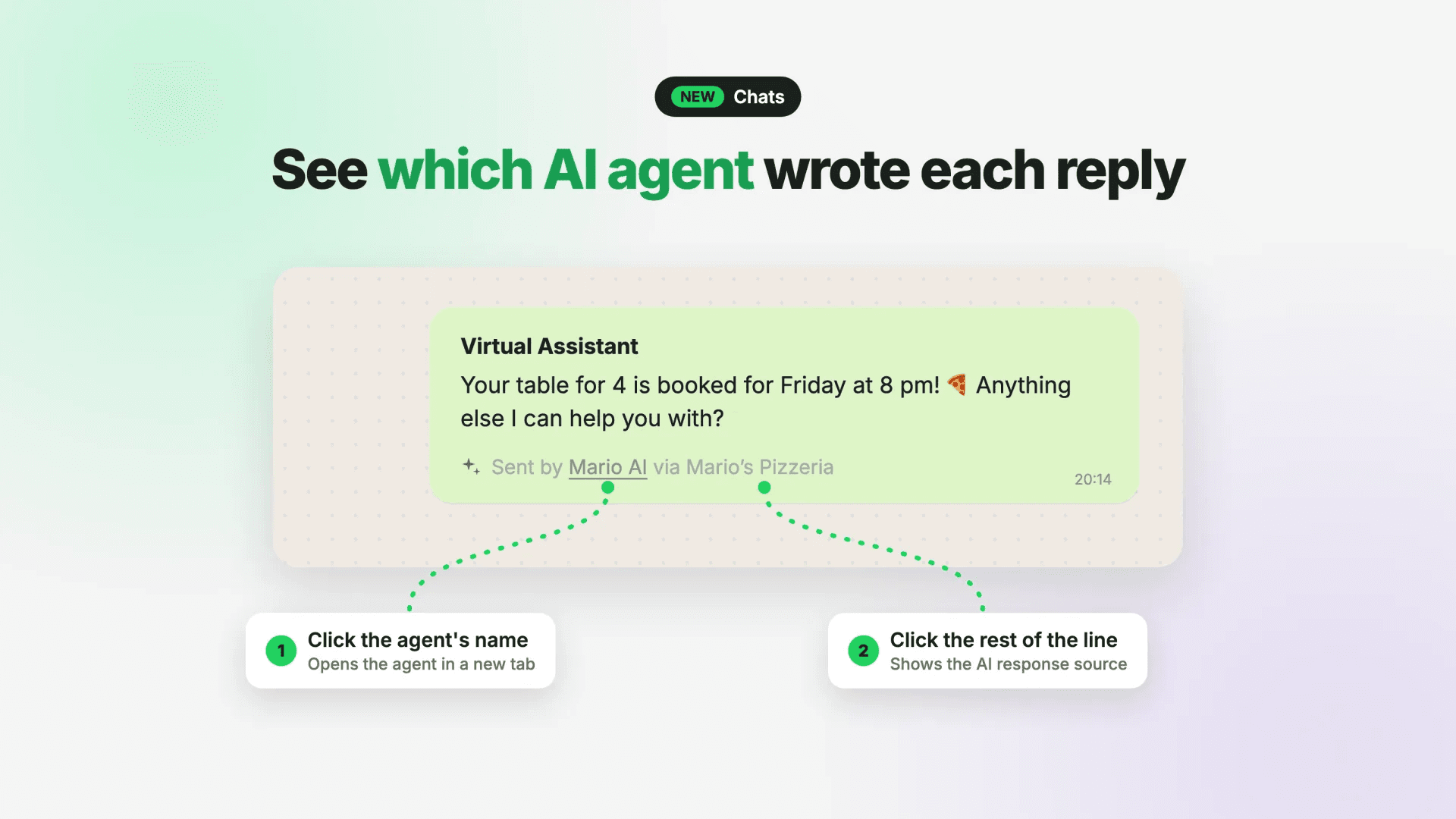
Spoki’s latest update, v20.4.5, directly addresses this critical need by introducing a significant enhancement: every AI reply in chats now clearly indicates which AI agent generated it. For example, you’ll now see “Sent by Mario AI via Mario’s Pizzeria” instead of a generic label. This update dramatically improves transparency and manageability, allowing you to easily see which AI agent replied, streamlining your operations and maximizing the effectiveness of your automated messaging strategies.
Understanding the New AI Agent Identification Feature
The core of this update lies in its ability to provide granular visibility into your AI-powered customer interactions. With v20.4.5, Spoki ensures that every automated response is attributed to its specific source. This means no more guessing games when reviewing chat logs or analyzing customer service performance. The change is simple yet profound, transforming how businesses interact with and manage their AI agents.
How It Works: A Practical Look
When an AI agent responds to a customer query via WhatsApp, the chat interface will now display a clear attribution. For instance, if you have an AI agent named “Product Info Bot” operating for “Your E-commerce Store,” the reply will appear as “Sent by Product Info Bot via Your E-commerce Store.” This immediate identification offers several benefits:
- Instant Recognition: Quickly see which AI agent is handling specific types of queries.
- Improved Oversight: Monitor the activity of individual agents without confusion.
- Enhanced Troubleshooting: Pinpoint issues with a particular agent’s responses more efficiently.
This feature is designed to be intuitive and user-friendly, integrating seamlessly into your existing Spoki chat interface. It’s a direct response to the growing complexity of modern customer service, where multiple AI agents often work in tandem to provide comprehensive support.
Navigating Agent Configuration and Response Sources
Spoki’s v20.4.5 update doesn’t just show you which AI agent replied; it also provides quick access to manage and understand those agents better. This dual functionality empowers users with both clarity and control, making the management of WhatsApp chatbots and automated messaging more efficient than ever.
Direct Access to Agent Configuration
One of the most powerful aspects of this update is the ability to directly access an AI agent’s configuration. When you see an AI reply in a chat, you can now click on the agent’s name (e.g., “Mario AI” in “Sent by Mario AI via Mario’s Pizzeria”). This action will open that specific AI agent’s configuration settings in a new tab. This feature is invaluable for:
- Quick Adjustments: Need to tweak an agent’s response logic or update its knowledge base? Access it directly from the chat.
- Performance Review: Easily jump to an agent’s settings to understand its parameters after reviewing its chat performance.
- Training and Optimization: Facilitates a faster feedback loop for training and optimizing your AI agents.
This direct link streamlines the workflow for marketing managers and business owners who need to maintain agile and responsive customer communication strategies. It eliminates the need to navigate through multiple menus to find the correct agent, saving valuable time and reducing friction in managing your WhatsApp automation.
Viewing the AI Response Source
Beyond agent configuration, the update retains and enhances the ability to view the AI response source. By clicking anywhere else on the line of the AI reply (not directly on the agent’s name), you can still access the underlying source of the AI’s response, just as before. This is crucial for:
- Debugging: Understand why an AI agent provided a particular answer.
- Content Review: Verify the accuracy and appropriateness of automated messages.
- Compliance Checks: Ensure all automated communication adheres to internal guidelines and external regulations.
This dual-click functionality provides a comprehensive approach to managing AI interactions. You can either delve into the agent’s operational settings or examine the specific content it generated, offering complete transparency and control over your automated customer service.
Handling Edge Cases: Deleted Agents and User Permissions
Spoki has also considered practical scenarios to ensure the feature remains robust. If an AI agent has been deleted, or if the user viewing the chat does not have the necessary permissions to open AI agents, the agent’s name will still be displayed, but it will not be clickable. This ensures that even in these situations, you still know which AI agent was responsible for the message, maintaining clarity without providing access where it’s not applicable.
It’s also important to note that AI replies sent before this update will retain the generic “AI response source” label. This is because Spoki cannot retrospectively determine which specific agent sent those messages, highlighting the importance of this new update for all future AI interactions.
Use Cases: Revolutionizing WhatsApp Business Communication
The ability to clearly see which AI agent replied opens up a myriad of possibilities for businesses utilizing WhatsApp Business API for customer communication. This enhancement transforms how businesses manage their automated messaging, leading to improved efficiency, better customer experiences, and more informed decision-making.
E-commerce Customer Support
Imagine an e-commerce store using multiple AI agents for different aspects of customer support:
- Order Status Bot: Handles queries about shipping, tracking, and delivery.
- Product FAQ Bot: Answers common questions about product features, availability, and specifications.
- Returns & Exchanges Bot: Guides customers through the return or exchange process.
With v20.4.5, a customer asking about their order will receive a reply clearly attributed to the “Order Status Bot.” If the customer then asks about a product feature, the “Product FAQ Bot” will respond, with its name clearly displayed. This clarity allows the e-commerce operator to:
- Monitor Agent Specialization: Ensure each bot is effectively handling its designated domain.
- Identify Training Needs: If the “Product FAQ Bot” is frequently struggling with certain questions, the operator can quickly access its configuration to update its knowledge base.
- Optimize Customer Journey: Understand which bots are most engaged at different stages of the customer’s buying journey.
This level of insight is crucial for optimizing automated messaging and ensuring a seamless customer experience, ultimately contributing to higher customer satisfaction and repeat business.
Lead Qualification and Sales Automation
Businesses often use WhatsApp chatbots for lead qualification and nurturing. Consider a real estate agency with agents like:
- Property Inquiry Bot: Collects initial requirements from potential buyers.
- Appointment Scheduler Bot: Helps schedule viewings or consultations.
- Mortgage Info Bot: Provides general information about financing options.
When a lead interacts, the agency can now see if the “Property Inquiry Bot” successfully gathered all necessary information or if the “Appointment Scheduler Bot” managed to book a meeting. If a lead drops off, the sales manager can review the chat and immediately identify which AI agent was involved, allowing for targeted improvements to the sales funnel. This detailed visibility supports more effective lead management and conversion strategies.
Service-Based Businesses and Booking Systems
For service providers like salons, clinics, or workshops, WhatsApp automation can manage appointments, answer service-related questions, and send reminders. With distinct AI agents:
- Booking Bot: Manages appointment scheduling and rescheduling.
- Service Info Bot: Provides details about services, pricing, and preparation.
- FAQ Bot: Answers general questions about the business.
If a customer has an issue with a booking, the business owner can quickly see if the “Booking Bot” made an error or if the customer’s query was misunderstood. This allows for immediate corrective action and refinement of the booking automation process, ensuring smooth operations and preventing customer frustration.
Internal Communication and HR Support
Beyond external customer interactions, AI agents can also streamline internal communications. For larger organizations, an HR department might deploy:
- Payroll Bot: Answers questions about salaries, deductions, and benefits.
- Leave Request Bot: Manages employee leave applications and approvals.
- Policy Info Bot: Provides access to company policies and procedures.
When an employee interacts with these bots, HR managers can now see which specific bot provided the information. This helps in auditing internal support, ensuring consistency in responses, and identifying areas where employees might need more direct human intervention or clearer AI guidance. This enhances employee experience and reduces the workload on HR staff.
Optimizing Your AI Agents with Spoki
Spoki’s commitment to providing robust and transparent WhatsApp automation tools means that businesses can continually optimize their AI agents for peak performance. The new agent identification feature is a cornerstone of this optimization process, offering actionable insights that were previously unavailable.
Data-Driven Optimization
By knowing exactly which AI agent replied, businesses can collect more granular data on agent performance. This includes:
- Response Accuracy: Track which agents provide the most accurate answers.
- Resolution Rates: Measure how often a specific agent successfully resolves a customer’s query.
- Customer Satisfaction: Correlate agent performance with customer feedback to identify top-performing agents and areas for improvement.
This data empowers marketing managers and business owners to make informed decisions about agent training, content updates, and overall AI strategy. It moves beyond generic “virtual assistant” metrics to specific, actionable insights for each deployed AI agent.
Enhanced Collaboration and Team Management
For teams managing multiple AI agents, this update fosters better collaboration. Team members can quickly understand which agent is responsible for what, reducing confusion and improving efficiency. If one team member specializes in product information and another in order fulfillment, they can easily focus on optimizing their respective AI agents without ambiguity.
Furthermore, the ability to click directly into an agent’s configuration streamlines the handover process or cross-training initiatives. New team members can quickly grasp the setup and logic of different AI agents by simply reviewing their configurations directly from the chat interface.
Scalability and Growth
As businesses grow and their customer communication needs become more complex, the number of AI agents deployed often increases. This update ensures that scalability does not come at the cost of clarity. Whether you have two AI agents or twenty, Spoki provides the tools to manage them effectively, ensuring that your WhatsApp automation can grow with your business without becoming unwieldy.
This is particularly important for SMBs and e-commerce operators looking to expand their reach and customer base. Spoki enables them to leverage advanced AI capabilities without getting bogged down in administrative complexities, allowing them to focus on what they do best: serving their customers.
Further Resources for WhatsApp Automation Success
To help you maximize the potential of Spoki’s AI agents and WhatsApp automation, we encourage you to explore our comprehensive resources. Understanding the nuances of the WhatsApp Business API and how it integrates with your CRM can significantly enhance your communication strategy.
- For a deeper dive into how WhatsApp Business API can transform your customer engagement, refer to our WhatsApp Business API Documentation.
- Explore different plans and features that suit your business needs on our Spoki Pricing Plans page.
- Stay updated with the latest enhancements and features by visiting our Product Updates section.
These resources provide valuable insights and practical guides to help you implement and optimize your WhatsApp automation strategies effectively and in compliance with WhatsApp policies.
Conclusion: Empowering Your Business with Transparent AI
Spoki’s v20.4.5 update, allowing you to see which AI agent replied, marks a significant leap forward in transparent and manageable WhatsApp automation. By clearly attributing every AI response, Spoki empowers marketing managers, business owners, and e-commerce operators with unprecedented clarity and control over their automated communication. This enhancement not only resolves the previous ambiguity of generic “Virtual Assistant” labels but also provides direct access to agent configurations, streamlining optimization and troubleshooting.
The ability to distinguish between AI agents fosters better performance analysis, more effective team collaboration, and greater scalability for your WhatsApp Business operations. It ensures that your automated messaging is not just efficient but also intelligent and accountable, leading to improved customer satisfaction and operational excellence.
Ready to experience the clarity and control of Spoki’s enhanced AI agent management? Start for free with Spoki — no credit card required.