Spoki Automations Table & Folders: Organize WhatsApp Workflows
Content
Are you a marketing manager, business owner, or e-commerce operator struggling to keep your WhatsApp Business automations organized? As your business grows, so does the complexity of managing customer communications. Disjointed workflows can lead to missed opportunities, inefficient operations, and a less-than-stellar customer experience. The challenge isn’t just creating powerful automations; it’s about managing them effectively so you can quickly find, update, and optimize your strategies.
Spoki understands these pain points. That’s why we’re thrilled to introduce significant enhancements to our Automations page with version 19.9.0: a clearer Automations Table and the brand-new Folders feature. These updates are designed to make managing your WhatsApp Business API workflows simpler, more intuitive, and perfectly aligned with your team’s operational needs. Say goodbye to endless scrolling and hello to a streamlined, organized approach to your automated messaging.
With Spoki’s latest update, you can now group workflows in a way that truly makes sense for your business, ensuring that your automated campaigns, customer support flows, and promotional messages are always at your fingertips. This means less time searching and more time focusing on what matters most: engaging your customers and growing your business.
The Enhanced Automations Table: Clarity and Control at Your Fingertips
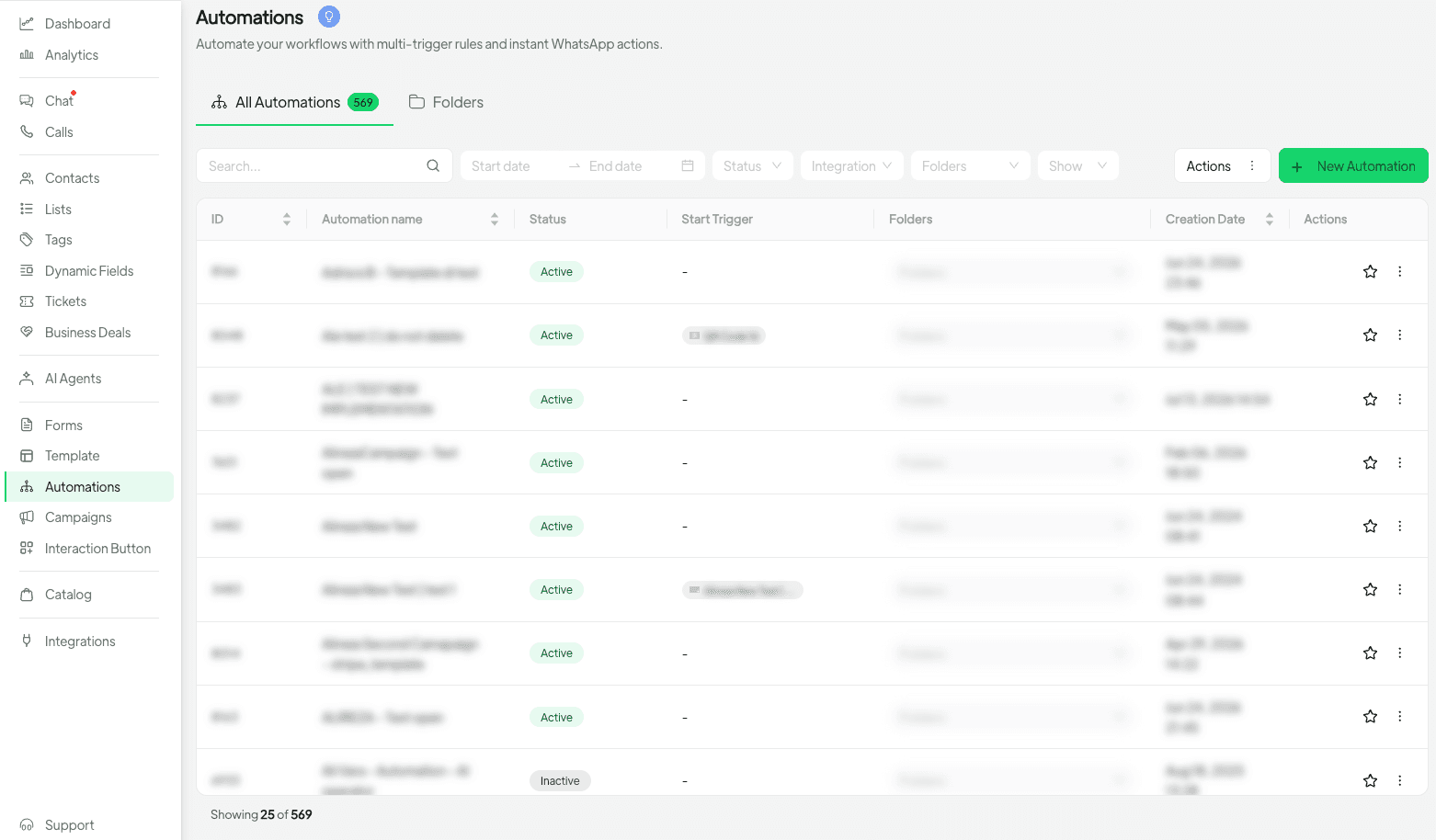
The first thing you’ll notice on the updated Automations page is the significantly clearer and more intuitive table layout. Spoki has redesigned this view to provide you with all the essential information about your automations at a glance, making it easier to monitor their performance and status.
Improved Filtering for Precision
Finding specific automations used to be a task, especially for businesses with a large number of active workflows. Now, Spoki’s enhanced filters allow you to quickly narrow down your list based on various criteria:
- Creation Date: Need to see all automations launched last month? Filter by creation date to review recent campaigns.
- Status: Easily distinguish between active, paused, or draft automations to manage your live campaigns effectively.
- Integration: If you’re using Spoki with various CRM or e-commerce platforms, you can filter by integration to see all automations connected to a specific system.
- Folder: The most exciting addition! Instantly view all automations assigned to a particular folder, making project-based or team-specific management a breeze.
Powerful Sorting Options
Beyond filtering, the new table allows you to sort your automations by:
- ID: For quick reference and technical troubleshooting.
- Name: Organize alphabetically to find specific workflows by their title.
- Creation Date: See your newest or oldest automations first, ideal for tracking development over time.
These sorting and filtering capabilities mean less time searching and more time optimizing your WhatsApp automation strategies. Whether you’re a marketing manager reviewing campaign performance or a business owner ensuring customer service efficiency, this level of control is invaluable.
Introducing Folders: Organize Your WhatsApp Workflows Like Never Before
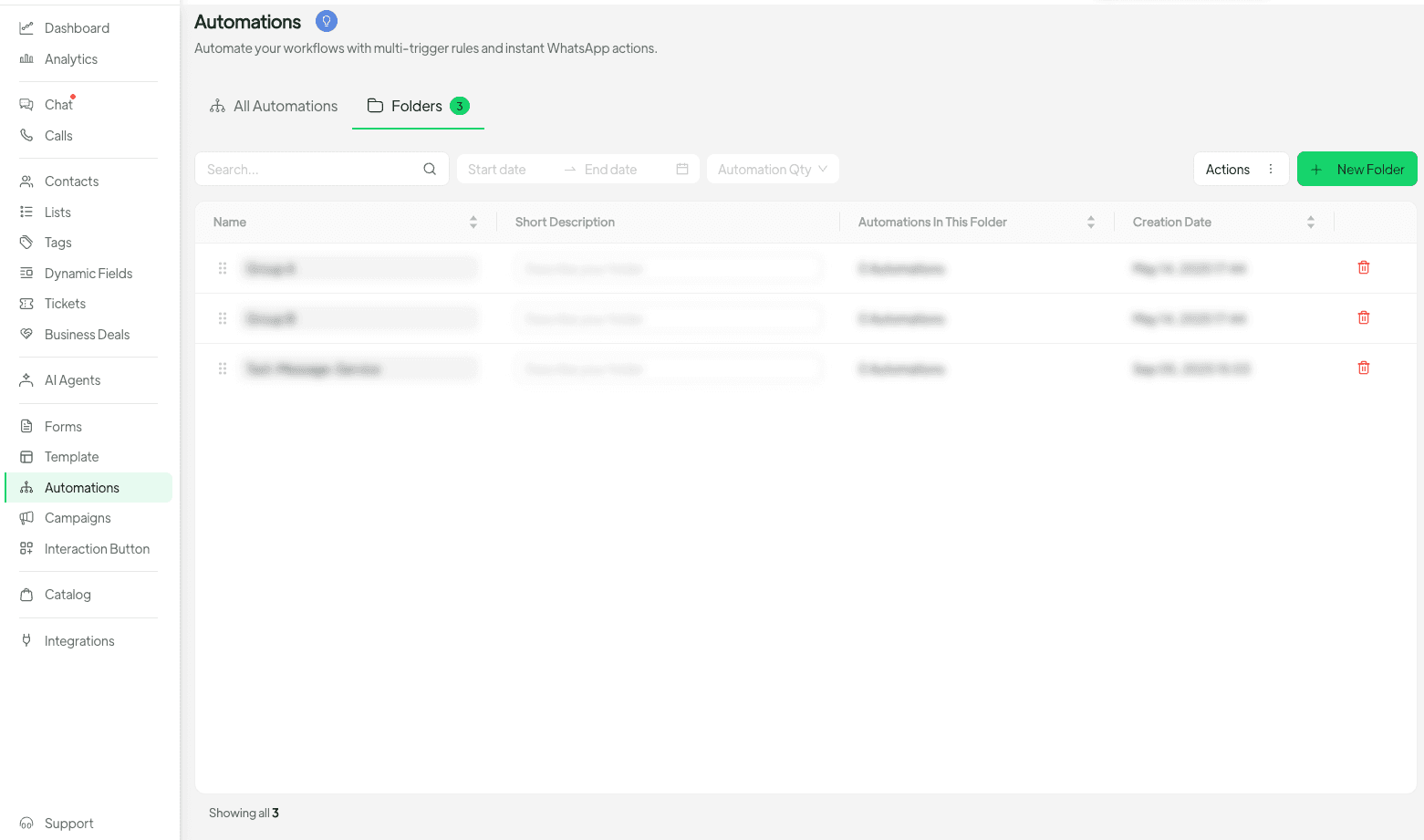
The Folders tab is a game-changer for anyone managing multiple WhatsApp automation workflows. Think of folders as powerful tags that allow you to categorize and group your automations in a way that aligns perfectly with your business operations, marketing campaigns, or team structure.
How Folders Enhance Your Workflow Management
- Campaign-Specific Grouping: Group all automations related to your Black Friday sale, new product launch, or seasonal promotions into a single folder. This makes it easy to manage, activate, or pause an entire campaign’s worth of messages.
- Team-Based Organization: If different teams handle different types of automations (e.g., sales, customer support, marketing), create folders for each team. This ensures everyone can quickly find and manage their relevant workflows without sifting through unrelated automations.
- Customer Journey Stages: Categorize automations by customer journey stage – onboarding, engagement, retention, re-engagement. This provides a clear overview of your customer communication strategy at each touchpoint.
- Integration-Specific Grouping: If you have automations tied to specific CRM integrations or e-commerce platforms, create folders to keep them separate and easily identifiable.
Creating and Assigning Folders is Simple
Spoki makes it incredibly easy to integrate folders into your existing workflow:
- Create a Folder: Navigate to the Folders tab, click to create a new folder, give it a descriptive name (e.g., “Q4 Sales Campaigns,” “Customer Support Flows”), and add a short description.
- Assign Inline: From the All Automations table, you can now assign a folder to any automation directly from its row. This is perfect for quick organization as you review your list.
- Bulk Actions: Need to assign multiple automations to a new folder or update their status simultaneously? Select several automations, and use the bulk action feature to apply changes efficiently. This is a massive time-saver for large-scale updates.
This flexibility ensures that whether you’re setting up a new automation or reorganizing existing ones, your system remains tidy and efficient. The ability to manage automations in bulk, whether assigning folders or updating statuses, significantly reduces administrative overhead.
Practical Use Cases for WhatsApp Automation with Spoki
Let’s explore how these new features can empower various businesses to optimize their WhatsApp communication strategies.
E-commerce Operators: Boosting Sales and Customer Satisfaction
For e-commerce businesses, WhatsApp is a powerful channel for driving sales and providing exceptional customer service. With Spoki’s new Automations Table and Folders, you can:
- Abandoned Cart Recovery: Create a folder named “Abandoned Carts.” Inside, group automations that send reminders, offer discounts, or provide live chat support for customers who left items in their cart. Easily monitor the performance of all these related automations.
- Order Updates: Set up a “Order Notifications” folder containing automations for order confirmation, shipping updates, and delivery notifications. This keeps all transactional messages organized and ensures timely communication.
- Promotional Campaigns: For seasonal sales (e.g., Black Friday, Cyber Monday), create a dedicated folder like “Holiday Sales 2024.” Group all pre-sale announcements, flash sale alerts, and post-purchase follow-ups here. When the campaign is over, you can easily pause or archive the entire folder’s contents.
- Customer Feedback: Create a “Feedback & Reviews” folder for automations that request product reviews after delivery or gather customer satisfaction scores.
By organizing these workflows, you can quickly assess the effectiveness of your e-commerce WhatsApp strategy, make data-driven decisions, and ultimately improve conversion rates and customer loyalty.
Marketing Managers: Streamlining Campaigns and Lead Nurturing
Marketing managers juggle multiple campaigns and lead nurturing sequences. Spoki’s update provides the structure needed to keep everything in order:
- Lead Nurturing Sequences: Create folders for different lead segments, e.g., “New Leads – Product A,” “Warm Leads – Service B.” Within each, group automations that send welcome messages, educational content, and calls to action via WhatsApp.
- Webinar & Event Promotions: Set up a folder like “Webinar Series Q3” to house automations for event registration confirmations, reminder messages, and post-event follow-ups, including links to recordings or surveys.
- Content Distribution: If you use WhatsApp to share blog posts, whitepapers, or case studies, create a “Content Marketing” folder. Group automations that push new content to opted-in subscribers, ensuring your audience stays engaged.
- A/B Testing Variations: When testing different message variations for a campaign, create a folder like “Campaign X – A/B Tests.” Group all variations here for easy comparison and management.
This level of organization allows marketing teams to launch, monitor, and optimize campaigns with unprecedented efficiency, ensuring consistent brand messaging and improved ROI.
Business Owners & SMBs: Enhancing Customer Service and Engagement
Small and medium-sized businesses can leverage Spoki to punch above their weight in customer communication:
- FAQ Chatbots: Create a “Customer Service Chatbot” folder. Group all automated responses for common queries (e.g., opening hours, product availability, return policy). This makes it simple to update or expand your chatbot’s knowledge base.
- Appointment Reminders: For service-based businesses (salons, clinics, consultants), a “Appointment Reminders” folder can contain automations for booking confirmations, pre-appointment instructions, and post-service follow-ups.
- Welcome Sequences: When a new customer signs up or makes a first purchase, a “New Customer Onboarding” folder can house a series of welcome messages, tips for using your product/service, and an invitation to join your community.
- Internal Communications: While primarily for external use, some businesses might use WhatsApp for internal alerts. A “Internal Alerts” folder could group automations for urgent staff notifications.
By keeping these essential automations organized, business owners can ensure a consistent, professional, and efficient customer experience, freeing up valuable time to focus on core business operations.
Maximizing Your Spoki Experience: Tips and Best Practices
To get the most out of Spoki’s new Automations Table and Folders, consider these best practices:
- Descriptive Naming Conventions: Use clear and consistent names for both your automations and your folders. This makes it easier for everyone on your team to understand their purpose at a glance.
- Regular Review and Archiving: Periodically review your automations. Pause or archive those that are no longer active to keep your list clean. Folders make this process much faster.
- Team Collaboration: If multiple team members use Spoki, establish a shared folder structure and naming convention. This ensures seamless collaboration and prevents disorganization.
- Leverage Bulk Actions: Don’t underestimate the power of bulk assigning folders or updating statuses. This feature is designed to save you significant time.
- Stay Updated: Spoki is continuously evolving. Keep an eye on our Product Updates to discover new features and improvements that can further enhance your WhatsApp automation strategy.
Conclusion: Take Control of Your WhatsApp Automations
Spoki’s version 19.9.0, with its enhanced Automations Table and the introduction of Folders, represents a significant leap forward in managing your WhatsApp Business API workflows. For marketing managers, business owners, e-commerce operators, and SMBs, these tools translate directly into greater efficiency, better organization, and ultimately, more effective customer communication.
No more sifting through endless lists. No more confusion about which automation belongs where. With Spoki, you gain the clarity and control needed to scale your WhatsApp marketing and customer service efforts confidently. Organize your campaigns, streamline your support, and nurture your leads with precision.
Ready to experience the power of truly organized WhatsApp automation? Start for free with Spoki — no credit card required.