Spoki Channels Checkout from Plans: Streamlined Activation
Content
In today’s fast-paced digital landscape, effective customer communication is not just an advantage—it’s a necessity. Businesses, from burgeoning e-commerce startups to established SMBs, are constantly seeking ways to connect with their audience more efficiently and personally. However, navigating complex platforms to activate essential communication channels can often be a frustrating bottleneck, diverting valuable time and resources away from core business operations. Marketing managers and business owners understand the critical importance of a seamless user experience, not just for their customers, but for their own teams when managing vital tools like WhatsApp Business API, SMS, Email, and Voice.
Recognizing this challenge, Spoki is excited to announce a significant enhancement to its platform: the updated Channels Checkout from Plans (v19.23.0). This update is designed to make activating and managing your communication channels more intuitive and straightforward than ever before. Spoki understands that you need to get to what matters most without unnecessary hurdles, and this new feature prioritizes your access to channel management, ensuring a smoother journey from selection to activation. Say goodbye to endless scrolling past billing details; your path to powerful customer engagement just got clearer.
Why This Update Matters for Your Business
The latest Spoki update, v19.23.0, fundamentally improves how you interact with communication channels within the platform. By streamlining the activation process, Spoki empowers marketing managers, business owners, and e-commerce operators to deploy and manage their customer communication strategies with greater agility. This enhancement directly addresses common pain points associated with platform navigation and feature activation, ensuring that you can focus on what you do best: growing your business and engaging your customers effectively.
Prioritized Channel Access: Get Straight to What You Need
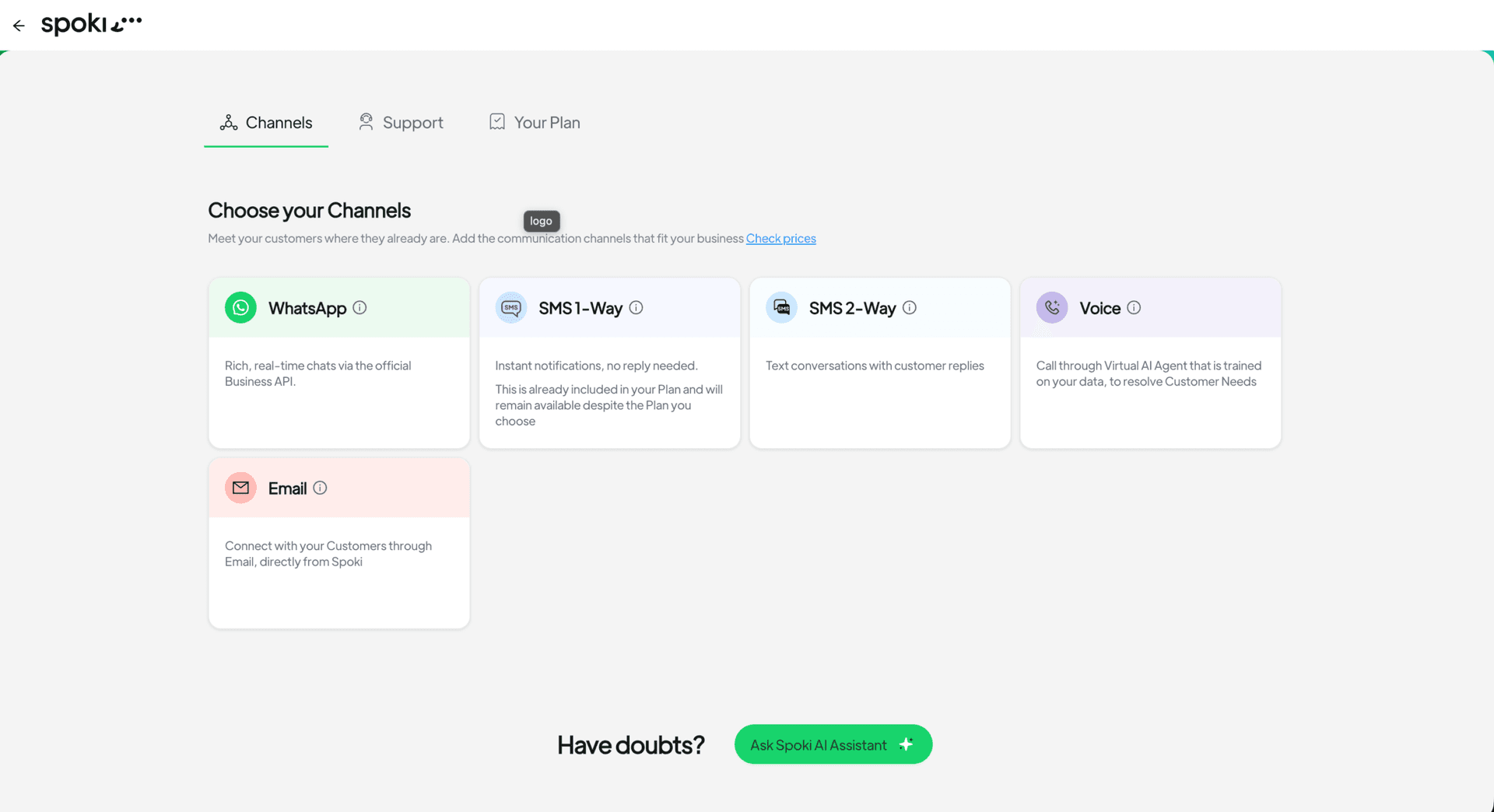
One of the most impactful changes in this update is the reordering of tabs within the ‘Plans’ section. The ‘Channels’ tab now takes precedence, appearing first, while ‘Your Plan’ details are moved to the end. This seemingly small adjustment has a profound impact on user experience. Instead of sifting through billing information or plan summaries, you are immediately presented with your communication channel options. This means less time spent navigating and more time dedicated to configuring and optimizing your customer outreach strategies.
For businesses heavily reliant on multi-channel communication, this prioritization means quicker access to essential tools. Whether you’re looking to activate a new WhatsApp Business API account, set up an SMS campaign, or configure your email automation, the path is now direct and uncluttered. This efficiency is crucial for marketing teams who need to react quickly to market changes or launch time-sensitive campaigns.
Seamless Activation for New and Free Users
If you’re new to Spoki or currently on a free plan, activating a channel has never been easier. The process is now designed to be incredibly intuitive:
- Direct Checkout: When you select a channel card—be it Voice, WhatsApp, SMS, or Email—you are now taken directly to the checkout process.
- Pre-selected Channel: The chosen channel is automatically pre-selected for you, eliminating extra clicks and potential confusion.
This direct-to-checkout flow is particularly beneficial for businesses eager to quickly implement a specific communication strategy. For instance, an e-commerce operator looking to leverage WhatsApp Business for abandoned cart recovery can now activate the WhatsApp channel with minimal friction, moving swiftly from decision to deployment. This reduces the learning curve and accelerates the time-to-value for new users, allowing them to experience the power of Spoki’s automation capabilities faster.
Empowering Existing Paid Plan Users
For businesses already benefiting from a paid Spoki plan, the update enhances your ability to manage and expand your communication channels:
- Activate or Configure: Opening a channel card now directly allows you to activate or configure that specific channel. This means you can easily fine-tune existing setups or bring new channels online without navigating through multiple menus.
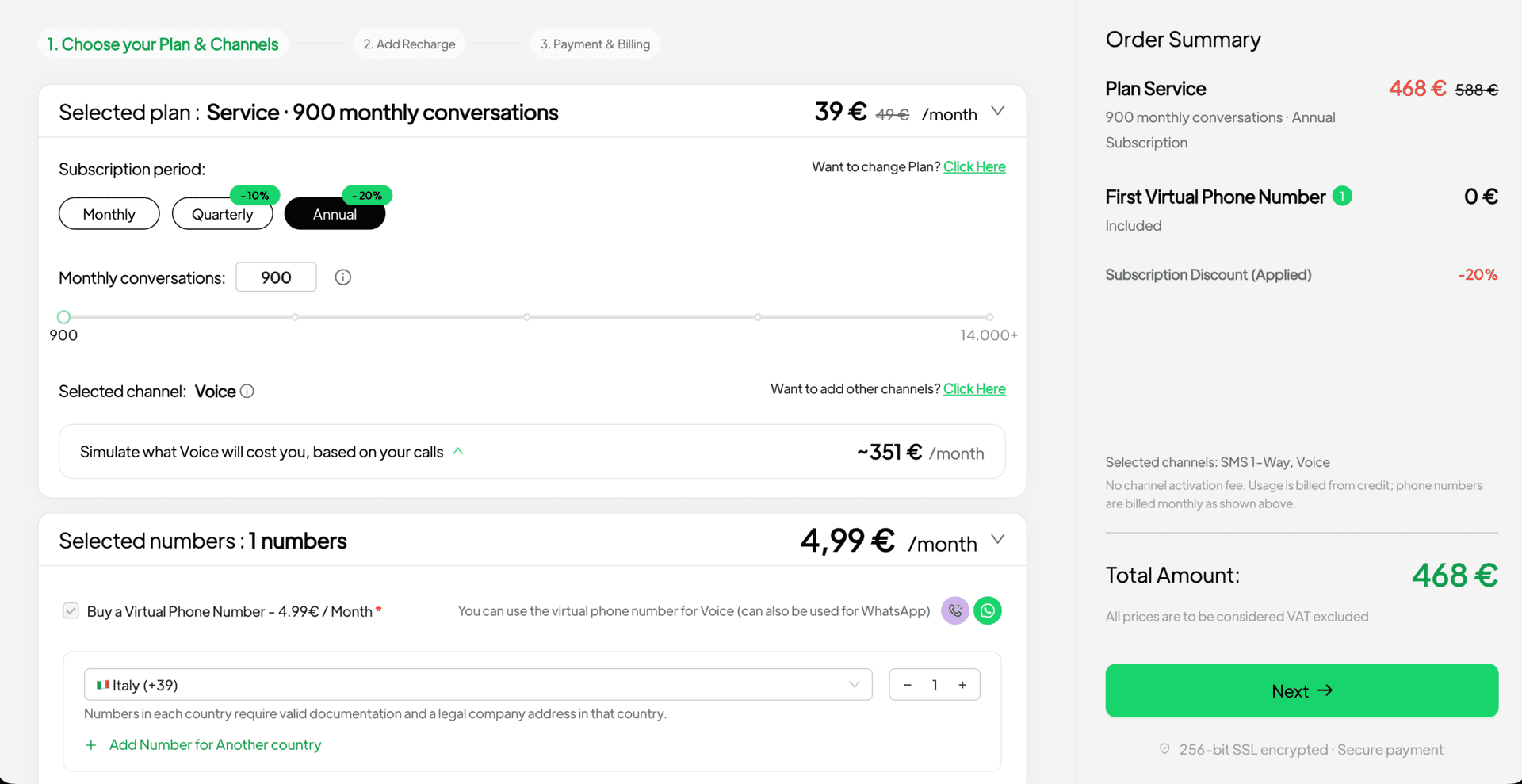
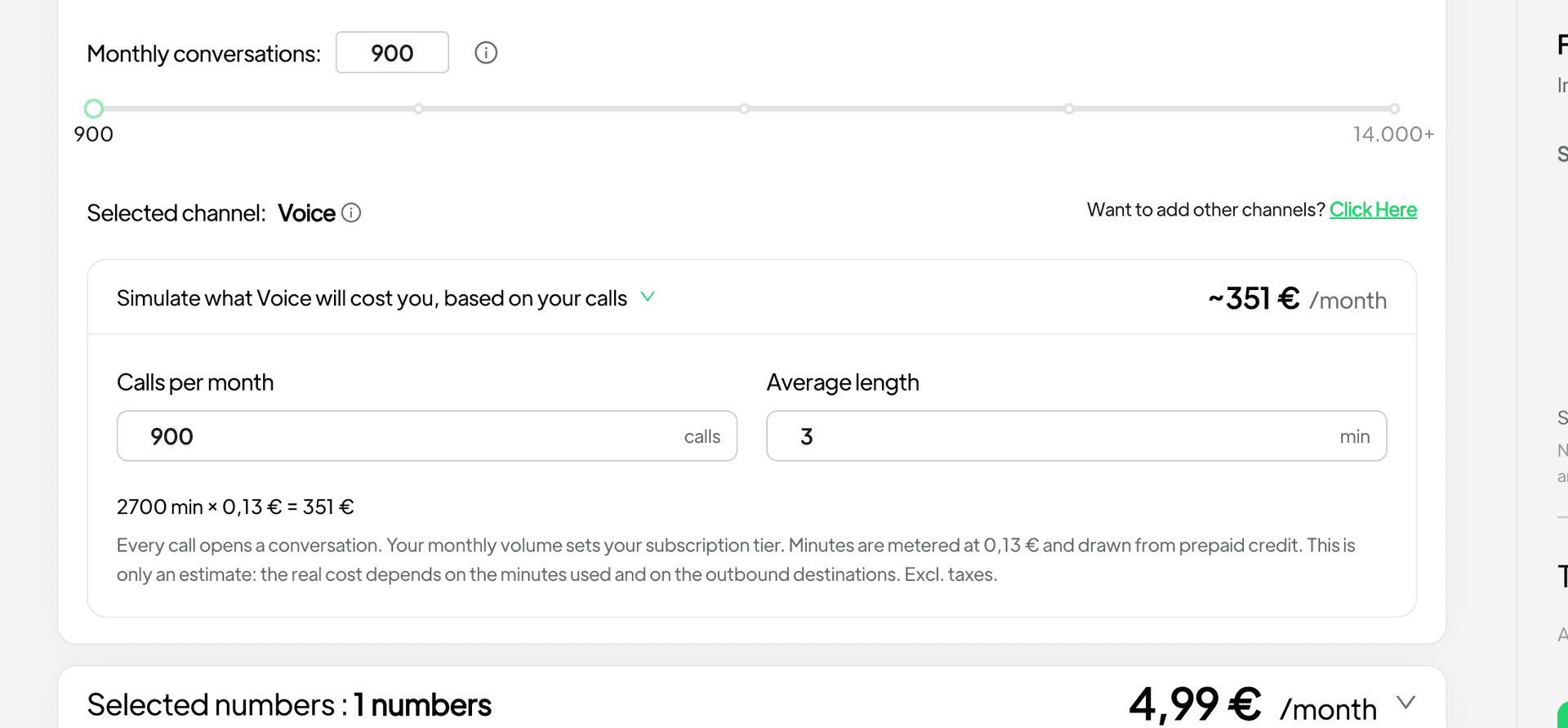
- Voice Channel Exception: The Voice channel offers a unique advantage. If you require a virtual number, Spoki ensures you stay on your current plan and claim the first virtual number included. Additional numbers are then available at a transparent cost of €4.99 each. The calculator within the platform clearly displays this, showing the included number and any extra numbers you might add. This flexibility allows businesses to scale their voice communication capabilities as needed, without unexpected charges.
This streamlined approach empowers existing users to adapt their communication strategies dynamically. A marketing manager might decide to add SMS to an existing WhatsApp automation workflow for critical alerts, and with this update, the activation is immediate and clear. This flexibility supports agile business operations and ensures that your communication toolkit can evolve with your customer needs.
Practical Examples and Use Cases for WhatsApp Automation
The enhanced Channels Checkout from Plans feature perfectly complements Spoki’s robust WhatsApp automation capabilities. For businesses leveraging the WhatsApp Business API, this update means quicker access to tools that can transform customer engagement. Here are some practical use cases:
1. Automated Customer Support with WhatsApp Chatbots
Imagine a customer has a query about an order. Instead of waiting on hold or for an email response, they can instantly connect with your business via WhatsApp. With Spoki, you can activate the WhatsApp channel and then integrate powerful chatbots to handle common inquiries 24/7. This frees up your human agents to focus on more complex issues, significantly improving response times and customer satisfaction. The new checkout process means you can get your WhatsApp channel up and running faster to deploy these essential chatbots.
2. Proactive Customer Communication and Notifications
E-commerce businesses thrive on timely communication. Use Spoki’s WhatsApp automation to send:
- Order Confirmations: Instantly confirm purchases, reducing customer anxiety.
- Shipping Updates: Provide real-time tracking information, enhancing transparency.
- Delivery Notifications: Alert customers when their package is about to arrive.
- Appointment Reminders: Reduce no-shows for service-based businesses.
By making WhatsApp channel activation more efficient, Spoki ensures you can quickly set up these automated messages, leading to improved customer experience and reduced inbound queries.
3. Personalized Marketing Campaigns and Promotions
WhatsApp offers an incredibly personal communication channel. With Spoki, you can segment your audience and send targeted promotional messages, special offers, or exclusive content directly to their WhatsApp inbox (ensuring compliance with WhatsApp Business API Documentation and opt-in policies). For example, an online fashion retailer could send personalized recommendations based on past purchases or browsing history. The streamlined channel activation means you can launch these impactful campaigns faster, driving conversions and fostering customer loyalty.
4. Abandoned Cart Recovery via WhatsApp
Abandoned carts are a significant challenge for e-commerce businesses. Spoki’s WhatsApp automation can be configured to send gentle reminders to customers who have left items in their cart. These messages can include a direct link back to their cart, a special discount, or an offer of assistance. By quickly activating and configuring your WhatsApp channel through the updated Plans section, you can start recovering lost sales more effectively.
5. Feedback Collection and Surveys
Understanding your customers’ experiences is vital for continuous improvement. Use WhatsApp to send short, engaging surveys or request feedback after a purchase or service interaction. The high open rates of WhatsApp messages mean you’re more likely to get valuable insights. With Spoki’s efficient channel management, you can quickly deploy these feedback mechanisms to gather actionable data and refine your offerings.
6. CRM Integration for Unified Customer View
Spoki integrates seamlessly with various CRM systems, allowing you to centralize customer data and communication history. By activating your WhatsApp channel, you can ensure that all interactions are logged within your CRM, providing your team with a complete 360-degree view of each customer. This integration is crucial for personalized communication and efficient customer relationship management, enhancing overall operational efficiency.
Where to Find It: Plans → Channels
Accessing these enhanced features is straightforward. Simply navigate to the ‘Plans’ section within your Spoki account, and you will immediately see the ‘Channels’ tab prioritized at the top. This direct path ensures that you can quickly manage your communication channels without unnecessary navigation.
The Spoki Advantage: Efficiency, Engagement, and Growth
The v19.23.0 update for Channels Checkout from Plans is more than just a minor tweak; it’s a strategic enhancement designed to empower your business. By making channel activation more intuitive and accessible, Spoki helps you:
- Save Time: Reduce the time spent on platform navigation and feature activation, allowing your team to focus on strategic tasks.
- Boost Customer Engagement: Quickly deploy and manage channels like WhatsApp Business API, enabling proactive, personalized, and efficient customer communication.
- Drive Conversions: Leverage automated messaging for abandoned cart recovery, targeted promotions, and timely updates that guide customers through their journey.
- Improve Customer Satisfaction: Offer instant support and clear communication, building trust and loyalty.
- Scale with Ease: Activate new channels or expand existing ones (like adding Voice numbers) with transparent pricing and minimal friction.
Spoki is committed to providing tools that not only meet the demands of modern business communication but also anticipate them. This update is a testament to that commitment, ensuring that marketing managers, business owners, and e-commerce operators have the most efficient path to powerful customer engagement.
Ready to experience the difference? Explore the full range of Spoki’s capabilities and find the perfect fit for your business needs by checking out the Spoki Pricing Plans. For more insights and updates, visit the Spoki Blog or our Product Updates section.
Conclusion
The v19.23.0 update to Spoki’s Channels Checkout from Plans fundamentally improves the user experience for activating and managing your essential communication channels. By prioritizing the ‘Channels’ tab and streamlining the checkout process for new and existing users alike, Spoki ensures that you can deploy powerful WhatsApp automation, SMS, Email, and Voice strategies with unprecedented ease. This means less time navigating platform complexities and more time connecting with your customers, driving engagement, and ultimately, growing your business. Embrace a more intuitive, efficient, and powerful way to manage your customer communications.
Start for free with Spoki — no credit card required.