Spoki Dark Mode: Enhanced Comfort for WhatsApp Automation
Content
In today’s fast-paced digital landscape, professionals spend countless hours in front of screens. This extended exposure can lead to eye strain, fatigue, and reduced productivity, especially when working in low-light conditions or during long sessions. For marketing managers, business owners, e-commerce operators, and SMBs who rely on WhatsApp Business for critical customer communication, maintaining focus and comfort is paramount. Spoki understands these challenges, and that’s why it’s excited to announce a significant enhancement designed to improve your user experience: the new Dark Mode (v20.5.0).
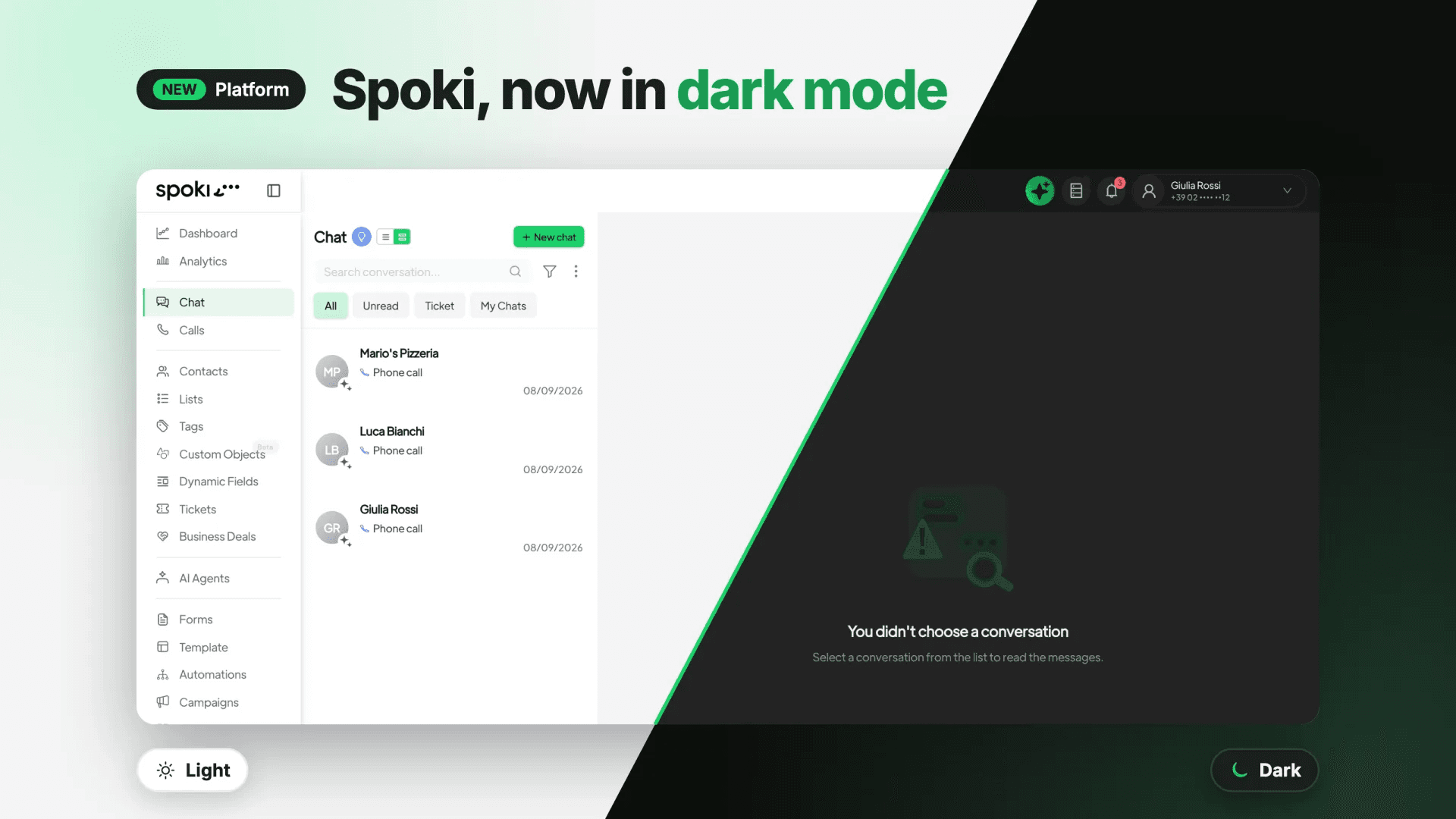
This highly anticipated feature allows you to switch to a more comfortable viewing experience, reducing the harsh glare of traditional light themes. By integrating Dark Mode, Spoki aims to provide a more ergonomic and visually pleasing environment, helping you manage your WhatsApp automation, chatbots, and automated messaging with greater ease and less eye fatigue. This update isn’t just about aesthetics; it’s about empowering you to work smarter, longer, and more comfortably, ensuring your customer engagement strategies remain sharp and effective.
Why Dark Mode Matters for Your Business Operations
The benefits of Dark Mode extend beyond personal preference, offering tangible advantages for business professionals who manage extensive digital communication. Understanding these benefits can help you appreciate how this new feature can positively impact your daily operations and overall well-being.
Reduced Eye Strain and Fatigue
One of the primary advantages of Dark Mode is its ability to significantly reduce eye strain. Bright screens, especially in dimly lit environments, can cause discomfort, dryness, and headaches. By switching to a darker interface, the contrast between the text and background is optimized, making it easier on your eyes. This is particularly beneficial for marketing managers and business owners who spend hours crafting automated messages, analyzing campaign performance, or responding to customer inquiries via WhatsApp Business API.
Imagine reviewing detailed analytics or setting up complex chatbot flows late in the evening. With Dark Mode, the visual fatigue that often accompanies such tasks is minimized, allowing you to maintain focus and accuracy for longer periods. This translates directly into improved productivity and a more pleasant user experience.
Improved Focus and Concentration
A darker interface can also help improve focus by reducing distracting glare and visual noise. When your eyes are less strained, your mind is free to concentrate more effectively on the task at hand. For e-commerce operators managing multiple customer conversations simultaneously, or SMBs orchestrating targeted automated messaging campaigns, enhanced concentration is invaluable.
Spoki’s Dark Mode provides a calmer visual environment, allowing you to delve deeper into your WhatsApp automation strategies without the constant visual assault of a bright screen. This can lead to more thoughtful message crafting, more efficient chatbot configuration, and ultimately, more successful customer interactions.
Extended Device Battery Life
While not the primary driver for its adoption, Dark Mode can contribute to extending the battery life of devices with OLED or AMOLED screens. Pixels on these screens consume less power when displaying darker colors, as they are effectively turned off. For professionals who are often on the go, managing WhatsApp Business communications from laptops or tablets, this can be a welcome bonus, ensuring your device stays powered longer when you need it most.
Activating Dark Mode in Spoki: A Seamless Experience
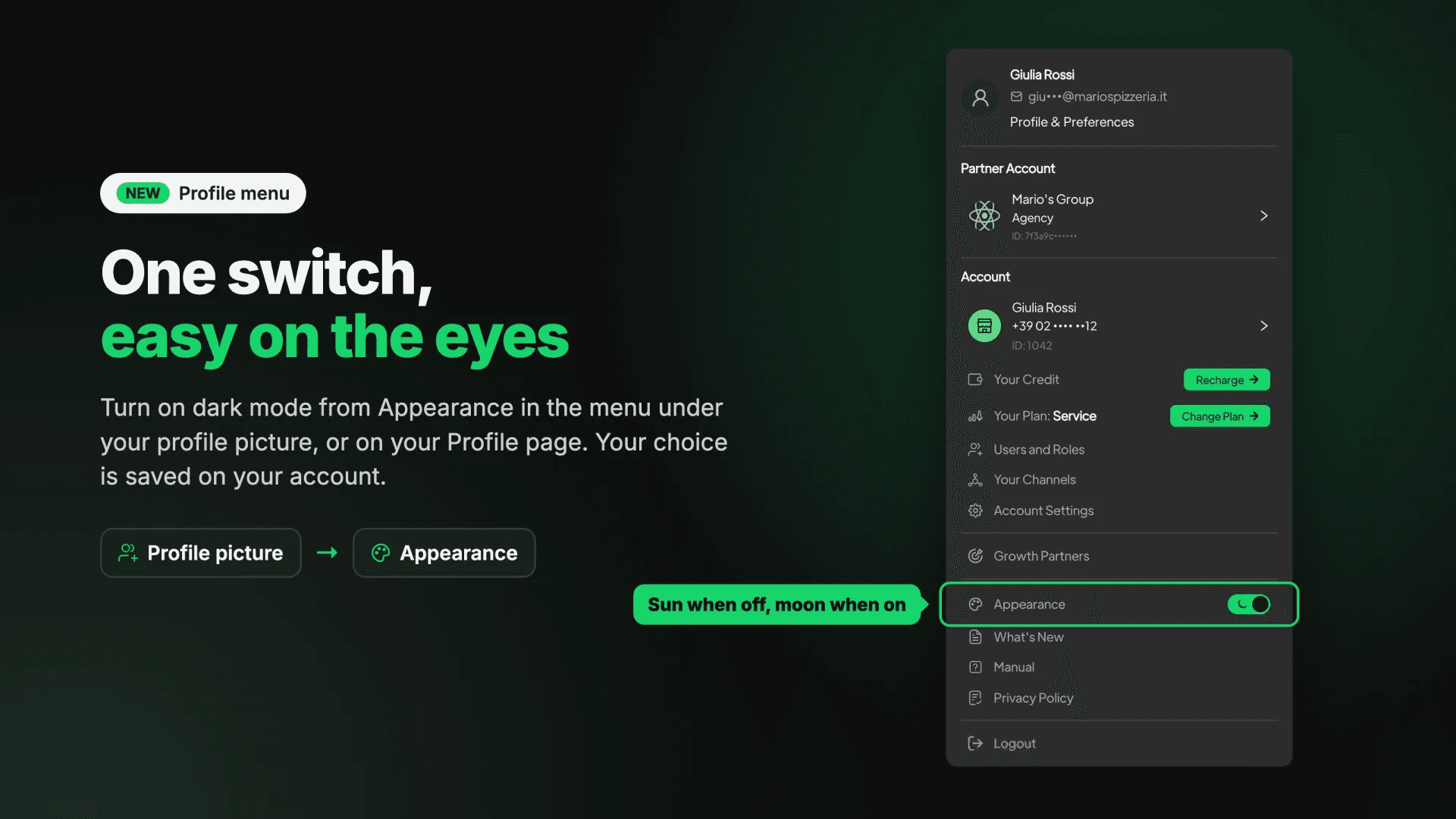
Spoki has made activating Dark Mode incredibly straightforward, ensuring you can switch to your preferred viewing experience with minimal effort. Your preference is saved directly to your account, guaranteeing a consistent experience across all your devices and browsers. This means once you set it, Spoki remembers your choice, so you don’t have to reconfigure it every time you log in.
From Your Profile Picture Menu
The quickest way to activate Dark Mode is directly from your profile picture menu in the Spoki header. This convenient access point allows for instant toggling, perfect for when you need to switch modes quickly based on your environment or personal preference.
- Locate Your Profile Picture: In the top right corner of your Spoki interface, you’ll find your profile picture.
- Open the Menu: Click on your profile picture to open a dropdown menu.
- Toggle Appearance: Within this menu, you’ll see a switch labeled ‘Appearance’. Simply toggle this switch to activate or deactivate Dark Mode.
On Your Profile Page
For those who prefer to manage their settings from a centralized location, Dark Mode can also be activated from your Profile page, specifically within the Platform section. This method offers a more structured approach to managing your Spoki account preferences.
- Navigate to Your Profile: Click on your profile picture and select ‘Profile’ from the dropdown menu, or find the link in your main navigation.
- Access Platform Settings: On your Profile page, locate the ‘Platform’ section.
- Adjust Appearance: Within the Platform settings, you will find the option to switch to Dark Mode. Toggle the switch to apply your preference.
Dark Mode in Action: Practical Use Cases for WhatsApp Automation
The introduction of Dark Mode isn’t just a cosmetic change; it’s an enhancement designed to support the demanding workflows of professionals using Spoki for WhatsApp automation. Let’s explore some practical use cases where Dark Mode can significantly improve your experience.
Crafting Automated Message Templates
Marketing managers often spend considerable time crafting compelling message templates for automated campaigns. This involves writing, reviewing, and refining text, emojis, and calls to action. With Dark Mode, the reduced glare makes this detailed work less taxing on your eyes, allowing for more precise wording and better attention to detail. This can lead to higher engagement rates for your WhatsApp Business API messages.
Imagine meticulously reviewing a series of welcome messages or promotional offers. Dark Mode provides a comfortable backdrop, ensuring your focus remains on the content, not on visual discomfort. This can be particularly useful when adhering to WhatsApp’s strict messaging guidelines and ensuring your templates are approved efficiently.
Monitoring Chatbot Performance and Conversations
Business owners and e-commerce operators frequently monitor chatbot interactions and customer conversations to gauge effectiveness and identify areas for improvement. This often involves scanning through logs, analyzing response times, and reviewing customer feedback. Dark Mode offers a calmer visual environment for this analytical work, making it easier to spot trends and anomalies without eye fatigue.
When you’re reviewing a high volume of chatbot interactions to optimize your customer support or sales funnels, Dark Mode helps maintain clarity and focus. This allows for more effective decision-making and quicker adjustments to your WhatsApp automation strategies.
Managing CRM Integrations and Data Syncs
Spoki’s ability to integrate with various CRM systems is crucial for maintaining a unified view of customer data. Marketing managers often oversee these integrations, ensuring data flows smoothly between platforms. This can involve reviewing configuration settings, checking data synchronization logs, and troubleshooting any issues. Dark Mode provides a more comfortable interface for these technical tasks, especially during extended periods of configuration or debugging.
For more insights into optimizing your integrations, explore Spoki’s WhatsApp Business API Documentation, which offers comprehensive guidance on connecting Spoki with your existing systems.
Scheduling and Overseeing Automated Campaigns
Planning and scheduling automated messaging campaigns requires careful attention to detail, including setting send times, segmenting audiences, and ensuring message relevance. Business owners and SMBs rely on Spoki to execute these campaigns flawlessly. Dark Mode can make the process of reviewing campaign schedules and monitoring their progress less strenuous, especially when managing multiple campaigns simultaneously.
Whether you’re setting up a drip campaign for new leads or a re-engagement series for dormant customers, Dark Mode helps keep your focus sharp on the strategic elements of your WhatsApp automation, ensuring timely and effective communication.
Training and Onboarding New Team Members
When onboarding new team members to use Spoki for WhatsApp Business communication, providing a comfortable and intuitive interface is key. Dark Mode can contribute to a more positive learning experience, reducing visual fatigue during training sessions where new users are familiarizing themselves with the platform’s features, such as setting up chatbots or creating automated workflows.
A visually comfortable environment can help new users absorb information more effectively, leading to quicker adoption and greater proficiency in leveraging Spoki’s powerful WhatsApp automation capabilities. For more general information about Spoki’s offerings, visit the Spoki Blog.
The Spoki Difference: Comfort Meets Cutting-Edge Automation
Spoki is committed to providing a platform that is not only powerful in its WhatsApp automation capabilities but also user-friendly and comfortable to use. The introduction of Dark Mode is a testament to this commitment, reflecting a continuous effort to enhance the user experience based on valuable feedback and evolving industry standards.
While the vibrant Spoki green remains a constant, symbolizing growth and efficiency, other elements like backgrounds, text, and borders gracefully transition to darker tones in Dark Mode. Importantly, essential visual content such as photos, videos, and QR codes retain their original colors, ensuring that your rich media messages and branding remain unaffected and impactful. This thoughtful design ensures that the core functionality and visual integrity of your communications are preserved, even as your viewing environment becomes more comfortable.
This update empowers marketing managers, business owners, e-commerce operators, and SMBs to work more efficiently and comfortably, whether they are crafting intricate chatbot flows, managing large-scale automated messaging campaigns, or simply engaging with customers through WhatsApp Business. By reducing eye strain and improving focus, Dark Mode helps you maximize your productivity and maintain a high level of performance throughout your workday.
Conclusion: Experience Spoki in a New Light (or Dark!)
The new Dark Mode in Spoki (v20.5.0) is more than just a visual update; it’s an investment in your comfort and productivity. By providing a more ergonomic and visually pleasing interface, Spoki empowers you to manage your WhatsApp automation, chatbots, and automated messaging with greater ease and less eye fatigue. This feature is designed to support the demanding workflows of modern businesses, ensuring that your customer communication strategies remain sharp and effective, regardless of your working environment or time of day.
Embrace a more comfortable and focused way to manage your WhatsApp Business communications. Activate Dark Mode today and experience the difference it makes in your daily operations. Your eyes will thank you, and your productivity will soar.
Start for free with Spoki — no credit card required.