Spoki Extra Usage Controls: Clearer WhatsApp Messaging (v19.23.0)
Content
Managing your WhatsApp Business communication effectively means not only engaging customers but also controlling your costs. For marketing managers, business owners, e-commerce operators, and SMBs, unexpected charges can be a significant concern. That’s why Spoki is excited to announce a crucial update (v19.23.0) to how Extra Usage for WhatsApp conversations is managed. This enhancement provides clearer controls and greater transparency, ensuring you can leverage the power of WhatsApp automation without any surprises.
With this update, Spoki is putting you firmly in control of your messaging budget. New accounts will now start with Extra Usage OFF by default, meaning your messaging will stop once you hit your included conversation limit, preventing any charges beyond your plan. For existing customers, Spoki is introducing a one-time notification to review your current settings, giving you the power to maintain your configuration or adjust it to better suit your business needs. This proactive approach empowers you to manage your WhatsApp messaging costs with confidence and avoid unexpected expenses.
Understanding Extra Usage: What’s New for Spoki Customers?
Spoki’s commitment to transparency and user control is at the heart of the v19.23.0 update. This section breaks down the key changes for both new and existing Spoki users, ensuring you understand how to best manage your WhatsApp Business API conversations.
New Spoki Customers: Extra Usage Starts OFF by Default
For all new Spoki accounts, Extra Usage will now be set to OFF by default. This is a significant change designed to give you immediate control over your spending. What does this mean in practice?
- No Unexpected Charges: Your WhatsApp messaging will automatically pause once you reach the conversation limit included in your Spoki plan. You won’t incur any extra charges unless you explicitly choose to turn Extra Usage ON.
- Budget Predictability: This default setting ensures that your monthly Spoki bill remains predictable, aligning perfectly with your chosen plan.
- Informed Decisions: If your business needs to send more messages than your plan allows, you’ll have the clear option to enable Extra Usage, understanding that additional conversations will be billed accordingly.
This approach is ideal for businesses just starting with WhatsApp automation, allowing them to scale their operations without fear of unforeseen costs.
Existing Spoki Customers: Review Your Settings with a One-Time Pop-up
For existing Spoki customers, your Extra Usage setting will remain as it is (typically ON, allowing conversations beyond your limit to continue and be billed). However, Spoki is introducing a helpful, one-time pop-up notification for Owners and Admins to ensure you’re fully aware of your current configuration and its implications.
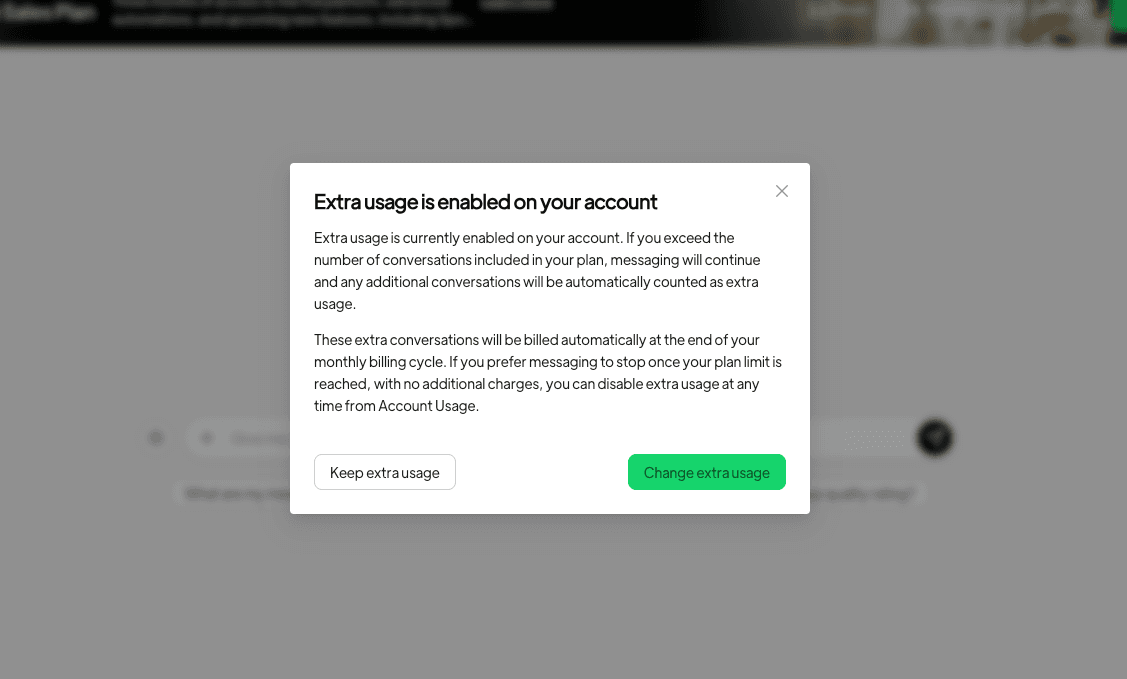
- Transparency First: The pop-up will clearly explain that conversations exceeding your included limit will continue and be billed.
- Your Choice: You’ll have two clear options:
- Keep it as-is: If you’re comfortable with your current setting and the flexibility of continuing conversations past your limit, you can choose this option.
- Change the setting: If you prefer to manage your budget more strictly and stop messaging at your limit, you can easily navigate to your settings to turn Extra Usage OFF.
- One-Time Notification: This pop-up is designed to be a one-time alert per billing cycle to ensure you’re informed without being disruptive.
This update ensures that all Spoki users, regardless of their tenure, have the necessary information and tools to manage their WhatsApp Business API usage effectively.
How Extra Usage Works When It’s OFF: Preventing Surprises
Whether you’re a new customer benefiting from the default OFF setting or an existing customer who has chosen to disable Extra Usage, Spoki has implemented clear safeguards to keep you informed about your messaging limits.
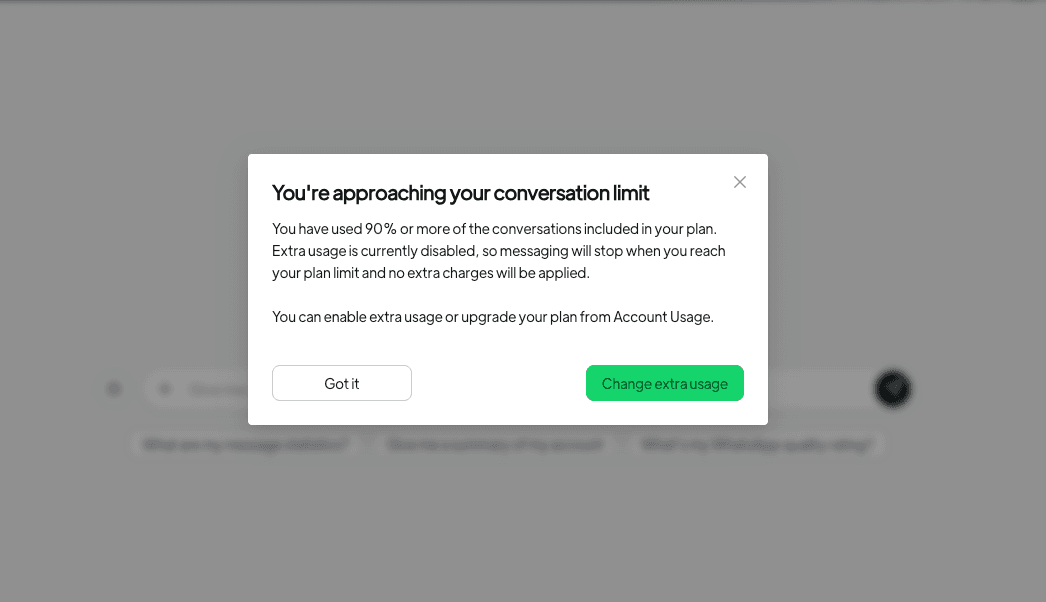
- Proactive Warnings: When your account reaches 90% or more of your included conversations for the billing cycle, Spoki will display a warning pop-up to the Owner or Admin. This pop-up will clearly state that messaging will stop once you hit your limit, ensuring no extra charges are incurred.
- Timely Notifications: This warning is designed to appear once per billing cycle, giving you ample time to decide whether to enable Extra Usage or adjust your messaging strategy.
- Empowered Decision-Making: This mechanism prevents abrupt halts in communication and allows you to make an informed decision about your WhatsApp automation needs before you reach your limit.
Spoki’s goal is to provide a seamless and predictable experience for all your WhatsApp Business communications, from automated messaging to chatbot interactions.
Who Sees the Pop-ups and Where to Manage Settings
Spoki understands the importance of targeted communication within your team. The Extra Usage pop-ups are designed to reach the right people with the authority to make decisions about your account.
Targeted Notifications: Owner or Admin Only
To avoid unnecessary clutter and ensure that critical information reaches decision-makers, the Extra Usage pop-ups are visible only to the Owner or Admin of the Spoki account. This means:
- No Distractions for Agents: Your customer service agents can continue their work without being interrupted by administrative notifications.
- Exclusions: The pop-ups will not appear for sandbox accounts or software-vendor child accounts, aligning with existing practices that hide Usage and Billing information from these user types.
This focused approach ensures that the right individuals are aware of and can act upon the Extra Usage settings.
Easy Access to Settings: Account → Usage → Extra Usage
Changing your Extra Usage settings is straightforward and easily accessible within your Spoki dashboard. You can navigate to it directly:
- Go to Account.
- Select Usage.
- Find the Extra Usage section.
Furthermore, if you choose the “Change the setting” option from the pop-up, Spoki will conveniently open this specific page with the Extra Usage option highlighted, streamlining the process for you.
Dismissing Pop-ups: Understanding the Behavior
Spoki has designed the pop-up dismissal behavior to be intuitive yet effective, ensuring you receive critical information without being constantly re-notified unnecessarily.
- Temporary Dismissal (X button): Clicking the ‘X’ button in the corner of the pop-up will hide it for the current session only. This means the pop-up may reappear later, especially if you haven’t taken a definitive action. This is useful if you’re busy and need to address it later.
- Permanent Dismissal (Action Buttons): To permanently dismiss the pop-up (for good, or for the current billing cycle, depending on the context), you must select one of the action buttons: “Keep it as-is,” “Got it,” or “Change the setting.” These actions confirm that you have acknowledged and acted upon the notification.
- No Bell/Inbox Notifications: To keep your notification center clean, Spoki will only use pop-ups for Extra Usage alerts; there will be no corresponding bell or inbox notifications.
Practical Use Cases for WhatsApp Automation with Spoki
Spoki’s enhanced Extra Usage controls provide even greater confidence for businesses leveraging WhatsApp automation for various critical functions. Here are some practical examples:
E-commerce: Order Updates and Abandoned Cart Recovery
For e-commerce businesses, WhatsApp automation is a game-changer. Spoki allows you to send automated order confirmations, shipping updates, and delivery notifications directly to your customers’ WhatsApp. With the new Extra Usage controls, you can:
- Manage High-Volume Campaigns: If you’re running a major sales event and anticipate a surge in automated messages for abandoned cart recovery or promotional offers, you can confidently enable Extra Usage to ensure all critical communications are sent.
- Prevent Overspending on Standard Alerts: For day-to-day operations, if your included conversations are sufficient for essential order updates, keeping Extra Usage OFF ensures you don’t accidentally overspend on routine messages.
Spoki’s integration with your CRM allows for seamless customer journey management, ensuring timely and relevant communication.
Customer Support: Chatbots and Automated FAQs
WhatsApp Business API, powered by Spoki, enables businesses to deploy chatbots for instant customer support, handling FAQs, and routing complex queries to human agents. The Extra Usage update helps here by:
- Controlling Chatbot Interaction Costs: For businesses with predictable customer support volumes, keeping Extra Usage OFF can help manage the costs associated with automated chatbot interactions.
- Scaling During Peak Seasons: During holiday seasons or product launches, when customer inquiries spike, an Admin can quickly enable Extra Usage to ensure your chatbot continues to provide uninterrupted support, preventing customer frustration and backlog.
Learn more about optimizing your WhatsApp Business API usage through Spoki’s WhatsApp Business API Documentation.
Marketing Campaigns: Opt-in Promotions and Re-engagement
WhatsApp is an incredibly effective channel for marketing, especially for sending opt-in promotions, personalized offers, and re-engagement campaigns. With Spoki, you can segment your audience and send targeted messages. The Extra Usage controls offer:
- Budgeted Campaign Launches: Plan your marketing campaigns with a clear understanding of your messaging limits. If a campaign is expected to generate a large number of conversations, you can adjust your Extra Usage settings accordingly.
- Cost-Effective A/B Testing: For smaller, experimental campaigns or A/B testing, keeping Extra Usage OFF can help you stay within budget while evaluating campaign performance.
Spoki ensures all your marketing efforts comply with WhatsApp Business API policies, focusing on customer-first, opt-in messaging.
Support for Spoki Customers: Common Questions Answered
Spoki’s support team is always ready to assist you with any questions regarding this update. Here are answers to some common inquiries:
- “I never saw a pop-up.”
- Remember, pop-ups are only shown to the Owner or Admin of the account. They are also skipped for sandbox and software-vendor child accounts.
- If Extra Usage is ON, the one-time notice might have already been dismissed.
- If Extra Usage is OFF, you will only see the warning pop-up when your usage reaches 90% or more of your included conversations.
- “I closed the pop-up with ‘X’ and it came back.”
- This is expected behavior. Clicking ‘X’ only hides the pop-up for the current session. To dismiss it permanently (for good or for the current billing cycle), you need to use one of the action buttons: “Keep it as-is,” “Got it,” or “Change the setting.”
- “My new account still has Extra Usage ON.”
- New accounts should start with Extra Usage OFF. Please ask them to check their settings by navigating to Account → Usage → Extra Usage. If it’s still ON, Spoki’s support team can investigate further.
Conclusion: Take Control of Your WhatsApp Business Messaging with Spoki
Spoki’s v19.23.0 update to Extra Usage controls for WhatsApp conversations is a testament to its commitment to providing transparent, user-friendly, and cost-effective WhatsApp automation solutions. By giving you clearer controls and proactive notifications, Spoki empowers marketing managers, business owners, and e-commerce operators to manage their messaging budgets with confidence, ensuring no unexpected charges.
Whether you’re leveraging chatbots for customer support, automating order updates, or running targeted marketing campaigns, Spoki provides the tools you need to communicate effectively and efficiently. This update ensures that your WhatsApp Business API usage aligns perfectly with your business goals and financial planning.
Ready to experience streamlined WhatsApp automation with predictable costs? Start for free with Spoki — no credit card required.