Spoki v19.17.0: Intelligent Interface Adapts to Active Channels
Content
In today’s fast-paced digital landscape, businesses rely on seamless communication to connect with their customers. However, managing multiple communication channels can often lead to confusion, inefficiency, and a fragmented user experience. Marketing managers, business owners, and e-commerce operators frequently encounter platforms that present irrelevant features or demand unnecessary information, creating friction in their daily workflows. This is particularly true for businesses leveraging powerful tools like the WhatsApp Business API for customer engagement and automated messaging. Spoki understands these challenges, and with its latest update, version 19.17.0, it introduces a smarter, more intuitive interface designed to adapt precisely to your active channels, ensuring a smoother, more focused experience. This update is a significant step towards optimizing your WhatsApp automation and overall customer communication strategy.
Imagine logging into your communication platform only to be greeted by features you don’t use or prompts for channels you haven’t activated. This not only wastes time but also detracts from the core tasks you need to accomplish. Spoki’s v19.17.0 update addresses this directly by intelligently tailoring the platform’s interface and contact requirements based on the specific channels active for each account. Whether you’re focused solely on email marketing or harnessing the full power of WhatsApp Business API for chatbots and automated campaigns, Spoki now provides a cleaner, more relevant view, empowering you to achieve your communication goals with greater ease and clarity.
A Smarter Interface for Enhanced User Experience
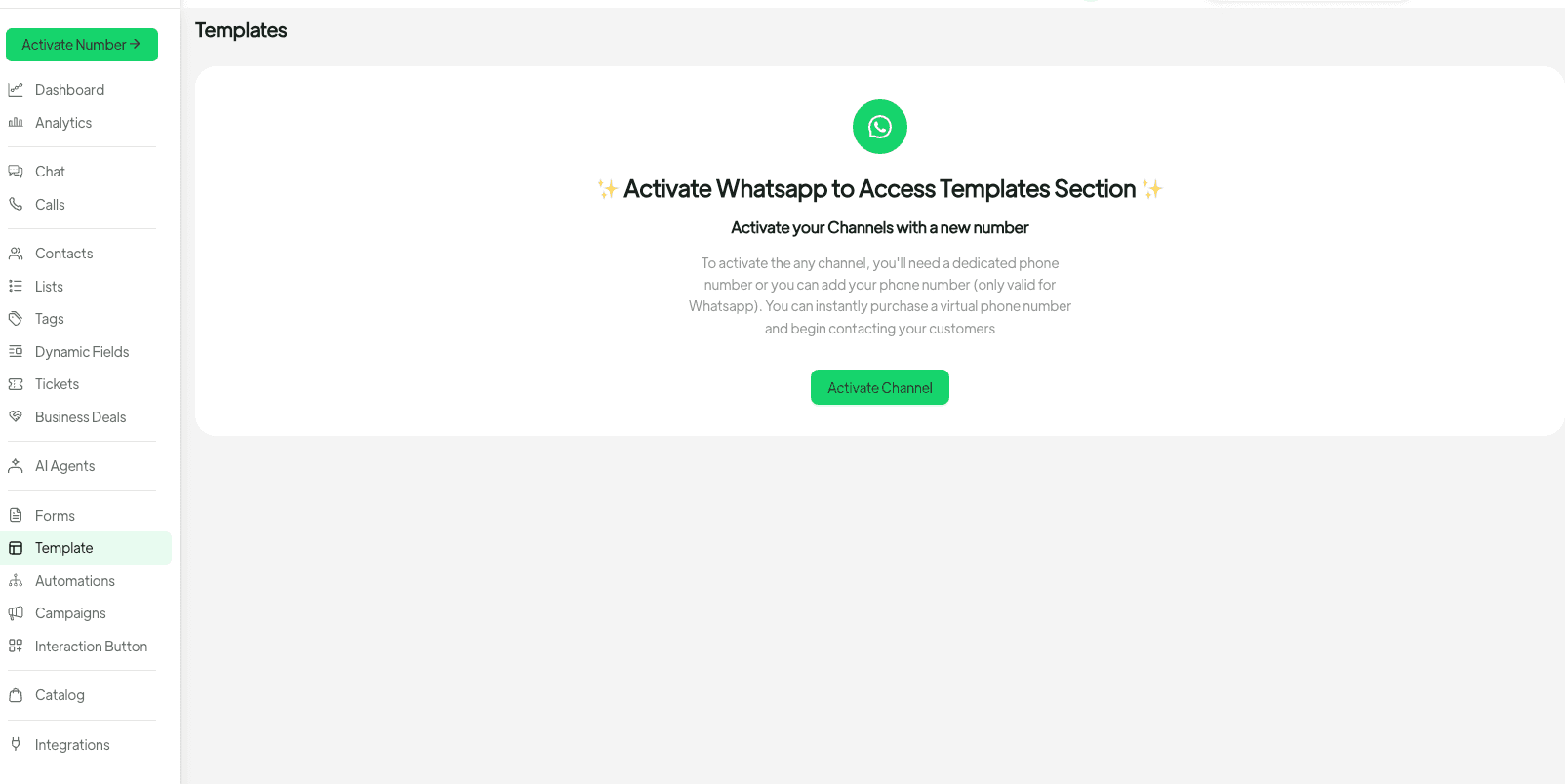
The core of this update lies in Spoki’s enhanced ability to recognize and respond to your account’s active channels. This means no more navigating through empty pages or encountering confusing options related to disconnected channels. If your account doesn’t have a channel like WhatsApp connected, pages such as Templates, Forms, Campaigns, or Commerce will now display a clear, actionable activation panel. This panel guides you directly to activate the missing channel, transforming what was once a dead end into a clear path forward. This intelligent adaptation extends to Voice and AI features as well, ensuring a consistent and helpful experience across the platform.
Why Menu Items Remain Visible
You might wonder why menu items for features like Templates or Campaigns remain visible even if their corresponding channel (e.g., WhatsApp) isn’t active. This is an intentional design choice. Spoki believes in empowering users to discover the full potential of its platform. Keeping these menu items visible serves as a gentle reminder of available features, encouraging exploration and activation when you’re ready to expand your communication capabilities. It’s about proactive discovery, not obstruction.
Refined Contact Validation: Precision for Your Channels
Another crucial enhancement in v19.17.0 is the refinement of contact validation. Spoki now ensures that your contact data aligns perfectly with your active channels, both within the app and when adding contacts externally. This prevents data inconsistencies and streamlines your communication efforts.
- Email-Only Accounts: If your Spoki account is configured for email-only communication, contacts will now require an email address for successful creation and saving. This ensures that all your contacts are ready for your primary communication method.
- WhatsApp/SMS Accounts: For accounts leveraging WhatsApp Business API or SMS, a phone number remains a mandatory field for contacts. This is essential for initiating and maintaining conversations through these channels.
These validation rules apply universally, whether you’re adding a new contact directly within the Spoki interface or importing contacts from external sources. This meticulous approach to data integrity supports efficient WhatsApp automation and prevents common issues related to incomplete contact information.
Practical Examples and Use Cases
Let’s explore how these updates translate into practical benefits for your business, especially if you’re engaged in WhatsApp automation, utilizing the WhatsApp Business API, or deploying chatbots and automated messaging.
Streamlined Onboarding for New Channels
Imagine you’ve been using Spoki primarily for email marketing, but now you’re ready to integrate WhatsApp Business API to enhance customer support and engagement. Previously, navigating to ‘Templates’ might have shown an empty page, leaving you to wonder how to get started. Now, with v19.17.0, clicking on ‘Templates’ will immediately present an activation panel, guiding you directly to connect your WhatsApp channel. This reduces friction and accelerates your journey into powerful WhatsApp automation.
Efficient Contact Management for Targeted Campaigns
Consider an e-commerce business running a flash sale. With Spoki, they can segment their audience based on communication preferences. For an email-only segment, the system ensures every contact has a valid email. For a segment targeted via WhatsApp Business API for personalized promotions and chatbot interactions, the system verifies the presence of a phone number. This precise validation means your automated messaging campaigns reach the right audience through the right channel without delivery issues due to missing contact details.
Seamless Transition Between Communication Strategies
A small business owner might start with SMS for local promotions and later decide to implement WhatsApp Business API for richer customer interactions, including sending automated order updates or managing customer inquiries via a chatbot. Spoki’s adaptive interface makes this transition smooth. When they switch to a WhatsApp-enabled account, the relevant features become fully accessible, while the contact validation adjusts automatically, ensuring their data is always fit for purpose.
Spoki’s Commitment to Your Success
This update reaffirms Spoki’s commitment to providing an intuitive, powerful, and adaptable platform for businesses of all sizes. By intelligently adapting to your active channels, Spoki minimizes confusion, maximizes efficiency, and helps you focus on what truly matters: connecting with your customers effectively. Whether you’re sending automated messages, managing customer service through WhatsApp Business API, or deploying sophisticated chatbots, Spoki ensures your experience is as seamless as possible.
For more in-depth information on leveraging WhatsApp Business API, integrating CRM systems, or optimizing your communication strategies, explore the WhatsApp Business API Documentation. You can also find valuable resources and guides on the Spoki Blog to further enhance your understanding of WhatsApp automation and customer engagement best practices.
Conclusion: Experience the Difference with Spoki
The v19.17.0 update is more than just a technical refinement; it’s a strategic enhancement designed to make your daily operations smoother, more focused, and ultimately, more successful. By adapting the interface and contact requirements to your active channels, Spoki empowers you to harness the full potential of your communication strategy, from email to advanced WhatsApp automation, without unnecessary distractions.
Ready to experience a truly intelligent communication platform that adapts to your unique business needs? Start for free with Spoki — no credit card required.