Spoki Profile Page Redesign: Enhanced Control & Clarity (v19.8.0)
Content
In today’s fast-paced digital landscape, efficiency and clarity are paramount for businesses managing customer communications. Marketing managers, business owners, e-commerce operators, and SMBs leveraging WhatsApp Business for customer engagement often juggle multiple tasks, making streamlined administrative processes crucial. The challenge often lies in quickly updating essential business information or communication preferences without navigating complex interfaces or risking unintended changes. This is particularly true when managing a powerful platform like Spoki, which empowers businesses with robust WhatsApp automation, including chatbots and automated messaging. Recognizing this need, Spoki is excited to announce a significant enhancement to its platform: the completely redesigned Profile page, part of our latest update, v19.8.0. This update focuses on making your profile management clearer and easier to update, ensuring you maintain full control over your business’s communication settings with unparalleled ease.
The previous Profile page, while functional, sometimes required users to navigate through various sections to locate specific settings. This could lead to a less intuitive experience, especially when making quick adjustments to personal information, notification preferences, or security settings. The new design addresses these pain points head-on, offering a more logical and user-friendly layout. Spoki understands that every second counts for businesses, and a simplified profile management system translates directly into time savings and reduced friction in maintaining your operational settings. This enhancement is a testament to Spoki’s commitment to continuous improvement, ensuring that our platform remains at the forefront of WhatsApp Business API solutions, providing practical value and an intuitive experience for all users.
A Fresh Look for Enhanced Usability: What’s New?
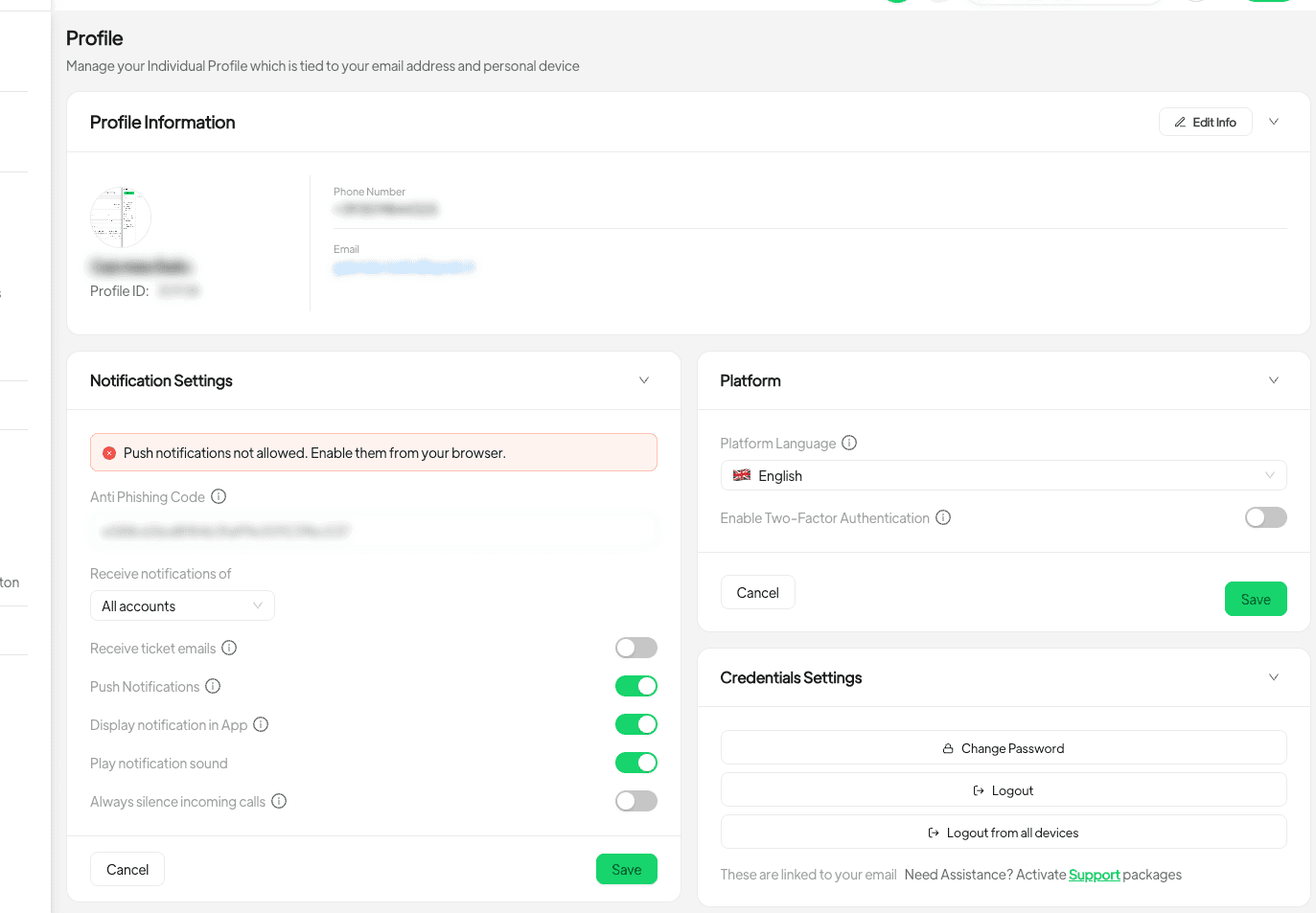
The core philosophy behind the v19.8.0 Profile page redesign was to enhance clarity and ease of use. Spoki’s development team meticulously reorganized the settings to provide a more intuitive experience. Instead of a single, scrollable page with various options, settings are now logically grouped into distinct cards. This modular approach means you can focus on one specific area—be it personal information, notifications, language, security, or password management—without losing context or getting overwhelmed by other options. This structured layout is particularly beneficial for users who frequently update their details or manage preferences across different business accounts.
Organized Settings Cards for Specific Control
The new Profile page introduces several dedicated cards, each housing related settings. This separation ensures that updating one area doesn’t inadvertently affect another. For instance, if you need to change your phone number, you’ll find all related personal information fields within a single card. This design choice significantly reduces the cognitive load and streamlines the update process, allowing you to make precise changes efficiently.
- Personal Information Card: This card is your hub for essential personal and business details. You can now easily edit your name, update your phone number, and even change your profile photo. A key improvement here is that changes are only saved when you explicitly click the ‘Save’ button, providing a crucial layer of control and preventing accidental updates.
- Notifications Card: Managing how and when you receive alerts is critical for timely customer responses. This card centralizes all your notification preferences. Whether it’s setting up alerts for new incoming messages or managing other system notifications, you have granular control. Similar to personal information, notification settings now require a ‘Save’ or ‘Cancel’ action, giving you the final say before any changes are applied.
- Language Card: For businesses operating in diverse markets or with multilingual teams, setting the preferred language for your Spoki interface is straightforward. This dedicated card ensures you can quickly switch languages and save your preference, enhancing the user experience for everyone.
- Security Card: Security is paramount, especially when handling sensitive customer communications. This card is dedicated to managing your security settings, including two-factor authentication (2FA). The option to enable or disable 2FA now also requires a ‘Save’ or ‘Cancel’ action, reinforcing security protocols and giving you explicit control over this critical feature.
- Password Management Card: Regularly updating your password is a fundamental security practice. This separate card makes it easy to change your password securely, ensuring your Spoki account remains protected.
Practical Examples & Use Cases for WhatsApp Automation
The enhanced Profile page, while seemingly a minor update, has significant implications for how marketing managers, business owners, and e-commerce operators leverage Spoki for WhatsApp automation. By making administrative tasks simpler and more controlled, it frees up valuable time that can be redirected towards optimizing customer engagement strategies and maximizing the potential of the WhatsApp Business API.
Streamlining Onboarding and Team Management
For growing businesses, onboarding new team members or updating existing team profiles is a regular occurrence. With the new Profile page, an administrator can quickly update a team member’s name, phone number, or even profile photo within the Personal Information card. The explicit ‘Save’ action ensures that these changes are reviewed before being finalized. This reduces errors and ensures that all team members’ profiles are accurate and up-to-date, which is crucial for maintaining consistent customer communication through Spoki’s WhatsApp Business API integration.
Consider an e-commerce business expanding its customer support team. A new agent joins, and their profile needs to be set up. The marketing manager can easily navigate to the Profile page, input the agent’s details, and upload their photo. The clear layout prevents confusion, and the ‘Save’ button provides a final check before the profile goes live, ensuring the agent is correctly represented when interacting with customers via Spoki’s automated messaging or live chat features.
Optimizing Notification Preferences for Timely Responses
Effective WhatsApp automation relies on timely responses and proactive engagement. The redesigned Notifications card allows businesses to fine-tune how they receive alerts, ensuring that critical customer messages or system notifications are never missed. For a business owner managing multiple Spoki campaigns, being able to quickly adjust notification settings—for instance, to silence incoming calls during specific hours or to receive alerts only for high-priority messages—is invaluable.
Imagine a business running a flash sale via WhatsApp chatbots. During this period, the marketing manager might want to receive immediate notifications for specific customer queries related to product availability or payment issues. They can easily access the Notifications card, adjust their preferences, and save them. Once the sale concludes, they can revert to their standard notification settings with the same ease and control. This flexibility ensures that the business can adapt its communication strategy on the fly, maximizing conversion opportunities and customer satisfaction.
Enhancing Security and Compliance
Security is a non-negotiable aspect of any business operation, especially when dealing with customer data and communications. The dedicated Security and Password Management cards empower users to maintain robust security protocols. Regularly updating passwords and managing two-factor authentication (2FA) are now more straightforward than ever.
For an SMB using Spoki to manage sensitive customer interactions, ensuring the security of their account is paramount. The marketing manager can easily enable 2FA from the Security card, adding an extra layer of protection against unauthorized access. The requirement to explicitly ‘Save’ this change reinforces the importance of this security measure. Furthermore, the ability to quickly change passwords within its own card promotes good security hygiene, helping businesses comply with data protection regulations and build customer trust.
Multilingual Support for Global Reach
Many businesses using WhatsApp Business API operate in diverse linguistic environments. The Language card simplifies the process of setting the preferred language for the Spoki interface. This is particularly useful for teams with members from different linguistic backgrounds or for businesses serving international customers.
Consider an e-commerce operator with a team spread across different countries. Each team member can now easily set their preferred language for the Spoki platform, ensuring they can navigate the interface and manage WhatsApp automation campaigns comfortably. This small but significant feature contributes to a more inclusive and efficient work environment, ultimately leading to better customer service and more effective communication strategies.
Integrating Spoki with Your Business Ecosystem
While the Profile page update focuses on individual user experience, its benefits extend to the broader integration of Spoki within your business ecosystem. A well-managed Spoki account, with accurate user profiles and optimized settings, is foundational for effective WhatsApp automation, seamless CRM integration, and successful customer engagement strategies.
Spoki’s robust capabilities, powered by the WhatsApp Business API, allow for advanced features like:
- Automated Messaging: Send personalized messages, order confirmations, shipping updates, and promotional content directly to your customers on WhatsApp.
- Chatbots: Deploy intelligent chatbots to handle common queries, qualify leads, and provide instant support 24/7, freeing up your human agents for more complex tasks.
- CRM Integration: Connect Spoki with your existing CRM system to synchronize customer data, personalize interactions, and streamline your sales and support workflows. This ensures that every customer interaction on WhatsApp is recorded and accessible, providing a holistic view of your customer journey.
To further enhance your understanding and utilization of Spoki’s features, we encourage you to explore our comprehensive resources. The Product Updates section on our blog keeps you informed about the latest enhancements and features. For those interested in the technical underpinnings and advanced integrations, our WhatsApp Business API Documentation provides in-depth information. Additionally, our Spoki Blog offers a wealth of articles on best practices for WhatsApp marketing, customer service, and automation.
Conclusion: Take Control with Spoki’s Enhanced Profile Management
The redesigned Profile page in Spoki’s v19.8.0 update is more than just a visual refresh; it’s a strategic enhancement designed to empower marketing managers, business owners, and e-commerce operators with greater control, clarity, and efficiency in managing their Spoki accounts. By organizing settings into distinct, actionable cards and requiring explicit ‘Save’ or ‘Cancel’ actions, Spoki ensures that you can update your personal information, notification preferences, language settings, and security options with confidence and precision.
This update reflects Spoki’s unwavering commitment to providing a user-friendly and powerful platform for WhatsApp automation. We understand that a seamless administrative experience is crucial for businesses to fully leverage the potential of the WhatsApp Business API for customer communication, engagement, and conversion. The time saved and the enhanced control gained from this new Profile page can be reinvested into crafting more compelling WhatsApp campaigns, refining your chatbot strategies, and ultimately, fostering stronger customer relationships.
Experience the difference of a clearer, more intuitive profile management system. Access the updated Profile page from the main menu and take full control of your Spoki settings today. Ready to revolutionize your WhatsApp communication? Start for free with Spoki — no credit card required.