Voice Analytics Shows Billed Minutes: True Cost Insights
Content

For marketing managers, business owners, e-commerce operators, and SMBs leveraging WhatsApp Business for customer communication, understanding the true cost of engagement is paramount. Historically, reconciling call length figures with actual billing charges has presented a significant challenge. Discrepancies often arose because call duration metrics included ring time and didn’t account for the common practice of rounding up each call to the next full minute for billing purposes. This led to confusion, making it difficult to accurately assess the WhatsApp Marketing ROI Calculator">return on investment for voice interactions.
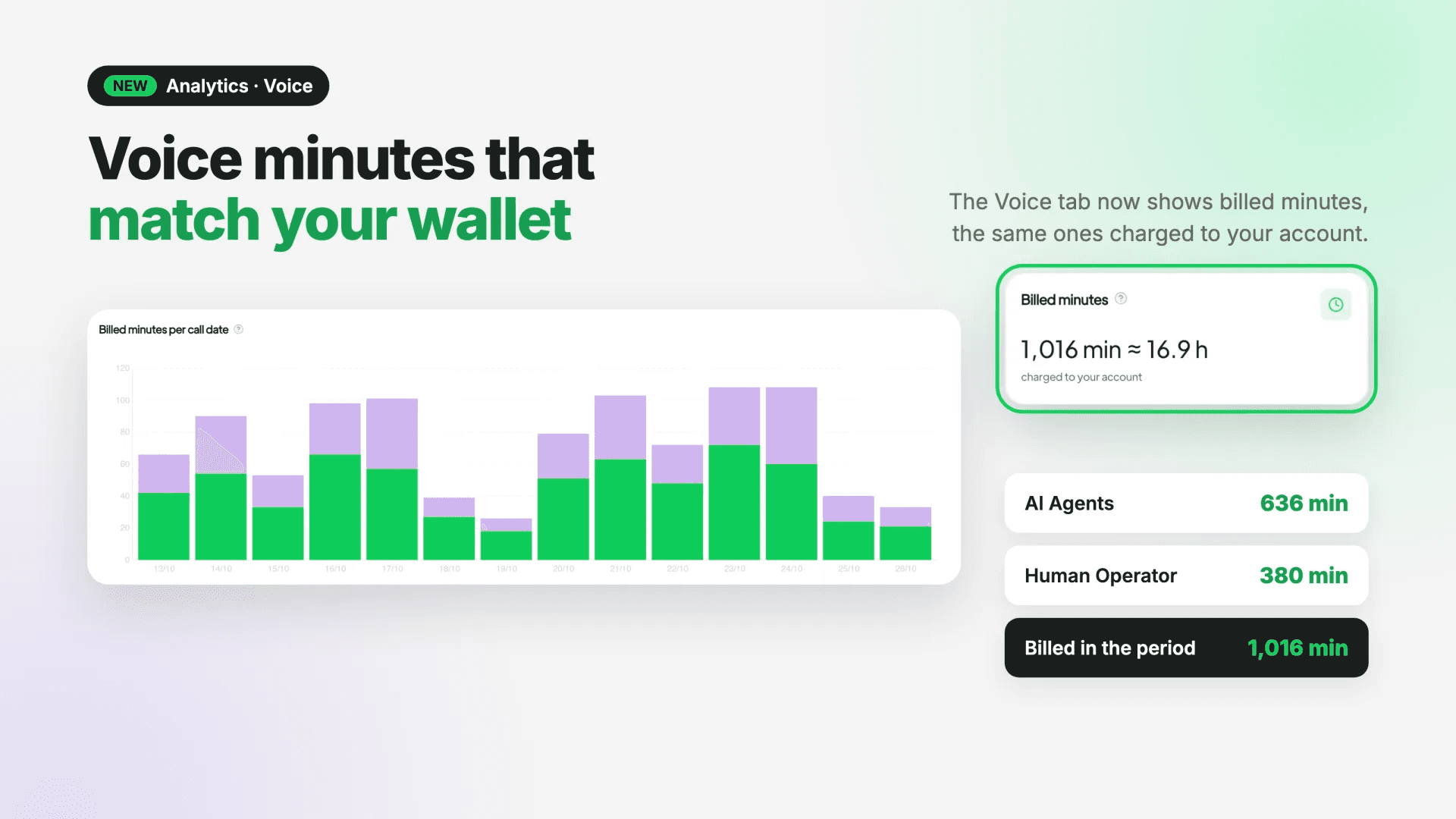
Spoki is excited to announce a crucial update to its Analytics platform: the Voice tab now displays billed minutes. This enhancement directly addresses those past inconsistencies, providing a clear, accurate reflection of the minutes you are actually charged for. By aligning the data in your Analytics with your wallet charges, Spoki empowers you with unparalleled transparency into your communication costs, enabling smarter budgeting and more effective resource allocation. This update ensures that every minute you see in your reports directly corresponds to the amount billed, eliminating guesswork and fostering greater financial clarity.
Why Billed Minutes Matter for Your Business
The transition from ‘talk time’ to ‘billed minutes’ in Spoki’s Voice Analytics is more than just a nomenclature change; it’s a fundamental shift towards greater financial transparency and operational efficiency. For businesses relying on WhatsApp Business API for customer interactions, every minute counts. Understanding the precise cost of each customer engagement is crucial for optimizing your communication strategy and maximizing profitability.
Eliminating Billing Discrepancies and Boosting Confidence
Previously, the ‘talk time’ metric could be misleading. It often included ring time and didn’t factor in the industry standard of rounding up each call to the next full minute for billing. This meant that the figures you saw in your analytics might not have perfectly matched your actual wallet charges. With billed minutes, Spoki ensures that the numbers you see in your Analytics → Voice tab are identical to the figures used for billing. This eliminates confusion, builds trust, and gives you complete confidence in your financial reporting.
Accurate Cost Analysis for Better Budgeting
For marketing managers and business owners, accurate cost analysis is the bedrock of effective budgeting. When you know exactly how many minutes you’re being billed for, you can:
- Forecast expenses more precisely: Plan your communication budget with greater accuracy, avoiding unexpected overages.
- Evaluate campaign ROI: Directly link your WhatsApp voice campaign costs to their outcomes, providing a clearer picture of profitability.
- Optimize resource allocation: Identify peak usage times and allocate your team members or automated solutions more effectively to manage call volumes within budget.
Streamlined Data for Focused Insights
In conjunction with displaying billed minutes, Spoki has also removed the ‘Avg call duration card per handler’. This streamlining of data presentation ensures that your focus remains on the most impactful metrics. While answer rate, ring time, quality, and sentiment metrics remain unchanged, the emphasis is now firmly on actionable financial data, allowing you to quickly grasp the cost implications of your voice interactions without unnecessary distractions.
Practical Applications of Billed Minutes in WhatsApp Automation
The enhanced Voice Analytics in Spoki provides invaluable insights that can be directly applied to optimize your WhatsApp automation strategies. Whether you’re using chatbots for initial customer queries or leveraging automated messaging for follow-ups, understanding your billed minutes helps refine your approach.
Optimizing Chatbot-to-Human Handover
WhatsApp chatbots are excellent for handling routine inquiries, but complex issues often require human intervention. By analyzing billed minutes, you can:
- Identify costly handovers: Pinpoint scenarios where chatbot-to-human handovers lead to unexpectedly long and expensive calls. This might indicate areas where your chatbot script needs refinement to resolve more issues autonomously.
- Improve chatbot efficiency: Train your chatbots to gather more comprehensive information before a handover, reducing the duration of subsequent human-led calls and thus lowering billed minutes.
- Strategize agent availability: Understand when human agents are most frequently engaged in longer, billed calls, allowing you to optimize staffing schedules to meet demand efficiently.
Enhancing Customer Support Workflows
For businesses using WhatsApp Business API for customer support, billed minutes offer a direct measure of efficiency:
- Agent performance evaluation: While not a direct measure of agent quality, consistently high billed minutes for certain types of queries or agents might signal a need for further training or process optimization.
- Service level agreement (SLA) adherence: Monitor average billed minutes per resolution to ensure your support team is resolving issues efficiently and within your defined SLAs.
- Proactive communication: If certain issues consistently lead to long, billed calls, consider implementing automated messages or FAQs to address these proactively, reducing the need for lengthy voice interactions.
Driving Sales and Conversion Through Efficient Voice Engagement
WhatsApp isn’t just for support; it’s a powerful sales tool. Billed minutes can help optimize your sales conversations:
- Qualifying leads effectively: Analyze the billed minutes for calls with qualified leads versus unqualified ones. This can help refine your lead qualification process, ensuring your sales team spends valuable billed time on high-potential prospects.
- Optimizing sales scripts: Identify which sales approaches or scripts lead to shorter, more effective billed calls that result in conversions.
- Follow-up strategy: Understand the typical billed minutes for follow-up calls that lead to successful conversions, helping you streamline your post-initial contact strategy.
Understanding Your Billed Minutes Data in Spoki
Navigating the new ‘billed minutes’ display in Spoki’s Analytics is straightforward, but there are a few key points to keep in mind to ensure you’re interpreting the data correctly.
Where to Find It
The updated Voice Analytics is easily accessible:
- Log in to your Spoki account.
- Navigate to Analytics.
- Select the Voice tab.
Here, you will now see the cards and the minutes chart reflecting the same numbers as your wallet charges, based on billed minutes.
Important Considerations for Support
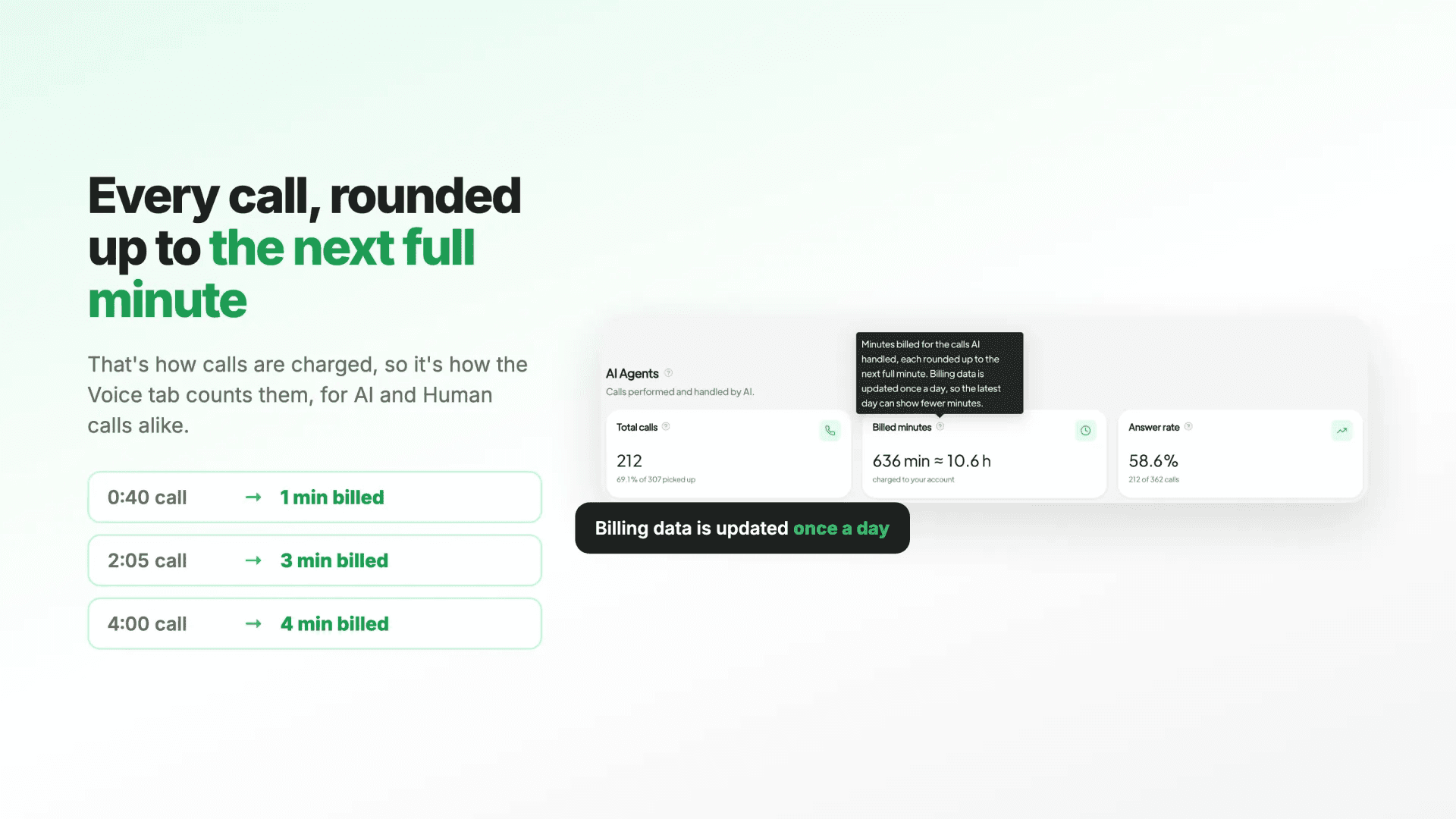
- Higher minute counts: You might notice that your minute counts are generally higher than before. This is expected, as each call is now rounded up to a full minute for billing purposes. This reflects the actual amount you are charged.
- “-” with “No billing data for part of this period”: If you see this message, it typically means the selected period includes days before September 21, 2026 (when billing data started being recorded), or a day for which data has not yet been loaded. To view the figures, try selecting a shorter, more recent period.
- Daily data updates: Billing data is updated once a day. Therefore, today’s minutes might appear lower than the final number. It’s best to review complete daily data for a full picture.
Leveraging Spoki for Advanced WhatsApp Business Automation
Spoki’s commitment to providing clear, actionable insights extends beyond just billing. By integrating powerful analytics with robust automation capabilities, Spoki empowers businesses to transform their WhatsApp communication strategy.
Seamless CRM Integration
Spoki offers seamless CRM integration guides, allowing you to connect your customer data with your WhatsApp interactions. This holistic view enables you to personalize automated messages, segment your audience more effectively, and ensure that every customer touchpoint is relevant and timely. Imagine automatically sending a personalized follow-up message via WhatsApp after a customer service call, or triggering a sales message based on their interaction history – all powered by integrated data.
Mastering the WhatsApp Business API
For businesses looking to scale their WhatsApp communication, understanding the WhatsApp Business API is crucial. Spoki simplifies this complexity, providing a user-friendly platform that harnesses the power of the API without requiring extensive technical knowledge. Explore the WhatsApp Business API Documentation to learn more about the possibilities and how Spoki helps you implement them effectively.
Continuous Learning with Spoki Academy
To help you get the most out of Spoki, the Spoki Academy offers a wealth of resources, tutorials, and best practices. From setting up your first automated campaign to advanced analytics interpretation, the Academy is designed to equip you with the knowledge and skills to excel in WhatsApp marketing and customer service. Continuous learning ensures you stay ahead in the dynamic world of digital communication.
Conclusion: Drive Smarter Decisions with Billed Minutes
The introduction of billed minutes in Spoki’s Voice Analytics marks a significant step forward in providing unparalleled transparency and control over your WhatsApp Business communication costs. For marketing managers, business owners, e-commerce operators, and SMBs, this update means clearer financial insights, more accurate budgeting, and the ability to make data-driven decisions that optimize your customer engagement strategies.
By understanding the true cost of each voice interaction, you can refine your automation workflows, enhance customer support efficiency, and ultimately drive better business outcomes. Spoki is committed to equipping you with the tools you need to succeed in the competitive landscape of digital communication.
Ready to experience the clarity and control of Spoki’s enhanced Voice Analytics? Start for free with Spoki — no credit card required.