Wait Until a Contact’s Date: Personalized WhatsApp Automation
Content
In the fast-paced world of digital marketing and customer communication, timing is everything. For businesses leveraging WhatsApp Business for customer engagement, delivering the right message at the precise moment can significantly impact customer satisfaction and conversion rates. However, traditional automation tools often struggle with personalized timing, forcing all contacts through a fixed schedule. This limitation can lead to generic experiences, missed opportunities, and ultimately, a less effective communication strategy.
Spoki understands this challenge. That’s why Spoki is excited to introduce a powerful new enhancement to its automation capabilities: the ability for a Delay step to wait until a contact’s specific date. This innovative feature, available in Spoki (v19.13.0), revolutionizes how businesses can personalize their WhatsApp automations, ensuring each customer receives timely, relevant messages tailored to their unique journey. No longer are your automations tied to a fixed date for everyone; now, each contact progresses at their own personalized moment, making your outreach more impactful and customer-centric.
The Power of Personalized Timing in WhatsApp Automations
Imagine being able to send a booking reminder exactly 24 hours before an appointment, a renewal notice precisely when a subscription is due, or a delivery update the moment a package is expected. With Spoki’s new ‘Wait Until a Contact’s Date’ feature, these scenarios are not just possible, but effortlessly integrated into your WhatsApp automation workflows.
This functionality is particularly ideal for businesses where the timing of communication is unique to each individual. Whether you’re managing appointments, handling bookings, overseeing product renewals, or coordinating deliveries, this feature ensures your WhatsApp messages hit their mark every single time.
How It Works: Setting Up a Personalized Delay Step
Implementing this new feature is straightforward and intuitive. Spoki has designed it to be user-friendly, allowing you to quickly enhance your existing or new automation flows.
- Save the Date: First, ensure the relevant date and time information is saved directly on the contact’s profile within Spoki. This could be an appointment date, a booking time, a renewal deadline, or an estimated delivery window. Spoki’s flexible contact fields make this easy to manage.
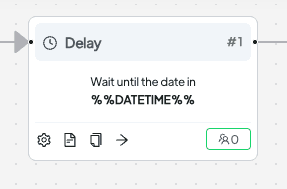
- Open a Delay Step: Within your Spoki automation builder, open an existing Delay step or add a new one to your workflow.
- Select Personalized Timing: In the Delay step configuration, you will now find an option to “Wait until a specific date and time.” Select this option.
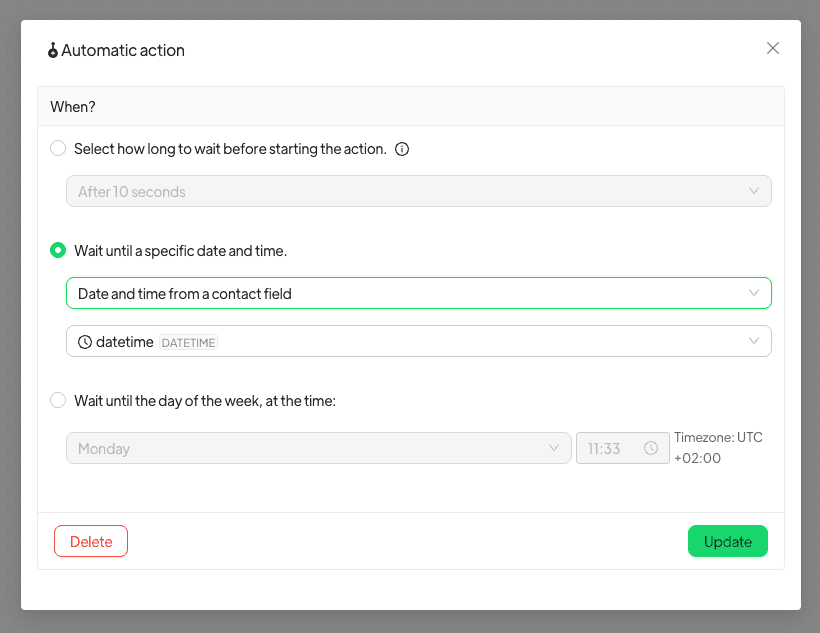
- Choose Contact Field: From the subsequent choices, pick “Date and time from a contact field.” A dropdown menu will appear, displaying all available contact fields that contain date and time information.
- Pick the Desired Field: Select the specific contact field where you’ve stored the personalized date and time for each contact.
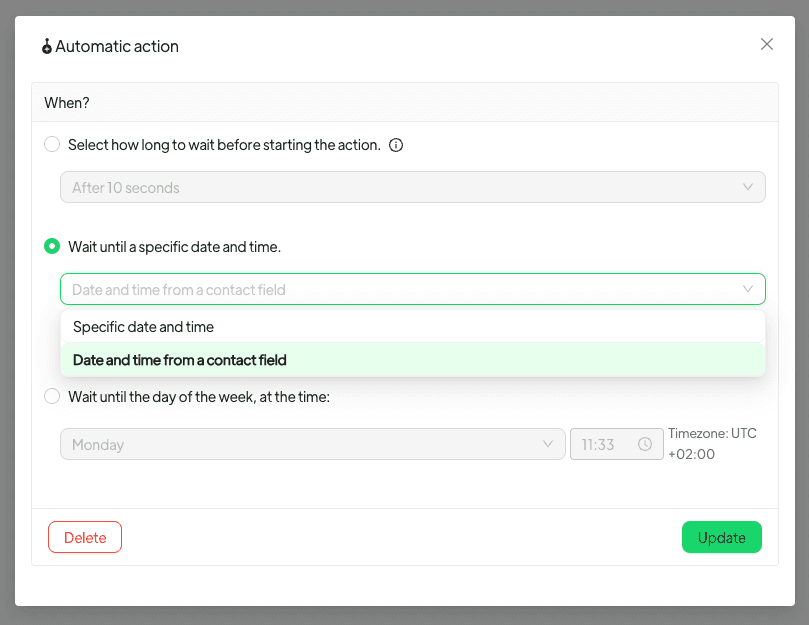
That’s it! Once configured, each contact entering this Delay step will pause until their unique date and time stored in that specific contact field. This ensures a truly personalized and timely communication experience.
Important Considerations for Seamless Automation
- Field Type: Only fields specifically configured to contain date and time information will be selectable. This ensures data integrity and proper functioning of the delay.
- Empty Fields: If the chosen date and time field is empty for a particular contact, their automation will pause at this step. Spoki will notify you of the missing information, allowing you to address it promptly and ensure no contact is left behind.
- Past Dates: If the date and time specified in the contact field has already passed when a contact reaches the Delay step, the automation will simply continue without any delay. This prevents contacts from getting stuck in an indefinite wait if a date has expired.
Practical Use Cases for WhatsApp Business Automation
Let’s explore some real-world scenarios where this feature can dramatically enhance your customer engagement and operational efficiency using WhatsApp Business API, chatbots, and automated messaging.
1. Appointment Reminders & Confirmations
For businesses like clinics, salons, consultants, or service providers, missed appointments are costly. With Spoki, you can automate personalized WhatsApp reminders:
- Scenario: A client books an appointment for a specific date and time.
- Spoki Workflow: Upon booking, save the appointment date and time in a contact field. An automation flow can then include a Delay step set to ‘Wait until a contact’s date’ (e.g., 24 hours before the appointment).
- WhatsApp Message: “Hi [Customer Name], just a friendly reminder about your appointment with [Business Name] tomorrow at [Appointment Time]. We look forward to seeing you! Reply Y to confirm or N to reschedule.”
- Benefit: Reduces no-shows, improves customer experience, and frees up staff time from manual reminders.
2. Booking Confirmations & Pre-Arrival Information
Hotels, event organizers, and tour operators can leverage this feature to provide timely information and enhance the guest experience.
- Scenario: A customer books a hotel stay or an event ticket.
- Spoki Workflow: Save the check-in date/event date in a contact field. An automation can send a confirmation immediately, then use a Delay step to ‘Wait until a contact’s date’ (e.g., 3 days before check-in/event).
- WhatsApp Message: “Hello [Customer Name], your booking for [Hotel Name] on [Check-in Date] is confirmed! Here’s some useful information for your stay: [Link to FAQs/Directions]. We can’t wait to welcome you!”
- Benefit: Reduces customer queries, provides essential information proactively, and builds anticipation.
3. Subscription & Service Renewals
For SaaS companies, subscription boxes, or service-based businesses, timely renewal reminders are crucial for customer retention.
- Scenario: A customer’s subscription is due for renewal on a specific date.
- Spoki Workflow: Store the renewal date in a contact field. An automation can include a Delay step set to ‘Wait until a contact’s date’ (e.g., 7 days before the renewal date).
- WhatsApp Message: “Hi [Customer Name], your [Service Name] subscription is set to renew on [Renewal Date]. To ensure uninterrupted service, please review your payment details here: [Link]. Need help? Reply to this message!”
- Benefit: Improves renewal rates, prevents churn due to forgotten payments, and offers a convenient way for customers to manage their subscriptions.
4. Delivery Notifications & Updates
E-commerce businesses can significantly enhance the post-purchase experience by providing real-time, personalized delivery updates.
- Scenario: A customer places an order with an estimated delivery date.
- Spoki Workflow: Save the estimated delivery date in a contact field. An automation can send an order confirmation, then use a Delay step to ‘Wait until a contact’s date’ (e.g., on the morning of the estimated delivery day).
- WhatsApp Message: “Great news, [Customer Name]! Your Spoki order #[Order Number] is out for delivery today and should arrive by [Estimated Time]. Track your package here: [Tracking Link].”
- Benefit: Reduces ‘where is my order?’ inquiries, boosts customer satisfaction, and builds trust in your brand.
5. Event-Triggered Follow-ups & Nurturing
Beyond fixed dates, this feature can be used for follow-ups tied to specific events unique to each customer.
- Scenario: A customer completes an online course, and you want to send a certificate or a follow-up offer a week later.
- Spoki Workflow: When the course is completed, save the completion date in a contact field. An automation can then use a Delay step to ‘Wait until a contact’s date’ (e.g., completion date + 7 days).
- WhatsApp Message: “Congratulations, [Customer Name], on completing your [Course Name]! Here’s your certificate: [Link]. Ready for the next step? Check out our advanced courses: [Link].”
- Benefit: Enhances post-event engagement, drives upsells, and maintains a relationship with the customer.
Why Personalized Timing Matters for Your Business
In today’s competitive landscape, generic communication falls flat. Customers expect and appreciate personalized interactions. By leveraging Spoki’s ‘Wait Until a Contact’s Date’ feature, your business can:
- Boost Customer Satisfaction: Deliver messages exactly when they are most relevant, showing customers you understand and value their individual journey.
- Improve Conversion Rates: Timely reminders for appointments, renewals, or abandoned carts can significantly increase successful outcomes.
- Enhance Operational Efficiency: Automate repetitive, time-sensitive tasks, freeing up your team to focus on more complex customer needs and strategic initiatives.
- Reduce Manual Workload: Eliminate the need for manual tracking and sending of personalized, time-sensitive messages.
- Strengthen Brand Loyalty: Consistent, personalized, and timely communication builds trust and fosters stronger relationships with your customer base.
- Comply with WhatsApp Business API: Ensure your automated messages are always relevant and value-driven, aligning with WhatsApp’s guidelines for high-quality customer communication. Spoki is committed to helping you maintain WhatsApp Business API documentation compliance.
Spoki: Your Partner in Smart WhatsApp Automation
This new feature is just one example of Spoki’s continuous commitment to providing marketing managers, business owners, e-commerce operators, and SMBs with the most robust and flexible WhatsApp Business solutions. Spoki empowers you to create sophisticated, customer-centric automations that drive real business results.
Whether you’re looking to streamline customer support with chatbots, send targeted promotional messages, or manage complex customer journeys, Spoki offers the tools you need to succeed. Explore more powerful features and stay updated on the latest enhancements by visiting the Product Updates section of the Spoki website.
Ready to transform your WhatsApp communication with personalized timing? Discover how Spoki can help your business thrive.
Conclusion: Unlock the Full Potential of Your WhatsApp Automations
The ability to ‘Wait Until a Contact’s Date’ is a game-changer for businesses seeking to elevate their WhatsApp marketing and customer service. It moves beyond one-size-fits-all messaging, enabling truly personalized, timely, and impactful communication. By integrating this feature into your Spoki automations, you’re not just sending messages; you’re delivering exceptional customer experiences that build loyalty and drive growth.
Embrace the future of personalized WhatsApp automation. Start leveraging Spoki’s powerful features today and see the difference precise timing can make for your business.
Start for free with Spoki — no credit card required.