Website Behaviour in WhatsApp Automations | Spoki Pixel Trigger
Content
In today’s competitive digital landscape, understanding and reacting to customer behavior on your website is paramount for driving conversions and fostering loyalty. Many businesses struggle to bridge the gap between website activity and proactive customer engagement, often missing critical opportunities to connect with interested prospects or re-engage abandoning customers. Imagine a potential customer browsing your products, adding items to their cart, but then leaving before completing the purchase. Without a timely intervention, that potential sale is often lost. This is where the power of website behavior in automations, specifically with the new Spoki Pixel Trigger (v19.25.3), transforms your customer communication strategy.
Spoki now empowers marketing managers, business owners, and e-commerce operators to initiate WhatsApp automations based on precise user actions on their website. This innovative feature allows you to engage with customers at the exact moment their behavior indicates interest or hesitation, opening a conversation at the right time to guide them towards a desired outcome. Whether it’s an abandoned cart, a visit to a crucial product page, or a returning visitor showing high intent, the Spoki Pixel Trigger enables you to turn passive website interactions into active, meaningful WhatsApp conversations.
What is the Spoki Pixel Trigger and How Does it Work?
The Spoki Pixel Trigger is a powerful new capability that allows you to connect your website’s visitor behavior directly to your WhatsApp automation workflows. By embedding a small piece of code (the Spoki Pixel) on your website, Spoki can track key user actions and use these as triggers to start automated WhatsApp messages. This means your automations are no longer just time-based or list-based; they are now dynamically responsive to how users interact with your digital storefront.
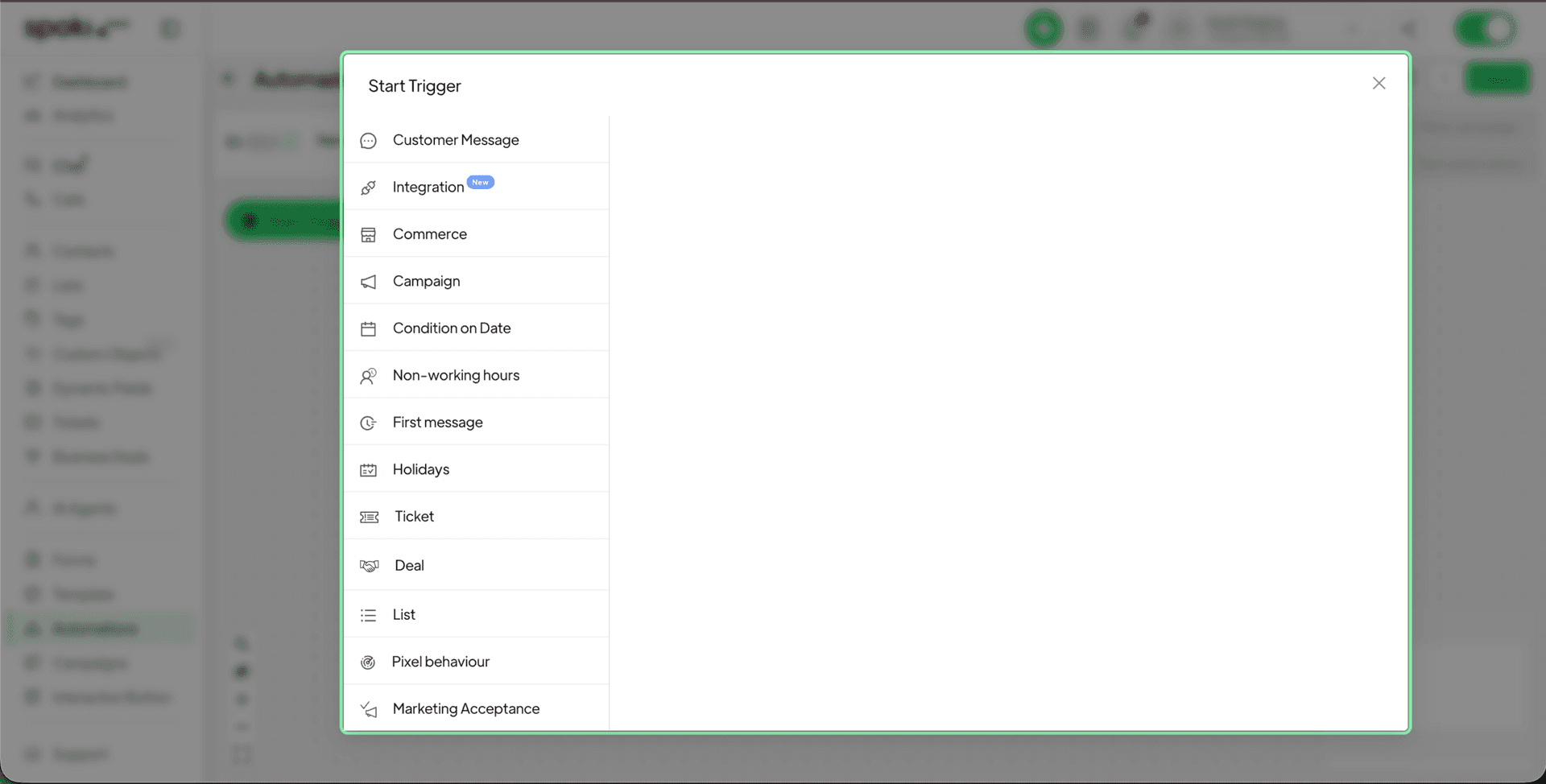
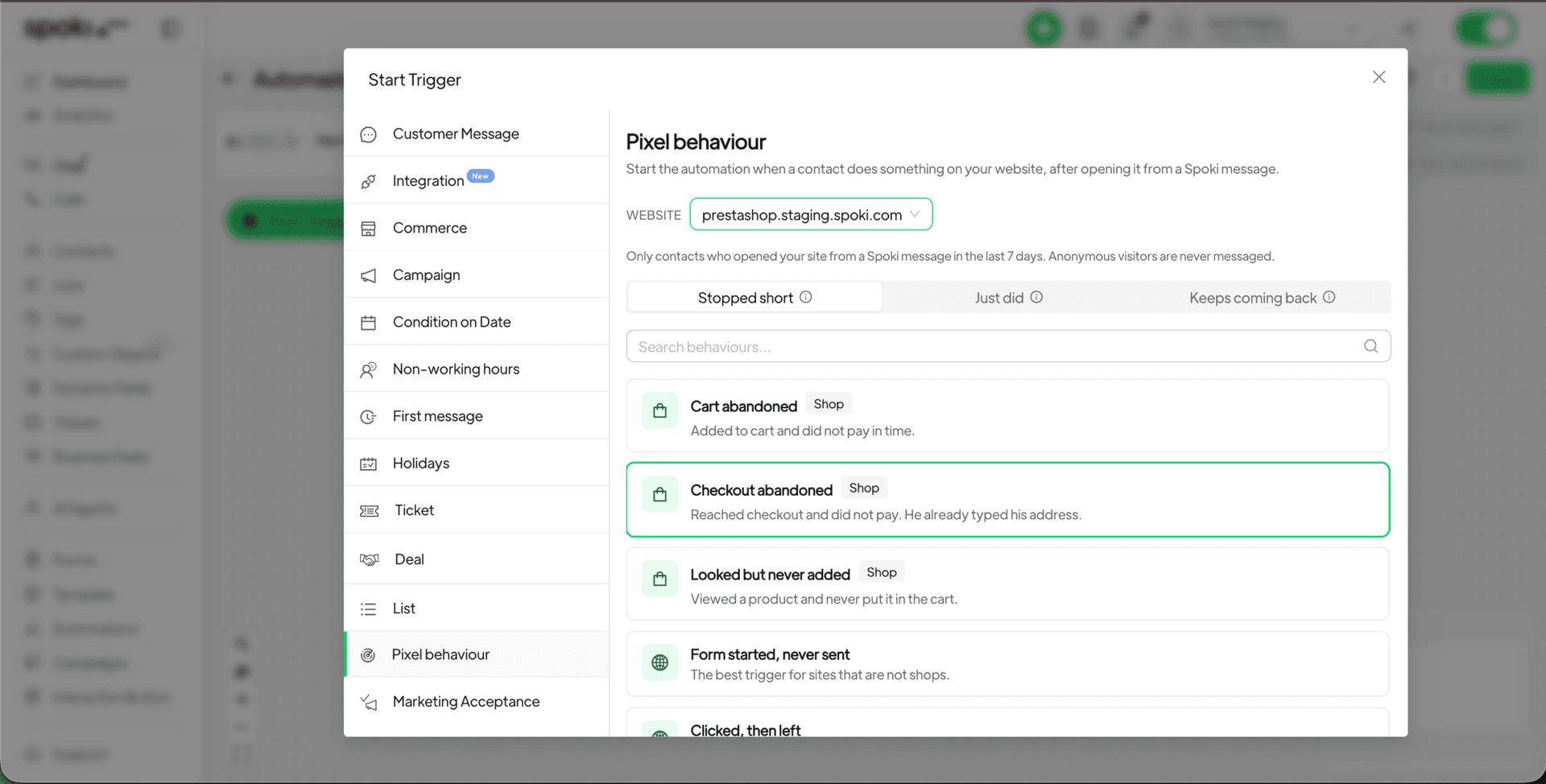
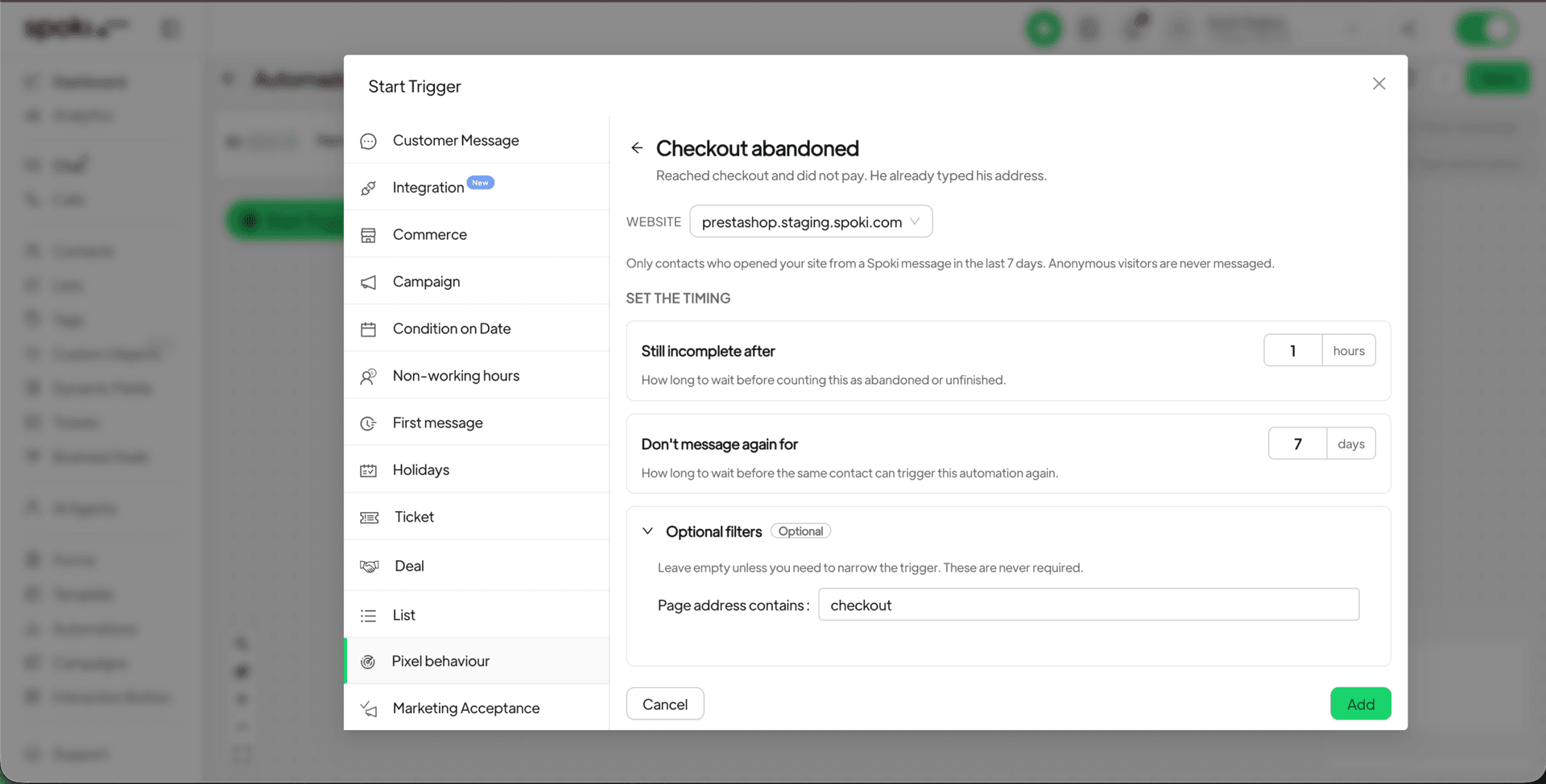
Implementing this feature is straightforward. Within your Spoki account, you simply open an automation, add a starting step, and choose ‘Pixel behaviour’. From there, you can select a ready-made scenario tailored to common e-commerce and business needs, and customize the timing in plain language to suit your strategy. For example, you can set an automation to trigger ‘5 minutes after a user abandons a cart’ or ‘1 hour after a user visits a specific product page’.
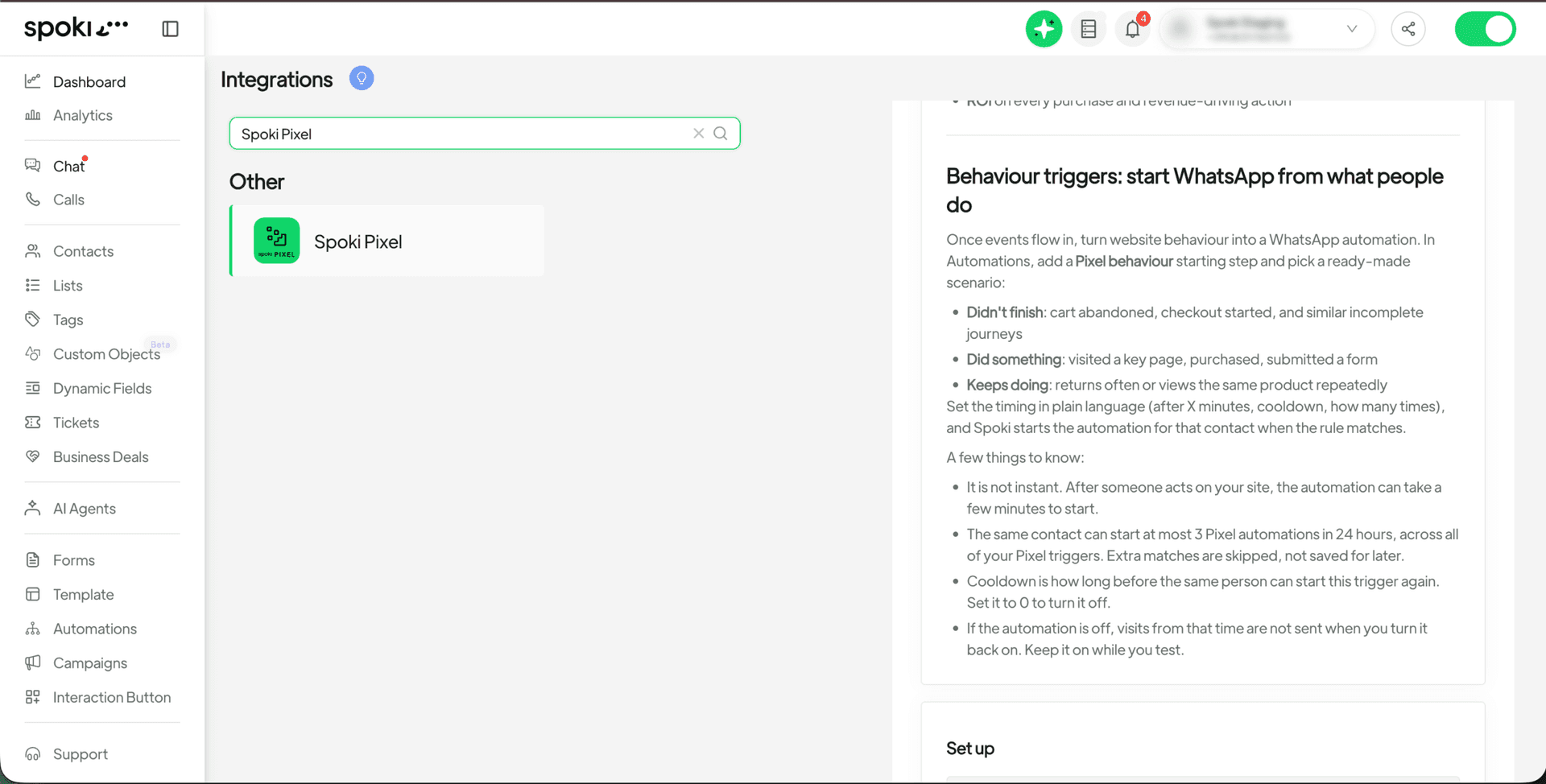
It’s important to note that while highly responsive, there will be a few minutes delay after the website visit before the automation is initiated. This ensures data accuracy and smooth processing. Additionally, if the automation is turned off, visits from that period will not be processed later, so ensure your automations are active to capture all relevant website interactions.
Practical Examples: Turning Website Actions into WhatsApp Conversations
Let’s delve into some practical scenarios where the Spoki Pixel Trigger can significantly enhance your customer engagement and conversion rates.
Abandoned Cart Recovery with WhatsApp Automation
One of the most common and costly issues for e-commerce businesses is abandoned carts. Customers add items they intend to buy, but for various reasons, leave before completing the purchase. The Spoki Pixel Trigger allows you to proactively address this by initiating a WhatsApp automation when a user abandons their cart.
- Scenario: A customer adds products to their cart but leaves the website without purchasing.
- Spoki Automation: Set a ‘Pixel behaviour’ trigger for ‘Abandoned Cart’. Choose to send a message after, for example, 30 minutes.
- WhatsApp Message: “Hey [Customer Name], we noticed you left some items in your cart! Is there anything we can help you with, or perhaps a small discount to sweeten the deal? [Link to Cart]”
- Benefit: Timely intervention can recover a significant percentage of lost sales, offering assistance or an incentive when the customer’s intent is still high.
Engaging Visitors of Key Product or Service Pages
Identifying high-intent visitors who spend time on specific product or service pages is crucial. These users are actively researching and are closer to making a purchasing decision. A well-timed WhatsApp message can provide the extra information or push they need.
- Scenario: A user spends more than 2 minutes on a high-value product page or a service inquiry page.
- Spoki Automation: Set a ‘Pixel behaviour’ trigger for ‘Visited Specific Page’ with a condition for time spent. Choose to send a message after 15 minutes.
- WhatsApp Message: “Hi [Customer Name], thanks for checking out our [Product/Service Name]! Do you have any questions? Our team is here to help you find the perfect solution. [Link to FAQ/Contact]”
- Benefit: Provides personalized support, answers potential questions, and moves the customer further down the sales funnel.
Re-engaging Frequent Visitors or Returning Customers
Loyal customers or highly engaged prospects who frequently return to your site represent a valuable segment. Recognizing their repeated visits allows you to offer exclusive deals or personalized recommendations.
- Scenario: A customer visits your website three times within a week without making a purchase.
- Spoki Automation: Set a ‘Pixel behaviour’ trigger for ‘Multiple Visits’ within a specified timeframe.
- WhatsApp Message: “Welcome back, [Customer Name]! We appreciate your interest. As a thank you for being a frequent visitor, here’s a special offer on your next purchase: [Discount Code].”
- Benefit: Fosters loyalty, encourages repeat purchases, and makes customers feel valued.
Post-Purchase Engagement and Upselling Opportunities
The customer journey doesn’t end at purchase. Website behavior can also indicate opportunities for post-purchase support, upselling, or cross-selling.
- Scenario: A customer purchases a product and then visits a related accessories page within 24 hours.
- Spoki Automation: Set a ‘Pixel behaviour’ trigger for ‘Post-Purchase Related Page Visit’.
- WhatsApp Message: “Hi [Customer Name], we hope you’re enjoying your new [Purchased Product]! We noticed you checked out [Related Accessory]. Did you know it pairs perfectly with your recent purchase? [Link to Accessory]”
- Benefit: Enhances customer satisfaction, provides relevant suggestions, and drives additional sales.
The Power of WhatsApp Business API in Automations
These sophisticated automations are made possible through the robust capabilities of the WhatsApp Business API, which Spoki leverages to provide a secure, scalable, and compliant platform for business communication. Unlike the standard WhatsApp Business App, the API allows for advanced features such as:
- Automated Messaging: Send templated messages, notifications, and personalized responses at scale.
- Chatbots: Integrate intelligent chatbots to handle common queries, provide instant support, and qualify leads 24/7.
- CRM Integration: Seamlessly connect WhatsApp conversations with your existing CRM systems for a unified view of customer interactions.
- Compliance: Adhere to WhatsApp’s strict messaging policies, ensuring a customer-first approach with explicit opt-ins.
By using Spoki, businesses can harness the full potential of the WhatsApp Business API to create highly effective and personalized customer journeys. The Spoki Pixel Trigger adds another layer of intelligence, enabling your automations to be truly event-driven and responsive to real-time customer intent.
Setting Up Your Spoki Pixel and Automations
Getting started with the Spoki Pixel Trigger is straightforward. Here’s a brief overview of where to find and set up this powerful feature:
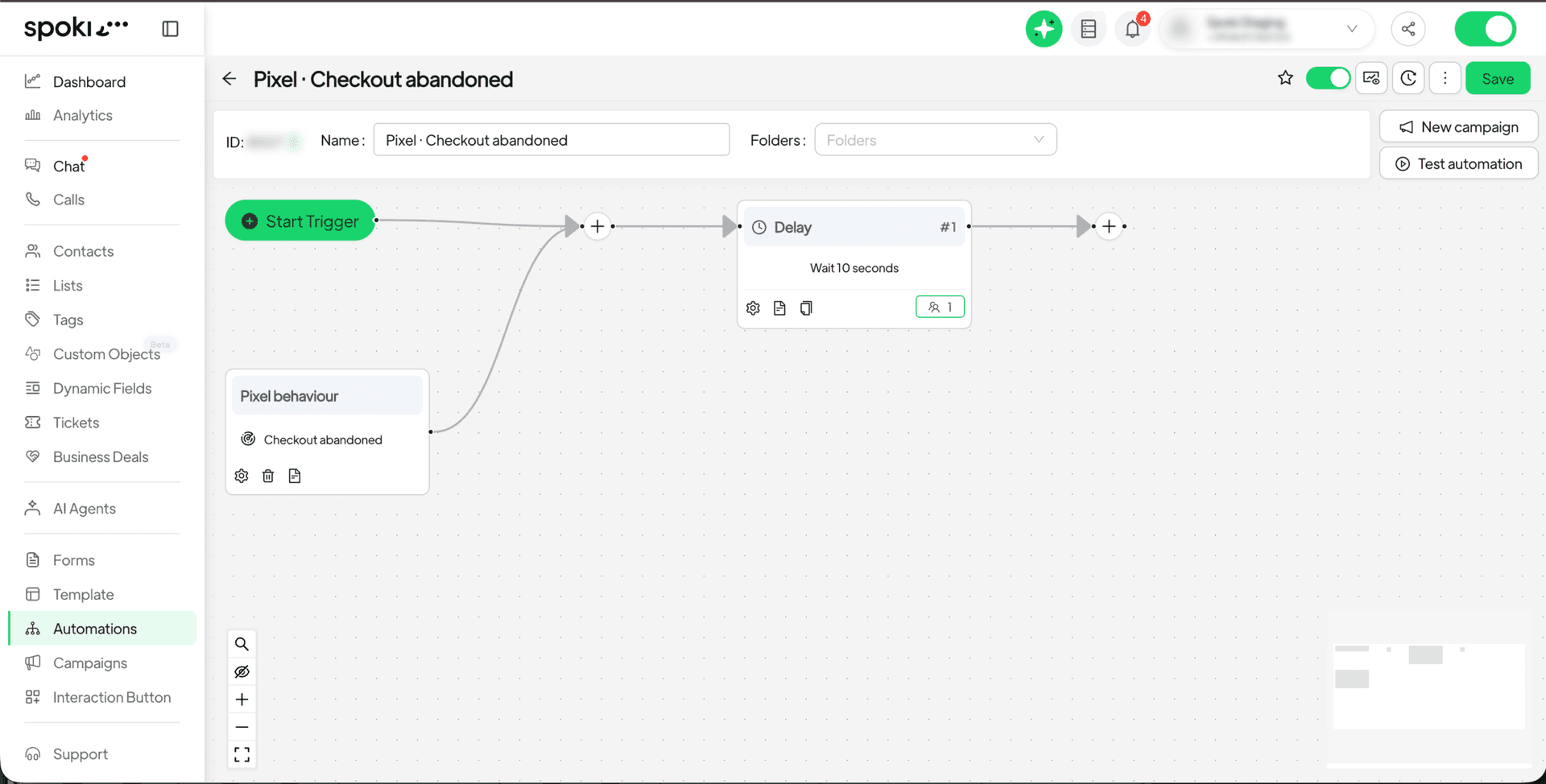
- Access Automations: Navigate to the ‘Automations’ section within your Spoki dashboard.
- Add a Trigger: When creating a new automation or editing an existing one, add a starting step and select ‘Pixel behaviour’.
- Choose a Scenario: Spoki provides ready-made scenarios like ‘Abandoned Cart’, ‘Visited Specific Page’, or ‘Multiple Visits’. Select the one that best fits your goal.
- Set Timing: Customize the delay and conditions for when the WhatsApp message should be sent after the website event.
- Integrate Spoki Pixel: Ensure the Spoki Pixel is correctly installed on your website. You can find a short overview and instructions under ‘Integrations → Spoki Pixel’ in your Spoki account.
Remember, the effectiveness of these automations lies in their relevance and timeliness. By using the Spoki Pixel Trigger, you’re not just sending messages; you’re initiating conversations based on genuine customer interest, leading to higher engagement and better outcomes.
Why Website Behaviour Automations are Essential for Modern Businesses
In today’s fast-paced digital world, customer expectations are higher than ever. They expect personalized experiences and immediate responses. Generic, one-size-fits-all communication strategies are no longer sufficient. Here’s why integrating website behavior into your WhatsApp automations is a game-changer:
- Increased Conversion Rates: By engaging customers at critical moments (e.g., cart abandonment, high-intent page visits), you significantly increase the likelihood of conversion.
- Enhanced Customer Experience: Proactive and relevant communication makes customers feel understood and valued, leading to greater satisfaction and loyalty.
- Improved Efficiency: Automating these interactions saves your team valuable time, allowing them to focus on more complex customer issues or strategic initiatives.
- Deeper Customer Insights: Tracking website behavior provides valuable data that can inform your marketing strategies and product development.
- Competitive Advantage: Businesses that can react quickly and personally to customer actions on their website stand out from competitors.
Spoki is committed to providing tools that empower businesses to communicate more effectively and build stronger customer relationships. The Spoki Pixel Trigger is a testament to this commitment, offering a sophisticated yet easy-to-use solution for dynamic customer engagement.
Further Resources and Support
To maximize your use of Spoki and its powerful features, we encourage you to explore our comprehensive resources:
- For a deeper dive into the technical aspects of integrating WhatsApp into your business, refer to the WhatsApp Business API Documentation.
- Stay updated with the latest enhancements and features by regularly checking our Product Updates.
- Discover more strategies and best practices for WhatsApp marketing and automation on the Spoki Blog.
Conclusion: Engage Smarter with Spoki Pixel Trigger
The introduction of the Spoki Pixel Trigger marks a significant advancement in how businesses can leverage website behavior to drive meaningful WhatsApp automations. It’s no longer enough to simply attract visitors to your site; the key is to understand their journey and engage them proactively at the right moment. With Spoki, you can transform passive website interactions into active, personalized conversations that lead to higher conversions, greater customer satisfaction, and stronger brand loyalty.
Empower your marketing efforts and unlock new levels of customer engagement by integrating your website’s intelligence with the power of WhatsApp automation. The Spoki Pixel Trigger is designed to help you connect with your audience more effectively, turning every website visit into a potential conversation and every interaction into an opportunity.
Start for free with Spoki — no credit card required.