WhatsApp Channel Names in Chat Filters (v20.4.5) | Spoki
Content
For businesses leveraging WhatsApp Business API for customer communication, managing multiple channels efficiently is paramount. As your operations grow, so does the complexity of distinguishing between various WhatsApp numbers, each potentially serving a different purpose, region, or customer segment. Previously, identifying specific channels within your chat filters could be a cumbersome task, relying solely on phone numbers. This often led to wasted time and potential errors for marketing managers, business owners, and e-commerce operators striving for seamless customer engagement.
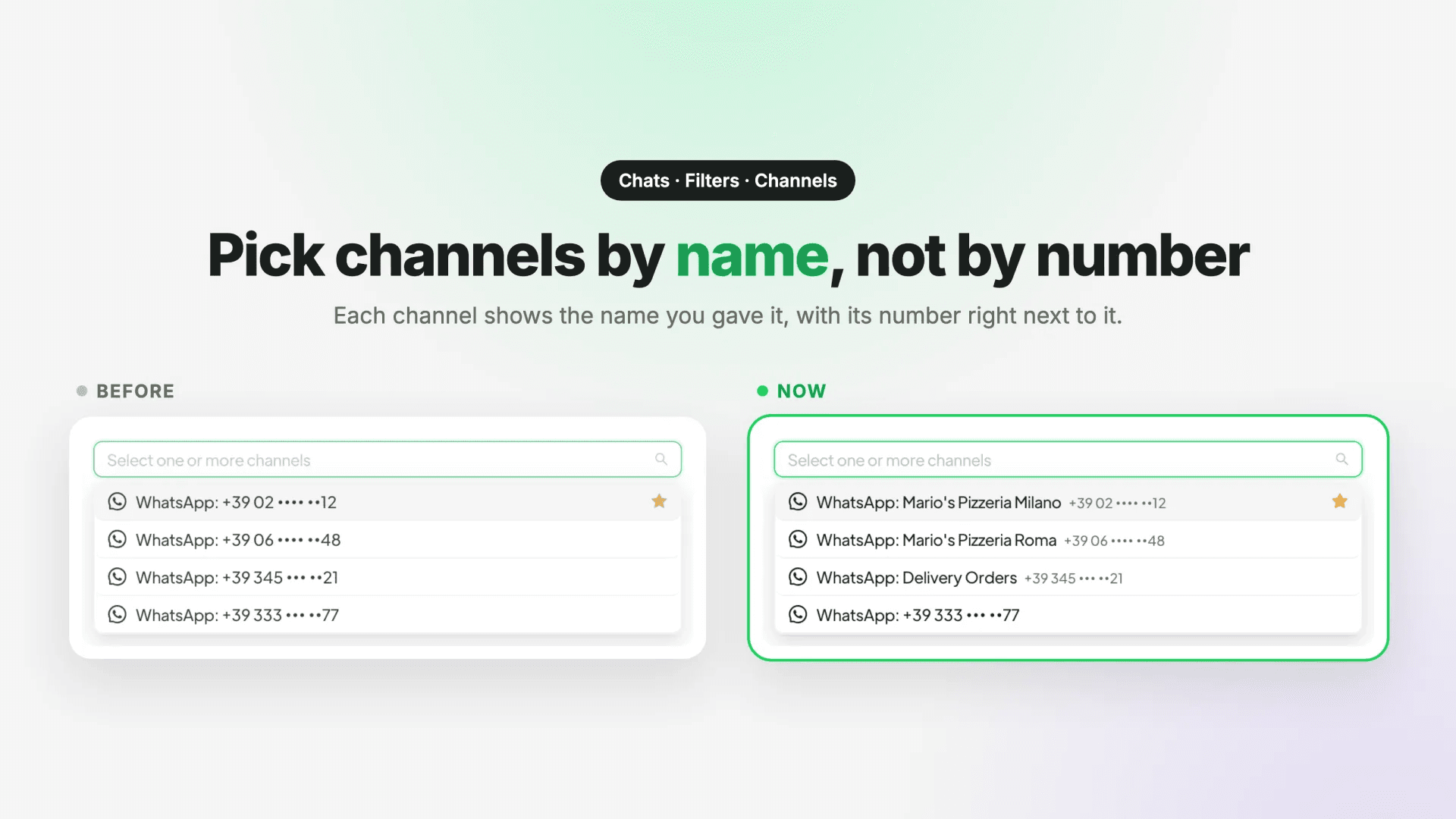
Spoki understands these challenges. That’s why, with our latest update, v20.4.5, Spoki introduces a significant enhancement: Channel Names in Chat Filters. This update revolutionizes how you interact with your WhatsApp channels, making it easier than ever to navigate, filter, and manage your customer conversations. Now, instead of just a string of digits, each channel is clearly identified by its designated name, such as “WhatsApp: Mario’s Pizzeria Milano,” with the associated phone number elegantly displayed in a smaller font. This seemingly small change delivers a massive boost in usability and clarity, especially for accounts managing a portfolio of WhatsApp numbers.
The Problem: Juggling Multiple WhatsApp Numbers Without Clear Identification
Imagine you’re a marketing manager overseeing several campaigns across different geographical regions, each with its dedicated WhatsApp number. Or perhaps you’re an e-commerce operator using separate numbers for sales, customer support, and order updates. In the past, when you wanted to filter chats by a specific channel, you’d be presented with a list of phone numbers. Unless you had an eidetic memory for digits, you’d likely spend precious moments cross-referencing or even guessing which number corresponded to which channel.
This ambiguity could lead to:
- Increased friction: Slowing down response times and impacting customer satisfaction.
- Operational errors: Accidentally sending messages from the wrong channel.
- Reduced efficiency: Wasting valuable time on administrative tasks instead of focusing on strategic outreach.
This is precisely the pain point that Spoki’s Channel Names in Chat Filters addresses head-on.
The Solution: Clear, Named Channels for Instant Recognition
With Spoki’s v20.4.5 update, the Channels filter in your Chats now displays each channel by its assigned name. This means you’ll see descriptive labels like “WhatsApp: Mario’s Pizzeria Milano” instead of just a phone number. The associated phone number is still present, but it’s now shown in a smaller font, providing context without cluttering the primary identification.
This enhancement is a game-changer for businesses with multiple WhatsApp numbers. You can now:
- Distinguish channels at a glance: Instantly identify the correct channel for your filtering needs.
- Improve workflow efficiency: Spend less time searching and more time engaging with customers.
- Reduce errors: Ensure you’re always working within the correct channel context.
Where to Find It: Navigating to Your Enhanced Channel Filters
Accessing this new feature is straightforward:
- Navigate to Chats within your Spoki dashboard.
- Click on Filters.
- Select Channels.
You’ll immediately notice the improved labeling, making your channel selection process intuitive and fast.
Practical Examples and Use Cases for WhatsApp Automation
The improved Channel Names in Chat Filters significantly enhances the utility of Spoki’s WhatsApp automation capabilities. Let’s explore some practical scenarios:
Use Case 1: E-commerce Customer Support and Sales
An e-commerce business uses Spoki for various WhatsApp communications:
- “WhatsApp: Sales Team – EU” (for European sales inquiries)
- “WhatsApp: Customer Service – US” (for US-based support)
- “WhatsApp: Order Updates – Global” (for automated shipping notifications)
Before: A support agent needs to review chats from the US customer service channel. They would see a list of phone numbers and might pick the wrong one, leading to delays or misdirected responses.
Now: The agent simply filters by “WhatsApp: Customer Service – US,” instantly accessing the relevant conversations. This streamlines their workflow, allowing them to provide faster, more accurate support, which is critical for customer satisfaction and retention.
Use Case 2: Marketing Campaigns Across Different Brands or Products
A marketing agency manages WhatsApp campaigns for multiple clients or product lines, each with its own WhatsApp Business API number via Spoki:
- “WhatsApp: BrandX – New Product Launch”
- “WhatsApp: BrandY – Loyalty Program”
- “WhatsApp: Agency – Lead Gen”
Before: The marketing manager wants to analyze engagement for the “BrandX – New Product Launch” campaign. They would have to remember or look up the specific phone number associated with that campaign to filter chats.
Now: They can easily select “WhatsApp: BrandX – New Product Launch” from the filter, quickly gaining insights into campaign performance, managing leads, and optimizing automated messaging sequences. This clarity supports better decision-making and more effective campaign management.
Use Case 3: Regional Business Operations
A restaurant chain uses Spoki for local order taking, reservations, and promotions:
- “WhatsApp: Mario’s Pizzeria Milano”
- “WhatsApp: Luigi’s Trattoria Roma”
- “WhatsApp: Spaghetteria Napoli”
Before: A central manager wants to check on reservations for the Milan branch. They would see a list of numbers and might confuse the Milan number with the Rome or Naples one.
Now: The manager filters by “WhatsApp: Mario’s Pizzeria Milano,” immediately seeing all relevant chats for that specific location. This ensures that local teams can manage their specific customer interactions efficiently, from automated booking confirmations to personalized promotional messages.
Enhanced Search Functionality: Finding Channels by Name or Number
Beyond clearer labeling, Spoki’s v20.4.5 update also improves the search capabilities within the Channels filter. The search box can now find channels by either their assigned name or their associated phone number. This dual search capability adds another layer of convenience and flexibility:
- If you remember the channel’s descriptive name, simply type it in.
- If you only recall a part of the phone number, that will work too.
This intelligent search ensures that no matter how you remember your channels, you can quickly locate and filter them, further streamlining your WhatsApp communication management.
The Importance of Naming Your Channels Effectively
To maximize the benefits of this update, it’s crucial to adopt a clear and consistent naming convention for your WhatsApp channels within Spoki. Think about names that are:
- Descriptive: Clearly indicate the channel’s purpose, region, or associated campaign (e.g., “Sales – EMEA,” “Support – APAC,” “Marketing – Q3 Promo”).
- Concise: Easy to read and understand at a glance.
- Consistent: Follow a uniform structure across all your channels for better organization.
Remember, a channel with no name, or whose name is just its number, will still show only the number. To take full advantage of this feature, ensure your channel names are updated in your Spoki Channels settings. If a customer sees the wrong name, they can rename the channel there.
Spoki’s Commitment to Usability and Clarity
This update reflects Spoki’s ongoing commitment to providing a user-friendly and powerful platform for WhatsApp Business API communication. By enhancing the clarity and searchability of your channels, Spoki empowers marketing managers, business owners, and e-commerce operators to:
- Save time: Reduce the effort spent on administrative tasks.
- Improve accuracy: Minimize errors in channel selection and message delivery.
- Boost productivity: Focus more on engaging customers and driving conversions.
- Scale efficiently: Manage a growing number of WhatsApp channels without added complexity.
These improvements directly contribute to more effective WhatsApp automation strategies, allowing you to leverage chatbots for instant responses, automate messaging for customer support, and streamline your overall customer engagement workflows.
Beyond Filters: The Power of WhatsApp Business API with Spoki
While Channel Names in Chat Filters significantly improves your daily operations, it’s just one piece of the puzzle that makes Spoki an indispensable tool for businesses. Spoki integrates seamlessly with the WhatsApp Business API Documentation, unlocking a world of possibilities for automated, personalized, and scalable customer communication. From setting up sophisticated chatbots that handle common queries to orchestrating automated messaging sequences for lead nurturing and post-purchase support, Spoki ensures your business stays connected and responsive.
For those looking to deepen their understanding of WhatsApp automation and optimize their Spoki experience, exploring the Spoki Academy offers valuable insights and guides. Additionally, understanding how Spoki facilitates CRM integration guides can further streamline your customer data management and communication strategies.
Conclusion: Streamline Your WhatsApp Management Today
The introduction of Channel Names in Chat Filters (v20.4.5) is a testament to Spoki’s dedication to enhancing usability and efficiency for businesses utilizing WhatsApp Business API. This update provides unparalleled clarity and ease of navigation for accounts managing multiple WhatsApp channels, transforming a potentially confusing process into an intuitive one. By allowing you to instantly identify channels by name and search effectively, Spoki empowers you to manage your customer conversations with greater precision and speed.
Ready to experience the difference clear channel identification can make for your business? Streamline your WhatsApp communication, enhance your customer engagement, and boost your team’s productivity with Spoki’s intuitive platform.
Start for free with Spoki — no credit card required.