AI Reply Hours: Optimize WhatsApp Customer Service with Spoki
Content
In today’s fast-paced digital landscape, businesses are constantly seeking innovative ways to enhance customer communication and streamline operations. For marketing managers, business owners, e-commerce operators, and SMBs leveraging WhatsApp Business for customer interactions, the challenge often lies in balancing instant responsiveness with the need for human oversight. While AI-powered chatbots offer unparalleled efficiency, there are times when a human touch is essential, or when automated responses are simply not appropriate. This is where Spoki’s new AI Reply Hours feature (v19.7.0) becomes a game-changer, allowing you to precisely define when your AI agents are active and when they should defer to your human team. This powerful update ensures that your WhatsApp automation strategy remains customer-centric and always in control.
Imagine a scenario where a customer sends a query late at night. While an AI could respond, the nature of the query might require follow-up from a human agent during business hours. Previously, this could lead to an AI providing a partial answer, potentially confusing the customer or setting incorrect expectations. With AI Reply Hours, you gain granular control, ensuring your AI agents operate only when it makes strategic sense, thereby improving the overall customer experience and optimizing your team’s workflow. This feature is designed to empower your business to deliver consistent, high-quality service without over-automating critical customer touchpoints.
Understanding AI Reply Hours: Precision Control for Your WhatsApp Automation
The core of the AI Reply Hours feature is its ability to provide businesses with precise control over their AI agents’ operational windows. This means you can now dictate exactly when your AI agents are permitted to reply to customer messages on WhatsApp. Outside these predefined hours, the AI will remain silent, effectively handing over the conversation to your human team. This ensures that complex inquiries, sensitive issues, or conversations requiring immediate human intervention are handled appropriately, preventing any miscommunication or customer frustration that might arise from an AI operating outside its optimal scope.
This functionality is particularly vital for businesses that operate within specific timeframes or have dedicated customer service teams available only during certain hours. By aligning your AI’s availability with your human team’s operational hours, you create a seamless customer service experience. Customers receive automated assistance when it’s most efficient, and human support when it’s most necessary, all without the risk of conflicting or out-of-hours AI responses.
Activating and Configuring AI Reply Hours in Spoki
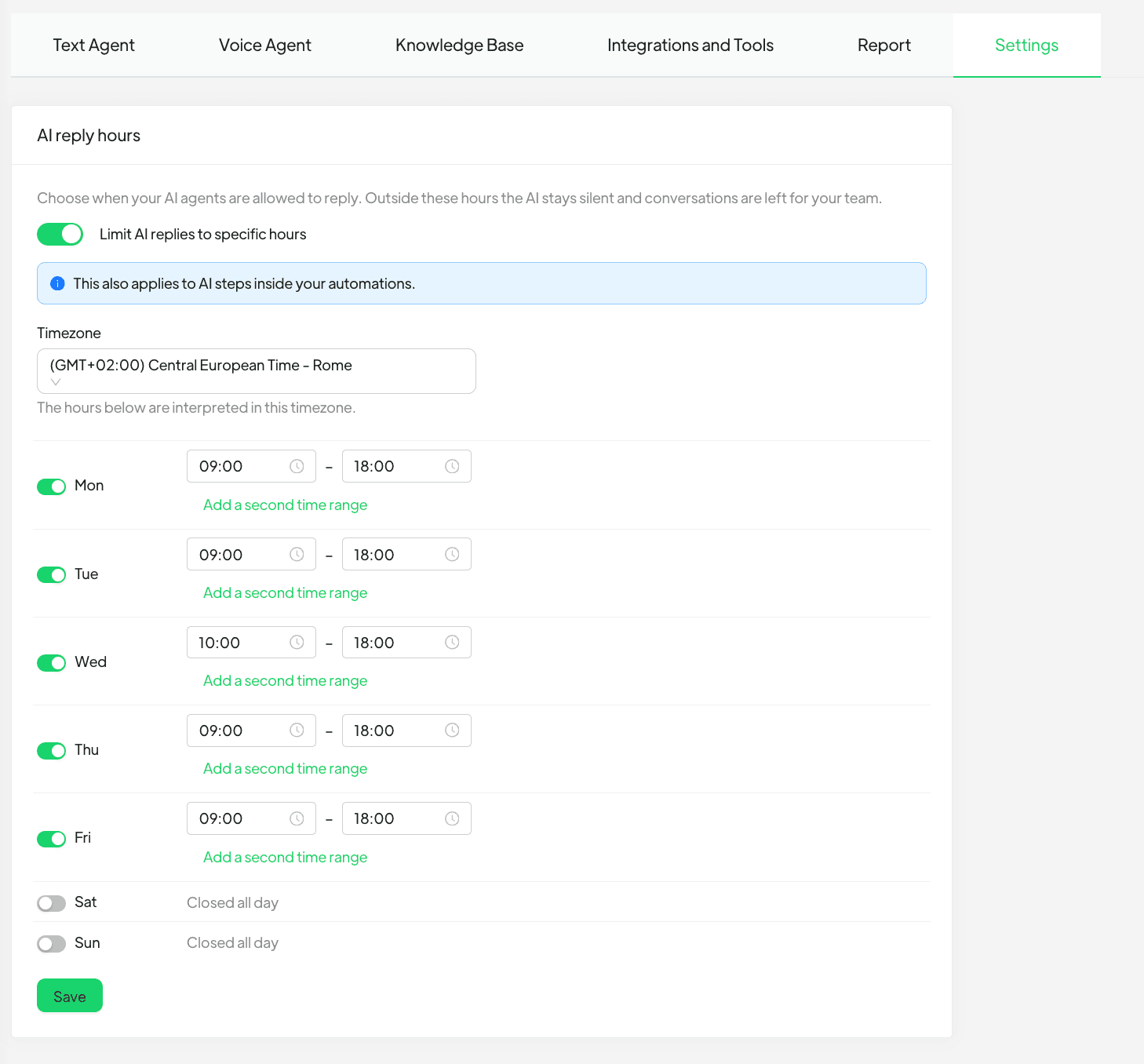
Enabling and configuring AI Reply Hours is straightforward, designed for ease of use by marketing managers and business owners alike. The feature can be activated directly within your Spoki account, providing a centralized control panel for your AI’s operational parameters.
- Navigate to AI → Settings: This is your central hub for managing all aspects of your AI agents within Spoki.
- Select Your Timezone: Crucially, you’ll need to choose the timezone in which these hours should be interpreted. This ensures that your AI’s operating schedule accurately reflects your business’s local time, regardless of where your customers or even your servers are located.
- Configure Daily Time Ranges: For each day of the week, you can open or close the AI’s reply capability. What makes this feature exceptionally flexible is the ability to set up to two distinct time slots per day. This allows for nuanced scheduling, such as a morning operational window and an afternoon window, with a break in between for lunch or other internal processes. This flexibility is invaluable for businesses with varying operational schedules or those looking to optimize AI usage around peak and off-peak hours.
The beauty of this system is its comprehensive application. These defined hours don’t just apply to general AI replies; they also extend to AI steps embedded within your automations. This means that any automated responses that rely on AI processing will also adhere to these set times, preventing any unintended automated messages from being sent after your closing hours. This holistic approach ensures consistency across all your WhatsApp automation efforts.
Practical Examples: Leveraging AI Reply Hours for Enhanced WhatsApp Customer Service
Let’s explore some real-world scenarios where AI Reply Hours can significantly benefit your business, particularly for those utilizing the WhatsApp Business API for customer engagement.
Scenario 1: E-commerce Customer Support During Business Hours
An e-commerce business receives numerous customer inquiries via WhatsApp, ranging from order status updates to product information. They have a dedicated customer service team available from 9 AM to 5 PM, Monday to Friday. Outside these hours, they prefer that complex queries wait for a human agent rather than receiving a generic AI response that might not fully address the issue.
- Before AI Reply Hours: The AI might respond to a complex query at 10 PM, providing a basic answer that doesn’t fully resolve the customer’s issue, leading to frustration and a need for the customer to repeat their query the next day.
- With AI Reply Hours: The e-commerce business configures their AI to operate only from 9 AM to 5 PM, Monday to Friday. If a customer sends a message at 10 PM, the AI remains silent. An automated message (not AI-driven, but a standard Spoki automation) could inform the customer that their message has been received and a human agent will respond during business hours. This sets clear expectations and ensures a human agent handles the query directly when they are available, leading to higher customer satisfaction.
Scenario 2: Service-Based Business with Scheduled Breaks
A local service business, such as a salon or a repair shop, uses WhatsApp for appointment bookings and inquiries. Their staff takes a lunch break from 1 PM to 2 PM daily, during which they cannot monitor WhatsApp messages.
- Before AI Reply Hours: An AI might continue to respond during the lunch break, potentially giving information that needs human confirmation or engaging in a conversation that will be abruptly paused when staff returns.
- With AI Reply Hours: The business sets two daily time slots for their AI: 9 AM to 1 PM and 2 PM to 6 PM. During the 1 PM to 2 PM lunch break, the AI is inactive. This ensures that any messages received during this hour are handled by staff once they return, or a non-AI automated message can inform customers of the break, maintaining professionalism and managing expectations.
Scenario 3: Global Businesses with Regional Support Teams
A global software company has support teams in different time zones. They want their AI to assist customers primarily during the active hours of their respective regional support teams to provide localized and timely assistance.
- With AI Reply Hours: The company can configure multiple AI agents (or a single AI agent with different settings applied based on customer segments or routing rules) to operate according to the business hours of each regional support team. For instance, an AI serving European customers operates during CET business hours, while another (or the same AI with different settings) serves North American customers during EST business hours. This ensures that AI support is always aligned with the availability of human backup, providing a cohesive global customer experience.
Strategic Advantages for Marketing Managers and Business Owners
Implementing AI Reply Hours offers a multitude of benefits that directly impact your bottom line and customer relationships:
- Enhanced Customer Experience: By ensuring AI responses are timely and appropriate, you prevent frustration from out-of-hours or incomplete automated replies. Customers receive the right level of support at the right time.
- Improved Team Efficiency: Your human agents can focus on complex issues during their working hours, knowing that the AI handles routine queries during its active periods. This reduces the burden on your team and allows them to prioritize high-value interactions.
- Greater Control and Brand Consistency: Maintain tighter control over your brand’s voice and messaging. The AI operates within your defined parameters, ensuring consistency in communication and preventing any off-brand or untimely automated interactions.
- Optimized Resource Allocation: Allocate your AI resources more effectively. By defining specific operating hours, you ensure your AI is working when it’s most impactful, rather than consuming resources unnecessarily during off-peak times.
- Seamless Integration with WhatsApp Business API: For businesses leveraging the WhatsApp Business API Documentation, AI Reply Hours integrates seamlessly, enhancing your existing automation workflows without requiring complex overhauls. This feature builds upon the robust capabilities of WhatsApp for business communication.
Integrating AI Reply Hours with Your Broader WhatsApp Automation Strategy
AI Reply Hours isn’t just a standalone feature; it’s a powerful addition to your comprehensive WhatsApp automation strategy. When combined with other Spoki features, it creates an even more robust and efficient customer communication system.
Synergy with Automated Messaging and Chatbots
Consider how AI Reply Hours complements your existing automated messaging. You can set up non-AI automated messages to trigger outside of AI Reply Hours. For example, if a customer messages after hours, an automation can send a polite message stating that your team will respond during business hours, providing an estimated response time, or directing them to an FAQ page. This keeps customers informed and manages expectations, even when your AI is silent.
For businesses using chatbots for specific tasks, AI Reply Hours ensures that these chatbots operate within a controlled environment. If a chatbot is designed to collect specific information before handing over to a human, setting reply hours ensures that this handover happens when a human agent is actually available to take over, preventing a fragmented customer journey.
Leveraging CRM Integrations
When Spoki is integrated with your CRM, the data collected during AI interactions can be seamlessly passed to your human agents. With AI Reply Hours, this integration becomes even more powerful. Messages received outside AI hours, which are then handled by human agents, can be logged and tracked within your CRM, providing a complete customer history. This ensures that every interaction, whether AI-driven or human-led, contributes to a unified customer profile, enabling personalized and informed follow-ups.
Conclusion: Take Control of Your WhatsApp Customer Service with Spoki’s AI Reply Hours
In the competitive landscape of modern business, delivering exceptional customer service is paramount. Spoki’s new AI Reply Hours feature empowers marketing managers, business owners, e-commerce operators, and SMBs to strike the perfect balance between efficient AI automation and invaluable human interaction on WhatsApp. By defining precise operating hours for your AI agents, you gain unprecedented control, ensuring that your customer communication is always strategic, timely, and aligned with your business’s operational capabilities.
This feature not only enhances the customer experience by preventing untimely or inappropriate AI responses but also significantly boosts your team’s efficiency, allowing them to focus on what they do best. It’s about smart automation – leveraging AI where it excels, and knowing when to let your human team shine. Take the next step in optimizing your WhatsApp Business strategy and deliver a superior customer journey.
Start for free with Spoki — no credit card required.