Dynamic Values in If / Else: Smarter WhatsApp Automations
Content
In today’s fast-paced digital landscape, businesses are constantly seeking ways to enhance customer engagement and streamline operations. For marketing managers, business owners, e-commerce operators, and SMBs leveraging WhatsApp Business for customer communication, the ability to create truly responsive and personalized experiences is paramount. However, traditional automation flows often hit a wall when they can only compare conditions against static, fixed values. This limitation can hinder the creation of sophisticated interactions, making it challenging to verify real-time data or adapt to individual customer journeys.
Spoki understands these challenges. That’s why, with the release of v20.4.0, the If / Else step in Spoki Automations now supports comparing a condition with a dynamic value. This significant enhancement unlocks a new level of flexibility and power for your WhatsApp automation flows. Instead of being confined to fixed values, you can now select a contact field, an automation context field, or even a custom object field to drive your conditional logic. Imagine the possibilities: verifying OTP codes, matching customer data, or personalizing messages based on recent interactions – all in real-time. If the dynamic value happens to be empty, the contact will simply proceed through the ‘No’ branch, ensuring your automations always have a clear path forward.
What Are Dynamic Values in If / Else?
Previously, the If / Else step in Spoki Automations allowed you to set conditions based on a fixed, pre-defined value. While useful for many scenarios, this approach limited the adaptability of your automation flows. With the introduction of dynamic values, you can now instruct Spoki to retrieve a specific piece of information unique to each contact or the current automation context at the moment they reach the If / Else step.
This means your automation can now make decisions based on:
- Contact Fields: Data stored directly within the contact’s profile in Spoki.
- Automation Context Fields: Information generated or passed within the current automation flow.
- Custom Object Fields: Data from custom objects linked to your contacts, offering deep integration with your business logic.
To leverage this feature, simply navigate to Automations → If / Else → Value, and then switch from ‘Fixed value’ to ‘Dynamic value’ to pick the relevant field.
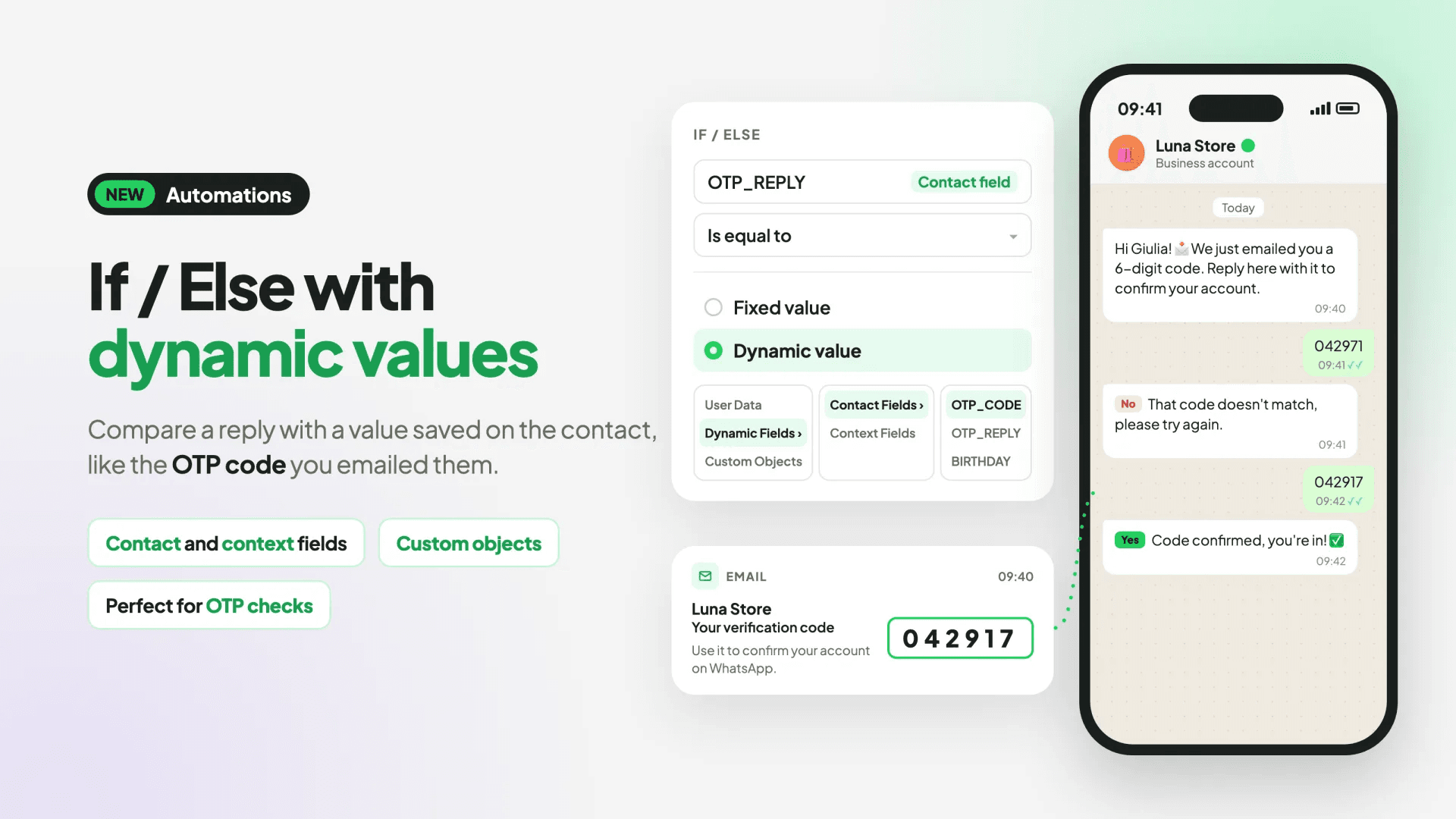
Spoki reads this dynamic value for each contact as they reach the step, enabling highly personalized and responsive interactions. If the dynamic value is empty, the contact will automatically proceed down the ‘No’ branch of your If / Else condition, ensuring a smooth flow without interruptions.
Practical Examples: Revolutionizing WhatsApp Automation
Let’s dive into some concrete examples of how dynamic values can transform your WhatsApp Business API strategies, making your chatbots more intelligent and your automated messaging more effective.
1. Real-Time OTP Verification via WhatsApp
One of the most powerful applications of dynamic values is verifying One-Time Passcodes (OTPs) or confirmation codes. Imagine a scenario where a customer initiates a password reset or a secure transaction on your website. You send them an OTP via email or SMS, and then direct them to WhatsApp to input the code for verification.
Before Dynamic Values: You would struggle to verify if the code the customer replies with matches the one you sent, as the sent code is unique per user and changes with each request.
With Dynamic Values:
- Generate and Store OTP: When a user requests an OTP, your system generates a unique code and stores it in a custom object field associated with that contact (e.g.,
customer_otp_code). - Send OTP and Prompt: Send the OTP via your preferred channel (email/SMS) and simultaneously send a WhatsApp message prompting the user to reply with the code.
- WhatsApp Automation Flow:
- Step 1: User replies with the OTP on WhatsApp.
- Step 2: An If / Else step in Spoki checks if the user’s reply (a dynamic value from the automation context, e.g.,
last_message_text) matches the storedcustomer_otp_code(a dynamic value from a custom object). - Step 3 (Yes Branch): If they match, the user is verified, and the automation proceeds to grant access or confirm the transaction.
- Step 3 (No Branch): If they don’t match, the user is prompted to try again, or a support agent is notified.
This ensures secure and seamless verification directly within WhatsApp, improving customer experience and reducing friction.
2. Personalized Follow-ups Based on Recent Purchases
For e-commerce businesses, dynamic values can drive highly relevant post-purchase communication.
Scenario: A customer just bought a product. You want to send them a personalized thank-you message and offer complementary products based on their purchase history.
With Dynamic Values:
- Store Purchase Data: When a purchase is made, update a custom object field (e.g.,
last_purchased_category) for that contact. - Automation Trigger: An automation is triggered after a purchase.
- If / Else Step: An If / Else step checks the
last_purchased_categorydynamic value.- Condition: If
last_purchased_categoryis ‘Electronics’. - Yes Branch: Send a message like: “Thank you for your recent electronics purchase! Check out our latest accessories for your new gadget.“
- No Branch: Further If / Else steps can check for other categories (e.g., ‘Apparel’, ‘Home Goods’) to send tailored messages.
- Condition: If
This level of personalization significantly boosts customer satisfaction and encourages repeat business.
3. Dynamic Lead Qualification and Routing
Streamline your lead management by dynamically qualifying and routing leads based on their interactions or profile data.
Scenario: A new lead interacts with your WhatsApp chatbot. You want to qualify them based on their industry or company size and route them to the appropriate sales team.
With Dynamic Values:
- Collect Data: During the initial chatbot conversation, ask questions to gather information like ‘industry’ or ‘company size’ and store these in contact fields (e.g.,
contact_industry,contact_company_size). - If / Else Step: An If / Else step checks the
contact_industrydynamic value.- Condition: If
contact_industryis ‘Healthcare’. - Yes Branch: Assign the lead to the ‘Healthcare Sales Team’ and send a tailored message.
- No Branch: Another If / Else step checks for ‘Finance’, ‘Tech’, etc., routing accordingly.
- Condition: If
This ensures leads are handled by specialists, improving conversion rates and sales efficiency.
4. Managing Customer Preferences and Opt-ins
Maintain compliance and respect customer preferences by dynamically checking their opt-in status or communication preferences.
Scenario: You want to send a promotional message, but only to contacts who have explicitly opted in for marketing communications.
With Dynamic Values:
- Store Opt-in Status: Maintain a contact field (e.g.,
marketing_opt_in) that stores ‘Yes’ or ‘No’. - Automation Trigger: An automation is triggered to send a promotional campaign.
- If / Else Step: An If / Else step checks the
marketing_opt_indynamic value.- Condition: If
marketing_opt_inis ‘Yes’. - Yes Branch: Send the promotional message.
- No Branch: Do not send the message, or send a message asking them to opt-in.
- Condition: If
This ensures you always adhere to WhatsApp Business API Documentation guidelines and build trust with your audience.
Where to Find and Implement Dynamic Values
Implementing dynamic values in your Spoki Automations is straightforward:
- Navigate to the Automations section within your Spoki account.
- Create a new automation or edit an existing one.
- Drag and drop an If / Else step into your automation flow.
- In the If / Else step configuration, next to the condition, you’ll see the ‘Value’ setting.
- Click on the dropdown menu and switch from ‘Fixed value’ to ‘Dynamic value’.
- A new dropdown will appear, allowing you to select the specific field: a contact field, an automation context field, or a custom object field.
- Choose the field that holds the data you want to compare dynamically.
Remember, if the dynamic value is empty when a contact reaches this step, they will automatically proceed through the ‘No’ branch of your If / Else condition. This provides a robust fallback mechanism for all your automation flows.
Enhance Your WhatsApp Strategy with Spoki
The introduction of dynamic values in the If / Else step is more than just a new feature; it’s a gateway to creating significantly more intelligent, personalized, and efficient WhatsApp automation flows. For marketing managers, this means more effective campaigns and higher engagement rates. For business owners and e-commerce operators, it translates to streamlined customer service, better lead qualification, and ultimately, increased conversions.
Spoki is committed to providing tools that empower businesses to maximize the potential of WhatsApp Business. By integrating dynamic data into your conditional logic, you can move beyond static interactions and build truly responsive customer journeys that adapt in real-time. This not only saves you valuable time but also elevates the entire customer experience, fostering loyalty and driving growth.
Explore more about how Spoki can transform your customer communication by visiting the Spoki Blog or checking out our Product Updates for the latest features and enhancements.
Conclusion
The ability to use dynamic values in If / Else conditions marks a significant leap forward for WhatsApp automation. It empowers businesses to create sophisticated, data-driven workflows that respond intelligently to individual customer data and real-time events. From secure OTP verification to hyper-personalized marketing and efficient lead routing, the possibilities are vast.
By leveraging Spoki’s enhanced If / Else step, you can build automations that are not just automated, but truly smart. This leads to more engaging customer interactions, greater operational efficiency, and a stronger competitive edge in the digital marketplace. Don’t let static conditions limit your potential. Embrace the power of dynamic values and elevate your WhatsApp strategy.
Ready to experience the power of dynamic WhatsApp automations? Start for free with Spoki — no credit card required.