Spoki Custom Roles: Granular Permissions for Your Team
Content
In today’s fast-paced digital landscape, efficient team collaboration is paramount for businesses leveraging WhatsApp Business for customer communication. Marketing managers, business owners, e-commerce operators, and SMBs often juggle multiple responsibilities, and ensuring each team member has precisely the right level of access to critical tools is crucial for security, productivity, and compliance. The challenge often lies in the rigidity of predefined user roles, which can either grant too much access, posing security risks, or too little, hindering workflows. This is where Spoki’s latest enhancement, Custom Roles (v19.21.0), steps in, offering an unparalleled level of control and flexibility. Spoki now empowers you to define custom roles with precise permissions for each team member, moving beyond the limitations of default settings to streamline operations and enhance security.
Why Custom Roles are a Game-Changer for Your WhatsApp Business Strategy
Imagine a scenario where your marketing specialist needs to manage WhatsApp automation campaigns but shouldn’t have access to billing information. Or perhaps your customer support team needs to view chats and send messages but not export your entire contact list. Previously, you might have had to assign a broader role, creating potential vulnerabilities or inefficiencies. Spoki’s Custom Roles feature addresses these pain points directly, allowing you to tailor access permissions to the exact needs of every individual on your team. This precision ensures that everyone has exactly the access they need, no more, no less, fostering a secure and highly efficient work environment.
Building Your Custom Role: A Step-by-Step Guide
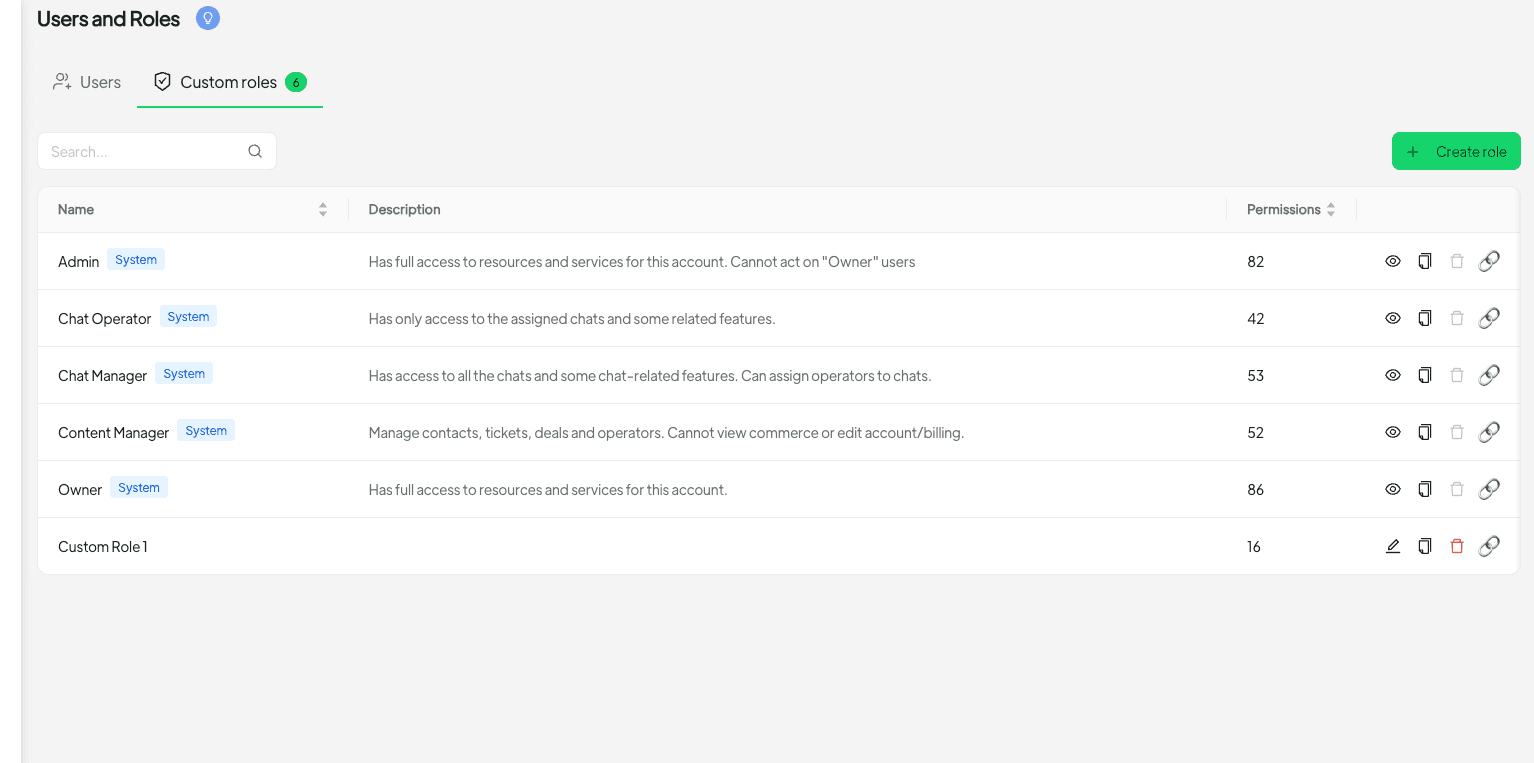
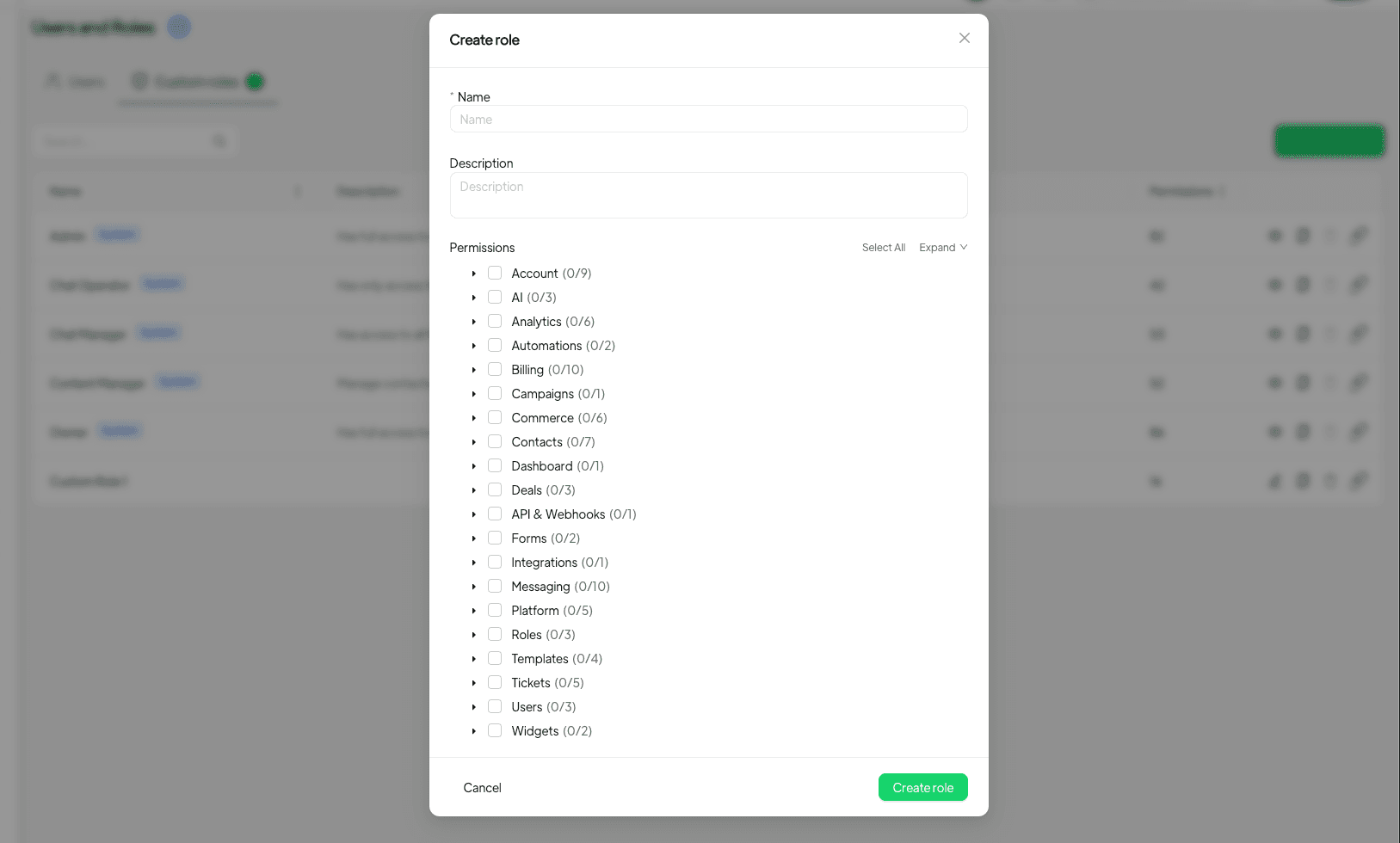
Creating a custom role in Spoki is intuitive and straightforward. Instead of relying solely on default roles, you can now navigate to the ‘Users & Roles’ section, select the ‘Roles’ tab, and build a role from the comprehensive permissions tree. This tree presents a clear, hierarchical view of all available permissions, allowing you to pick and choose with granular detail. Spoki makes it easy to assign who can edit automations, view chats, manage billing, export contacts, and much more.
Practical Examples of Permission Customization:
- Automation Editor: Grant permission to design, modify, and deploy WhatsApp automation flows and chatbots without access to sensitive account settings. This is ideal for marketing specialists focused on campaign execution.
- Chat Viewer & Responder: Allow customer service agents to view all incoming and outgoing chats and respond to customers, but restrict their ability to manage billing or export data.
- Billing Manager: Provide access solely to billing and subscription management for your finance department, keeping them out of day-to-day WhatsApp operations.
- Contact Exporter: Designate specific team members who can export contact lists for CRM integration or other marketing efforts, ensuring data security by limiting this powerful permission.
- Template Creator: Empower team members to create and manage WhatsApp message templates, crucial for maintaining brand voice and compliance, without broader administrative access.
An intelligent feature of Spoki’s Custom Roles is its built-in dependency checker. When a permission requires another to function correctly (e.g., viewing chats might require permission to access the chat module), Spoki will prompt you for confirmation before saving the role. This proactive guidance helps prevent misconfigurations and ensures your custom roles are always functional and effective.
Use Cases: Elevating Your WhatsApp Automation Strategy
Spoki’s Custom Roles are particularly powerful when integrated with your WhatsApp automation strategy, especially for businesses leveraging the WhatsApp Business API for advanced messaging, chatbots, and automated workflows. Here’s how different teams can benefit:
Marketing Teams: Streamlined Campaign Management
For marketing managers, the ability to define roles means greater control over campaign execution. You can assign specific team members to manage WhatsApp automation sequences, A/B test messages, and analyze campaign performance without giving them full administrative access. This ensures focus and reduces the risk of accidental changes to critical account settings. For more insights into leveraging WhatsApp for marketing, explore the Spoki Blog.
Sales Teams: Focused Lead Nurturing
Sales representatives often need to view chat histories, send personalized messages, and track lead interactions. With Custom Roles, you can grant them access to these specific functionalities, ensuring they can effectively nurture leads through WhatsApp without being able to modify core business settings or access sensitive data unrelated to their sales activities. This precision supports efficient lead management and conversion.
Customer Support Teams: Enhanced Service Delivery
Customer support is where WhatsApp truly shines. Custom Roles allow you to empower your support agents to view all customer chats, utilize pre-approved message templates, and even escalate issues, all within defined boundaries. You can prevent them from accessing billing details or exporting contact lists, maintaining data privacy and operational security. This ensures that your support team can deliver exceptional service efficiently and securely.
E-commerce Operators: Optimized Order Management and Communication
E-commerce businesses rely heavily on timely and accurate customer communication. With Custom Roles, you can create roles for order fulfillment teams that allow them to send automated shipping updates via WhatsApp, handle return inquiries, and manage customer service interactions related to purchases, all while restricting access to other sensitive business functions. This helps streamline post-purchase communication and improve customer satisfaction.
Business Owners & SMBs: Ultimate Control and Security
For business owners and SMBs, managing a small team often means wearing many hats. Custom Roles provide peace of mind by allowing you to delegate tasks with confidence. You can ensure that each team member, whether an intern, a part-time assistant, or a senior manager, has exactly the permissions required for their role, minimizing risks and maximizing productivity. This level of control is vital for maintaining security and operational integrity as your business grows.
Assigning and Managing Custom Roles
Once you’ve created your custom role, assigning it is simple. You can assign the new role when inviting someone new to your Spoki account or when editing an existing user’s profile. The beauty of this system is that people with a custom role only see the menus and actions they are allowed to use. This clean, tailored interface reduces clutter, minimizes confusion, and helps team members focus on their specific tasks, further boosting efficiency.
For businesses utilizing the WhatsApp Business API, understanding the nuances of permissions is critical for compliance and effective communication. Spoki’s Custom Roles complement the robust capabilities of the API by allowing you to manage who can initiate conversations, send template messages, and access conversation metrics, all in line with WhatsApp’s policies. For detailed information on the API, refer to the WhatsApp Business API Documentation.
Conclusion: Empower Your Team with Precision Access
Spoki’s Custom Roles (v19.21.0) represent a significant leap forward in empowering businesses to manage their WhatsApp communication with unprecedented control and security. By moving beyond generic roles, you can now tailor access permissions to the precise needs of every team member, from marketing specialists and sales representatives to customer support agents and finance personnel. This not only enhances security by limiting access to sensitive data but also improves operational efficiency by providing a streamlined interface relevant to each user’s responsibilities.
Embrace the power of granular control to optimize your team’s workflow, safeguard your data, and elevate your customer communication strategy on WhatsApp. With Custom Roles, Spoki ensures that your business operates with maximum efficiency and security, allowing you to focus on what matters most: growing your business and delighting your customers.
Ready to experience the benefits of precise team management and powerful WhatsApp automation? Start for free with Spoki — no credit card required.