Spoki Voice Analytics: Unlock Deeper Customer Insights (v19.26.0)
Content
In today’s fast-paced digital landscape, understanding customer interactions is paramount for business growth. For marketing managers, business owners, e-commerce operators, and SMBs leveraging WhatsApp Business for customer communication, gaining actionable insights into voice interactions has traditionally been a challenge. How do you measure the effectiveness of your customer service calls? Are your AI agents performing as expected? What about your human operators? Without clear data, optimizing your communication strategy becomes a guessing game. Spoki’s latest update, Voice Analytics (v19.26.0), addresses these critical questions by offering a comprehensive solution to track and analyze your Spoki Voice calls directly within the Analytics dashboard. This powerful new feature transforms raw call data into strategic insights, empowering you to make data-driven decisions that enhance customer satisfaction and drive business outcomes.
Introducing the New Voice Tab: Your Command Center for Call Performance
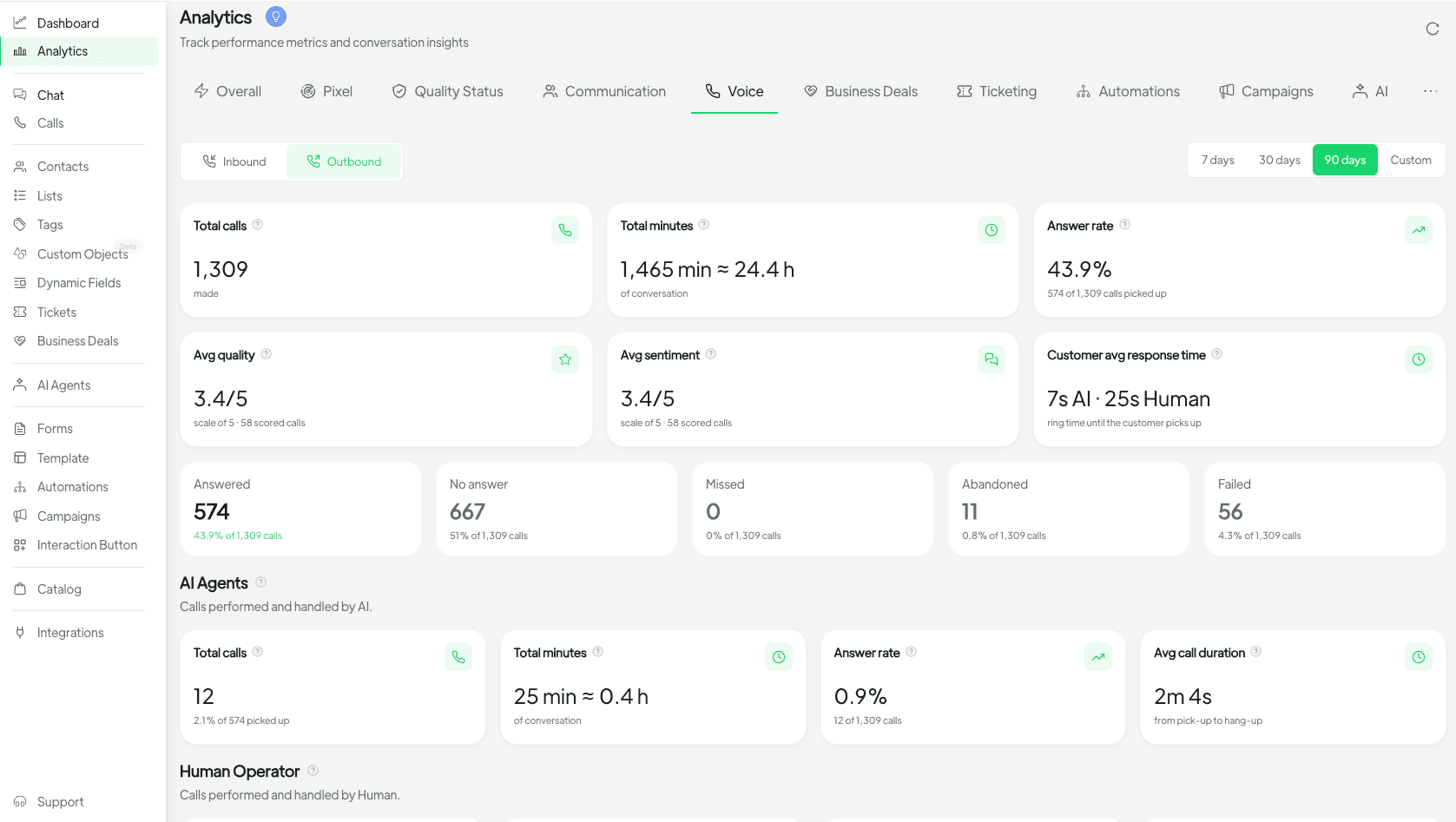
Spoki has rolled out a significant enhancement to its Analytics suite: a dedicated Voice tab. This new section is designed to provide an unparalleled view into your inbound and outbound call performance, offering a holistic understanding of your voice communication strategy. Previously, tracking the nuances of voice calls might have required disparate tools or manual data compilation. Now, all the essential metrics are consolidated in one intuitive interface, making it easier than ever to monitor, evaluate, and refine your customer interactions.
Comprehensive Call Volume and Duration Metrics
The Voice tab immediately presents you with crucial data points: inbound and outbound call volumes, along with the total minutes of conversation. These metrics are fundamental for assessing the overall scale and intensity of your voice communication. For instance, a sudden spike in inbound calls might indicate a successful marketing campaign or a new product launch, while a consistent increase in outbound calls could reflect a proactive sales or customer retention strategy. By tracking these volumes over time, you can identify trends, anticipate resource needs, and allocate your team effectively.
AI Agents vs. Human Operators: A Performance Comparison
One of the standout features of Spoki Voice Analytics is its ability to compare the performance of your AI agents against human operators. This comparison is invaluable for businesses that utilize a hybrid approach to customer service, combining the efficiency of chatbots with the empathy and problem-solving skills of human agents. You can now easily see which type of agent handles more calls, achieves higher answer rates, or maintains longer average durations. This data empowers you to:
- Optimize resource allocation: Determine whether certain types of inquiries are better suited for AI or human intervention.
- Identify training needs: Pinpoint areas where human operators might need additional training to match the efficiency of AI, or vice-versa.
- Refine AI scripts: Use insights from human operator performance to improve the effectiveness and conversational flow of your AI agents.
Navigating Your Data: Intuitive Views and Period Selection
Spoki understands the importance of flexibility when analyzing data. The Voice tab incorporates familiar navigation tools that make data exploration seamless and efficient.
Switching Between Inbound and Outbound Views
Above the charts, you’ll find an easy toggle to switch between inbound and outbound call views. This allows you to focus specifically on the dynamics of incoming customer queries versus your proactive outreach efforts. Understanding the differences in these two communication streams is crucial:
- Inbound View: Helps you assess customer demand, service responsiveness, and the effectiveness of your support channels.
- Outbound View: Provides insights into sales outreach effectiveness, follow-up success rates, and customer engagement initiatives.
Familiar Period Picker for Historical Analysis
Just like other Spoki Analytics tabs, the Voice tab utilizes the same intuitive period picker. This allows you to select specific date ranges – from daily to monthly, quarterly, or custom periods – to analyze trends and performance over time. This historical perspective is vital for:
- Measuring campaign impact: See how call volumes and performance metrics change during and after marketing campaigns.
- Seasonal trend identification: Understand peak periods for customer inquiries or sales calls.
- Long-term strategy evaluation: Track the effectiveness of your communication strategies over extended periods.
Diving Deeper: Key Performance Indicators for Voice Calls
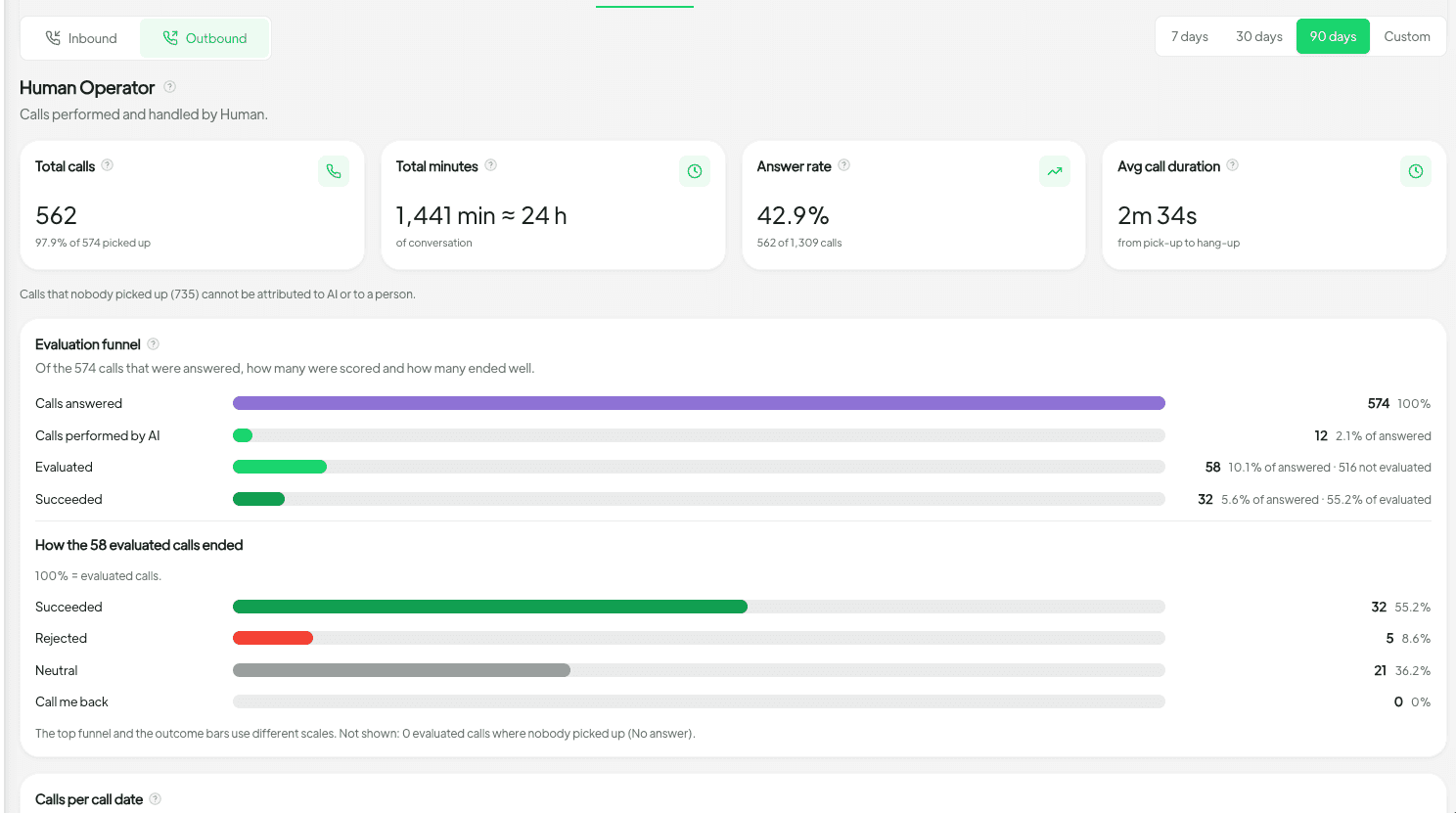
Beyond basic volumes, Spoki Voice Analytics provides a suite of advanced metrics to give you a granular understanding of your call performance.
Answer Rates: Measuring Responsiveness
The answer rate is a critical indicator of your responsiveness to customer inquiries. A high answer rate signifies that your customers are reaching you efficiently, leading to better customer satisfaction. Low answer rates, conversely, can point to understaffing, inefficient routing, or technical issues that need addressing. By monitoring answer rates for both AI and human operators, you can identify bottlenecks and optimize your call handling processes.
Average Duration: Efficiency and Engagement
Average call duration offers insights into the efficiency of your agents and the complexity of customer inquiries. A very short average duration might indicate that issues are resolved quickly, or that calls are being cut short prematurely. A very long duration could mean complex issues are being handled thoroughly, or that agents are struggling to resolve problems efficiently. Comparing average durations between AI and human agents can highlight areas where one might be more effective than the other for specific types of interactions.
Evaluation Outcomes: Quality and Resolution
Understanding the evaluation outcomes of your calls is crucial for quality control and continuous improvement. This metric allows you to track the success or failure of calls based on predefined criteria, such as problem resolution, customer satisfaction, or conversion rates. By analyzing these outcomes, you can:
- Improve agent performance: Identify common reasons for negative outcomes and provide targeted training.
- Refine processes: Discover systemic issues that lead to poor call outcomes.
- Enhance customer experience: Ensure that customer interactions consistently lead to positive resolutions.
Peak Performing Weekdays: Strategic Staffing
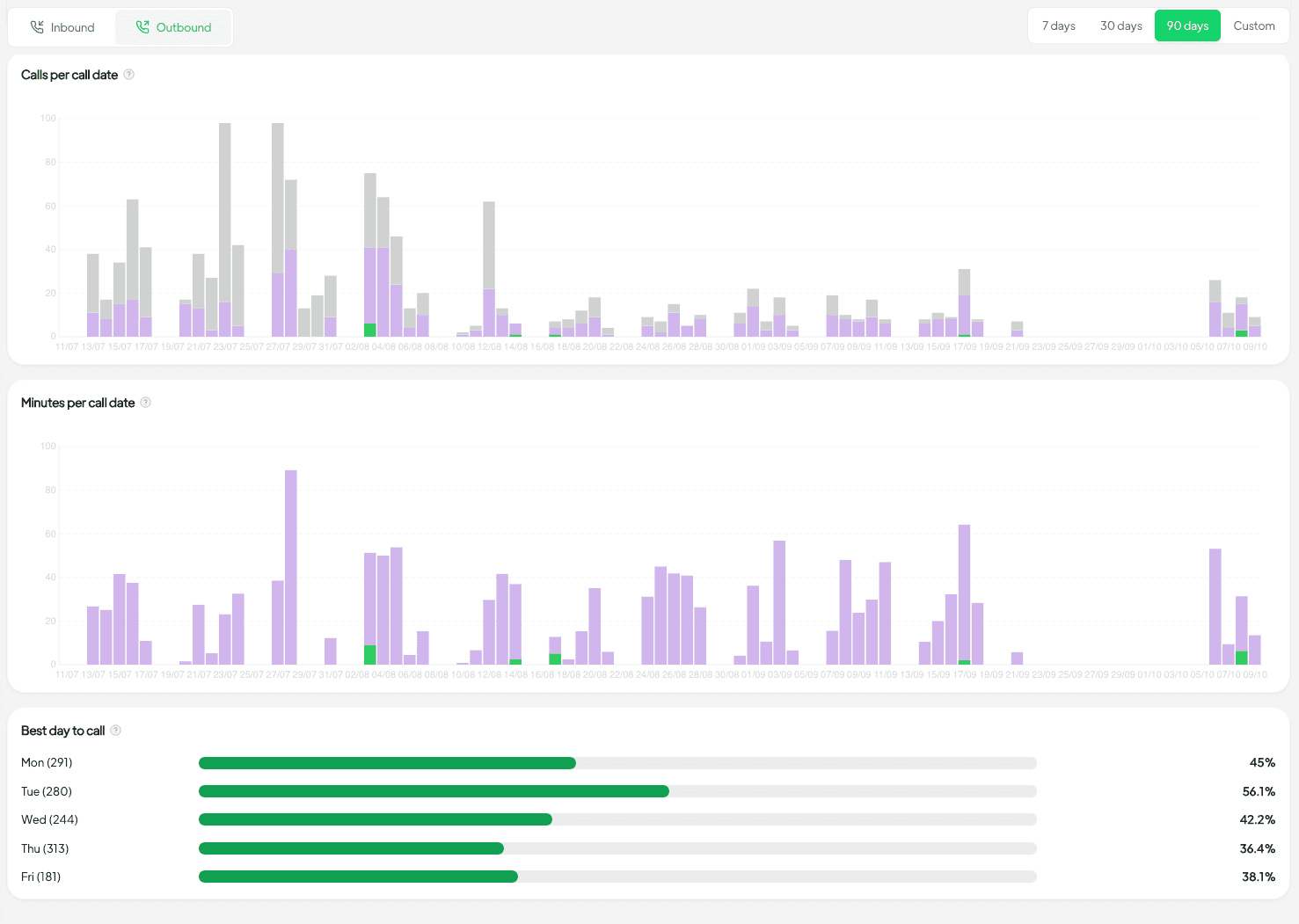
Knowing which weekdays perform best in terms of call volume, answer rates, or positive outcomes allows for strategic staffing and resource planning. If Tuesdays consistently show the highest inbound call volume, you can ensure adequate human operator coverage. If Fridays are peak days for outbound sales calls, you can schedule your sales team accordingly. This data-driven approach to staffing optimizes operational efficiency and ensures you’re always prepared for customer demand.
Practical Use Cases for WhatsApp Automation with Spoki Voice Analytics
For businesses leveraging WhatsApp Business API, chatbots, and automated messaging, Spoki Voice Analytics integrates seamlessly to provide a holistic view of your customer communication ecosystem.
1. Enhancing Customer Support with Hybrid AI-Human Models
Imagine a scenario where your WhatsApp chatbot handles initial customer inquiries. If the chatbot cannot resolve an issue, it seamlessly escalates the call to a human operator via Spoki Voice. With Voice Analytics, you can track:
- Chatbot-to-Voice Handover Efficiency: How many calls are escalated? What’s the average wait time?
- Human Operator Effectiveness Post-Chatbot: Are human agents able to resolve issues more quickly after a chatbot interaction?
- Identification of Common Escalation Triggers: What types of queries consistently require human intervention? This can help refine your chatbot’s capabilities.
This data helps you fine-tune your WhatsApp Business API Documentation and chatbot scripts, ensuring a smooth customer journey and efficient resolution.
2. Optimizing Sales and Lead Qualification Through Automated Messaging
Businesses often use WhatsApp for lead generation and qualification through automated messages. Once a lead shows interest, a Spoki Voice call can be initiated. Voice Analytics allows you to:
- Track Outbound Call Success Rates: How many leads answer your calls? What’s the average duration of these calls?
- Compare Agent Performance in Sales: Which human operators or AI agents are most effective at converting leads into sales over the phone?
- Identify Best Performing Days for Sales Calls: Use the peak performing weekdays metric to schedule your sales team for maximum impact.
By understanding these metrics, you can refine your automated messaging sequences and sales call strategies to boost conversions.
3. Proactive Customer Engagement and Retention
Spoki enables businesses to send automated WhatsApp messages for appointment reminders, order updates, or re-engagement campaigns. If a customer responds with a query that requires a voice call, Spoki Voice facilitates that interaction. Analytics helps you:
- Measure Engagement Call Effectiveness: If you’re making proactive calls (e.g., post-purchase check-ins), track their answer rates and evaluation outcomes.
- Assess Impact on Churn: Can you correlate proactive voice engagement with reduced customer churn?
- Optimize Follow-up Strategies: Determine the ideal timing and content for voice follow-ups based on historical performance.
Where to Find Spoki Voice Analytics
Accessing these powerful insights is straightforward. Simply navigate to Analytics → Voice within your Spoki dashboard. The tab will appear automatically for all accounts that have Spoki Voice enabled. This seamless integration ensures that your voice communication data is always at your fingertips, alongside your other critical WhatsApp Business metrics.
The Spoki Advantage: A Unified Communication Platform
Spoki is committed to providing a comprehensive platform that empowers businesses to excel in customer communication. The addition of Voice Analytics to our suite of tools reinforces this commitment. By bringing voice call tracking directly into your existing Analytics dashboard, Spoki eliminates the need for fragmented data sources and complex integrations. This unified approach allows marketing managers, business owners, and e-commerce operators to gain a complete 360-degree view of their customer interactions, from automated WhatsApp messages to live voice calls.
For more insights into optimizing your communication strategies and leveraging the full potential of Spoki, explore the Spoki Blog, where you’ll find articles on WhatsApp automation, customer engagement, and business growth. Stay informed about the latest enhancements by checking our Product Updates regularly.
Conclusion: Empower Your Business with Data-Driven Voice Communication
Spoki Voice Analytics (v19.26.0) is more than just a new feature; it’s a strategic tool designed to transform how you understand and optimize your customer voice interactions. By providing deep insights into call volumes, agent performance, answer rates, average durations, evaluation outcomes, and peak performing weekdays, Spoki empowers you to make informed decisions that drive efficiency, improve customer satisfaction, and ultimately, grow your business. Integrate these insights with your WhatsApp automation strategies to create a truly seamless and effective communication funnel. Stop guessing and start analyzing. Unlock the full potential of your voice communications today.
Start for free with Spoki — no credit card required.