Voice Step 2.0: Advanced Call Outcome Branching for Automations
Content
In today’s fast-paced digital landscape, businesses need to communicate effectively and efficiently. For marketing managers, business owners, e-commerce operators, and SMBs leveraging WhatsApp Business for customer communication, every interaction counts. Imagine a scenario where your automated customer journey hits a roadblock because a phone call goes unanswered, or a customer leaves a voicemail that isn’t immediately acted upon. This often leads to missed opportunities, frustrated customers, and inefficient workflows. Spoki understands these challenges, and that’s why we’re excited to introduce Voice Step 2.0, a significant enhancement to your automation capabilities. This update empowers you to define specific branches for different call outcomes, transforming how your automations react to real-world conversations.
With Voice Step 2.0, you gain unparalleled control over the post-call journey. Instead of a one-size-fits-all approach, you can now tailor subsequent actions based on whether a call was answered, went to voicemail, achieved a specific goal, or even if a customer requested a callback. This means more dynamic, responsive, and ultimately, more effective WhatsApp automation flows, ensuring no customer interaction is left to chance. Let’s delve into how this powerful new feature can revolutionize your customer engagement strategies.
Understanding Voice Step 2.0: A Branch for Every Outcome
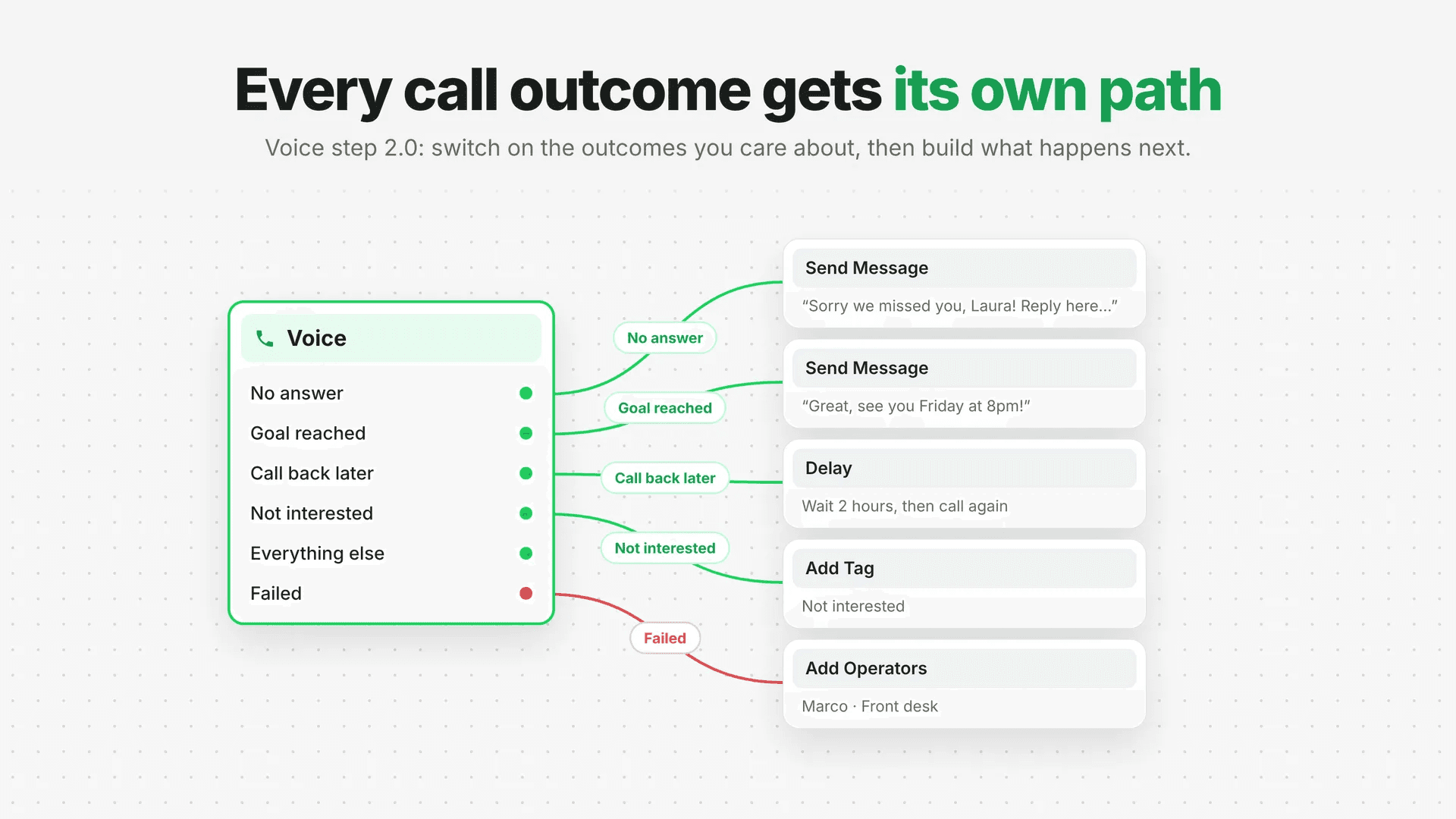
The core innovation of Voice Step 2.0 lies in its ability to create distinct pathways within your automations based on the precise outcome of a phone call. Previously, handling varied call results often required complex workarounds or manual intervention. Now, Spoki simplifies this by allowing you to switch on the outcomes you care about, each transforming into its own dedicated branch ready for the next steps in your customer journey.
How It Works: Granular Control Over Call Results
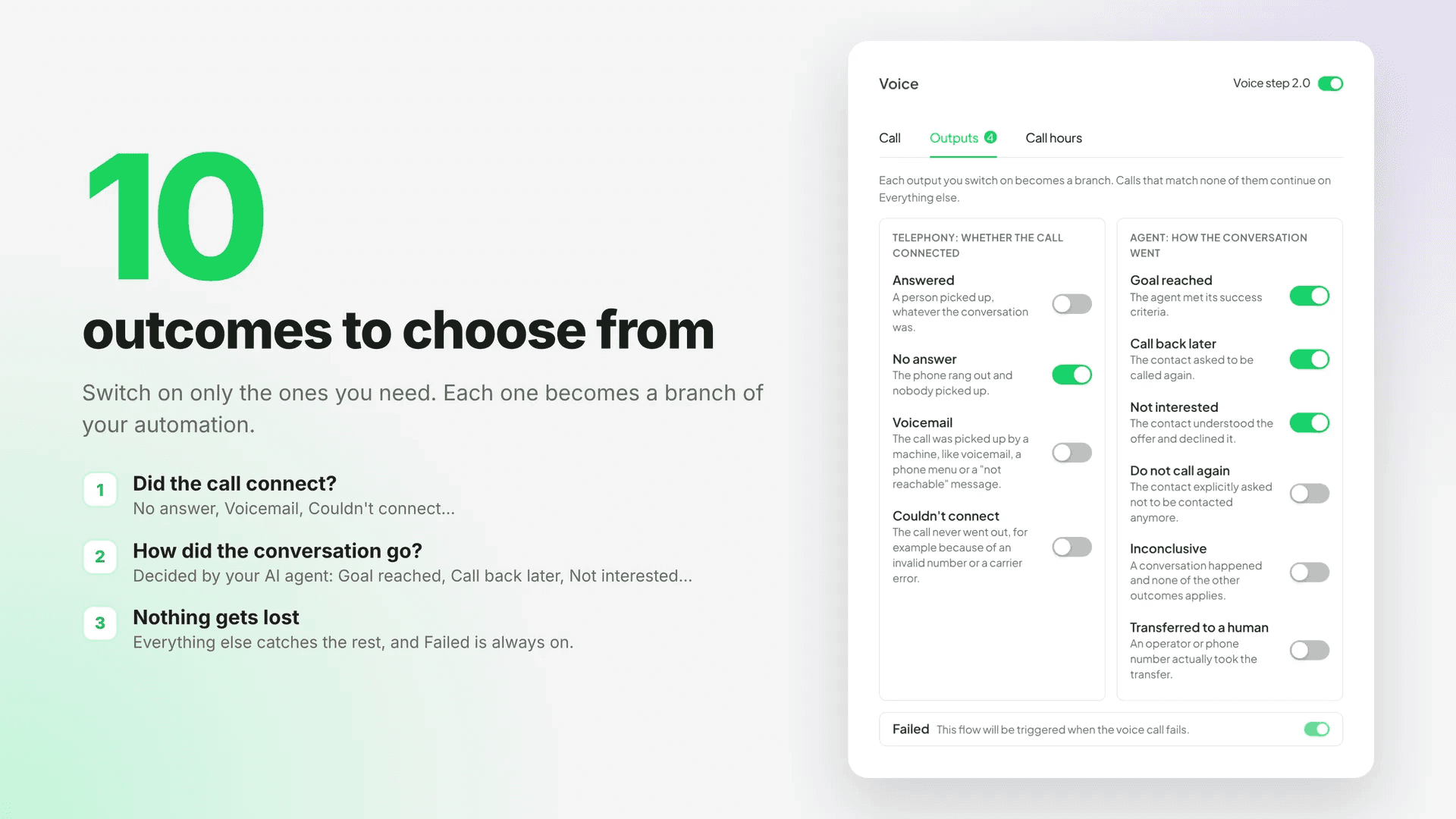
When you integrate a Voice step into your Spoki automations, you’ll find enhanced options in the Outputs tab. Here, you can specify what happens after each call by activating various outcome branches:
- No Answer: What if your customer doesn’t pick up? Instead of ending the automation, you can now trigger an immediate follow-up WhatsApp message, schedule a reminder for your team, or even attempt a call again later.
- Voicemail: If a call goes to voicemail, you can automatically send a WhatsApp message summarizing the reason for the call, providing relevant information, or offering a direct link to book a meeting.
- Goal Reached: This is crucial for sales and support teams. If the call successfully achieves its objective (e.g., a sale made, an issue resolved, an appointment booked), you can move the customer to a ‘post-conversion’ automation, update their CRM status, or send a thank-you message.
- Call Back Later: When a customer requests a callback, this branch can automatically create a task for your team, add them to a specific ‘callback queue’, or send a confirmation message via WhatsApp.
- Not Interested: If a customer explicitly states they are not interested, you can use this branch to remove them from future outreach campaigns, update their preferences, or send a polite ‘no hard feelings’ message.
- Everything Else: For calls that don’t fit into any of the predefined categories, this branch acts as a catch-all, ensuring no call outcome is left unaddressed.
- Failed: This branch is always present and handles technical issues or unexpected call failures, allowing you to implement recovery procedures or alert your team.
This level of detail ensures that your automations are not just reactive but intelligently adaptive, responding to the nuances of human interaction.
Seamless Transition: New vs. Existing Voice Steps
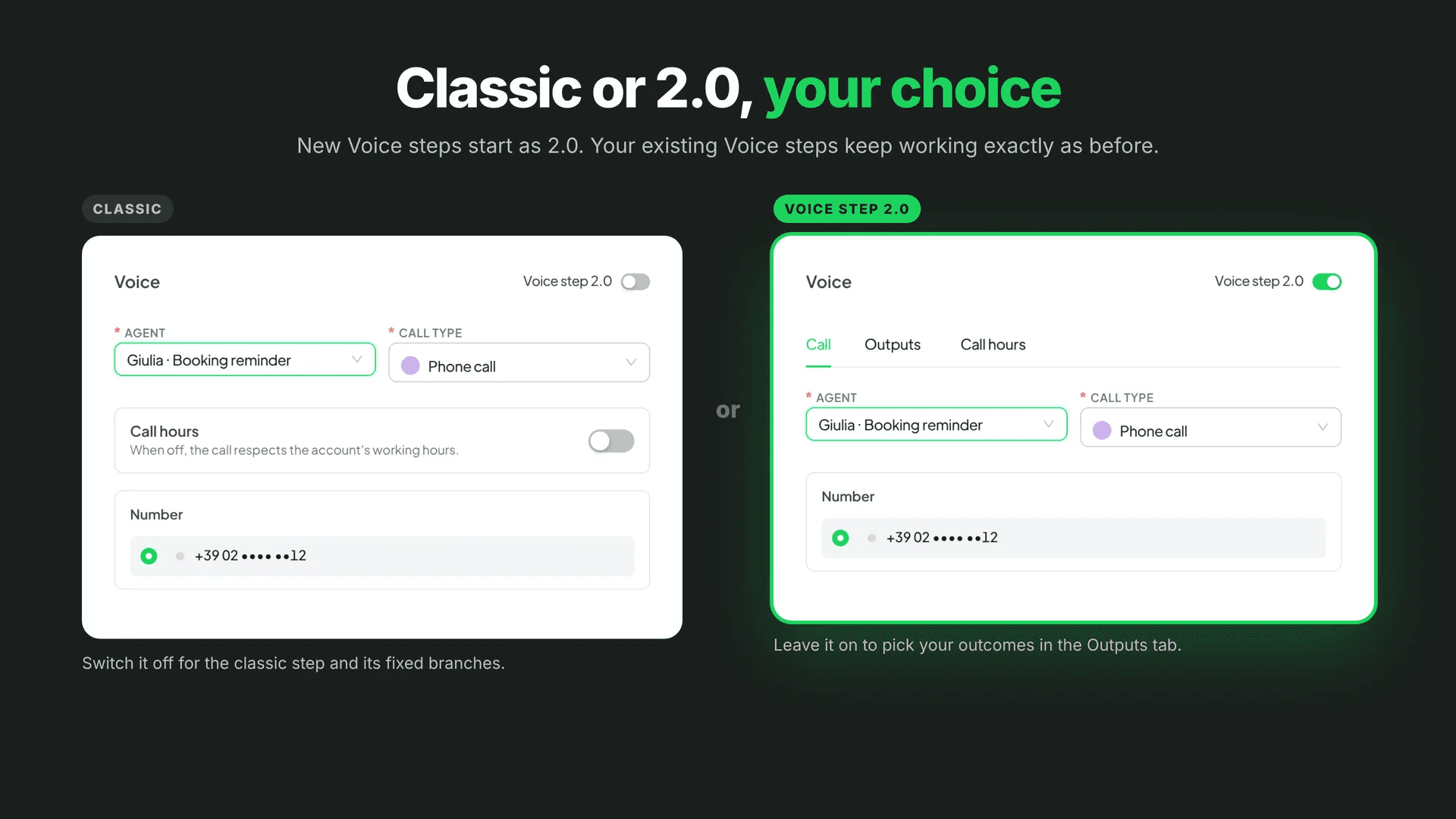
For new Voice steps you add to your automations, Voice Step 2.0 will be the default, immediately providing you with these advanced outcome capabilities. Spoki believes in continuous improvement while ensuring stability for your existing workflows. Therefore, any Voice steps you already have in place will continue to function exactly as before, without disruption. If, for any reason, you need to revert a new Voice Step 2.0 to the classic version, a simple toggle switch is available within the step settings. This flexibility allows you to gradually adopt the new features at your own pace.
Where to find it: Automations → Add step → Voice, in the Outputs tab.
Practical Examples: Leveraging Voice Step 2.0 in Your WhatsApp Automations
Let’s explore how marketing managers, business owners, and e-commerce operators can implement Voice Step 2.0 to enhance their WhatsApp Business API strategies, improve chatbot interactions, and refine automated messaging.
Use Case 1: Lead Qualification and Nurturing
Scenario: A potential customer fills out a form on your website, expressing interest in a product. Your automation triggers an initial WhatsApp message, followed by an automated call from a sales representative.
-
Call Outcome: Goal Reached (Successful Qualification): If the sales rep successfully qualifies the lead during the call, this branch can immediately:
- Update the lead status in your CRM (e.g., ‘Qualified Lead’).
- Send an automated WhatsApp message with a personalized product catalog or a link to book a demo.
- Assign the lead to a specific sales team member for follow-up.
-
Call Outcome: No Answer: If the lead doesn’t pick up, this branch can:
- Send a polite WhatsApp message: “Hi [Name], we tried reaching you about your interest in [Product]. When would be a good time to connect?”
- Schedule a follow-up call attempt after a few hours or the next day.
- Add the lead to a ‘Missed Call’ segment for targeted re-engagement campaigns.
-
Call Outcome: Voicemail: If the call goes to voicemail, this branch can:
- Send a WhatsApp message with a summary of the call’s purpose and a direct link to schedule a call at their convenience.
- Trigger an internal notification to the sales team to listen to the voicemail and prepare for a follow-up.
-
Call Outcome: Not Interested: If the lead indicates they are not interested, this branch can:
- Remove them from the current sales automation.
- Update their preference in your database to avoid future irrelevant outreach.
- Optionally, send a WhatsApp message asking for feedback on why they’re not interested to improve future strategies.
Use Case 2: Customer Support and Issue Resolution
Scenario: A customer initiates a support request via WhatsApp, which your chatbot handles. If the chatbot can’t resolve the issue, it offers a callback from a support agent.
-
Call Outcome: Goal Reached (Issue Resolved): If the support agent resolves the customer’s issue during the call, this branch can:
- Send a WhatsApp message confirming the resolution and asking for feedback (e.g., a quick survey link).
- Close the support ticket in your helpdesk system.
- Update the customer’s profile with the resolution details.
-
Call Outcome: Call Back Later: If the customer requests a callback at a later time, this branch can:
- Send a WhatsApp message confirming the scheduled callback time.
- Create a scheduled task for the support agent in your CRM or task management tool.
- Temporarily pause other support-related automations for this customer until the callback is completed.
-
Call Outcome: Failed: If the call fails due to technical issues, this branch can:
- Automatically trigger an alternative communication channel, such as sending an email or another WhatsApp message offering immediate chat support.
- Alert the IT team or relevant personnel about the call failure for investigation.
Use Case 3: E-commerce Order Confirmation and Upselling
Scenario: After a customer places a high-value order, an automation triggers an optional call to confirm details or offer an upsell.
-
Call Outcome: Goal Reached (Upsell Successful): If the customer accepts an upsell or cross-sell offer during the call, this branch can:
- Update the order details in your e-commerce platform.
- Send a revised order confirmation via WhatsApp.
- Trigger a new automation for post-purchase engagement related to the upsold product.
-
Call Outcome: No Answer: If the customer doesn’t pick up, this branch can:
- Send a WhatsApp message confirming the original order details and offering a direct link to customer support if they have questions.
- Avoid sending further upsell calls, respecting their availability.
-
Call Outcome: Everything Else: If the call is answered but no upsell occurs, and no specific ‘Not Interested’ outcome is selected, this branch can:
- Simply confirm the order details.
- Continue the customer journey with standard post-purchase WhatsApp messages (e.g., shipping updates, delivery notifications).
Integrating Voice Step 2.0 with Your Spoki Ecosystem
The power of Voice Step 2.0 is amplified when integrated seamlessly with other Spoki features and external tools. Spoki is designed to be a comprehensive solution for WhatsApp Business communication, and understanding its full potential can significantly boost your operational efficiency and customer satisfaction.
WhatsApp Business API and Chatbots
Voice Step 2.0 works hand-in-hand with your WhatsApp Business API Documentation and chatbot strategies. Imagine a scenario where your chatbot identifies a complex query that requires human intervention. It can then initiate a Voice step, and based on the call outcome, the automation can either revert to chatbot support, escalate to a different department via WhatsApp, or send a personalized message from a human agent. This creates a fluid transition between automated and human interactions, ensuring customers always receive the most appropriate support.
CRM Integration and Data Synchronization
For businesses that rely on CRM systems (like HubSpot, Salesforce, or Zoho CRM), Voice Step 2.0 offers immense value. By integrating Spoki with your CRM, every call outcome can trigger an update in the customer’s profile. A ‘Goal Reached’ outcome could automatically update a lead’s stage, while a ‘No Answer’ could schedule a follow-up task. This ensures your customer data is always up-to-date, providing your sales and support teams with a complete view of every customer interaction and preventing data silos.
Automated Messaging and Personalization
The branches created by Voice Step 2.0 are perfect for triggering highly personalized automated messages. Instead of generic follow-ups, you can craft messages that directly address the call’s outcome. For instance, a customer who reached a ‘Goal Reached’ outcome might receive a congratulatory message, while one who left a ‘Voicemail’ might receive a message offering an alternative way to connect. This level of personalization significantly enhances the customer experience and builds stronger relationships.
The Spoki Advantage: Why Voice Step 2.0 Matters
Voice Step 2.0 isn’t just a new feature; it’s a strategic tool designed to help businesses thrive in a competitive market. Here’s why it’s a game-changer:
- Enhanced Customer Experience: By reacting intelligently to every call outcome, you demonstrate a higher level of responsiveness and care, leading to increased customer satisfaction.
- Improved Operational Efficiency: Automating post-call actions saves your team valuable time, allowing them to focus on more complex tasks and high-value interactions.
- Higher Conversion Rates: Tailored follow-ups based on call results increase the likelihood of converting leads into customers and resolving support issues promptly.
- Data-Driven Insights: By tracking specific call outcomes, you gain valuable insights into your communication strategies, allowing for continuous optimization.
- Scalability: As your business grows, Voice Step 2.0 ensures your communication workflows remain robust and adaptable, handling increased call volumes without compromising quality.
Spoki is committed to providing tools that empower businesses to communicate effectively and build lasting customer relationships, always adhering to WhatsApp Business API policies and promoting a customer-first approach. This update is a testament to that commitment, offering unparalleled control and flexibility in your automation journeys.
Conclusion: Elevate Your Automations with Spoki’s Voice Step 2.0
The introduction of Voice Step 2.0 marks a significant leap forward in automation capabilities for businesses using WhatsApp. By providing a branch for every call outcome, Spoki enables you to create more intelligent, responsive, and effective customer journeys. Whether you’re a marketing manager aiming to optimize lead nurturing, a business owner streamlining customer support, or an e-commerce operator enhancing post-purchase engagement, Voice Step 2.0 offers the precision and control you need to succeed.
Don’t let valuable customer interactions fall through the cracks. Embrace the power of dynamic call outcome branching and transform your WhatsApp automations into highly efficient, customer-centric workflows. It’s time to move beyond basic automations and build truly intelligent systems that adapt to every conversation.
Ready to experience the next level of WhatsApp automation? Start for free with Spoki — no credit card required.