WhatsApp Service Message Pricing: What Businesses Need to Know
Content
For businesses leveraging WhatsApp for customer communication, understanding the nuances of its pricing structure is paramount. As of October 1, 2026, Meta is introducing significant changes to how WhatsApp service messages are priced, directly impacting replies sent within the 24-hour customer service window. This update, part of version 19.24.2, marks a shift that requires marketing managers, business owners, e-commerce operators, and SMBs to re-evaluate their WhatsApp Business strategies. While each WhatsApp number will still receive 1,000 free service messages monthly, exceeding this quota will incur standard utility message rates. This article will break down these changes, offer practical advice for managing costs, and highlight how Spoki can help optimize your WhatsApp automation efforts to maintain efficiency and customer satisfaction.
What Are WhatsApp Service Messages and How Are They Changing?
WhatsApp service messages are essentially the free replies businesses send to customers within 24 hours of their last message. This 24-hour window, often referred to as the ‘customer service window,’ has historically allowed for free, back-and-forth communication, facilitating prompt support and engagement. The upcoming change means that from October 1, 2026, these replies will no longer be universally free after a certain threshold.
The New Pricing Structure Explained
- 1,000 Free Service Messages Monthly: Each WhatsApp number associated with your business account will continue to receive 1,000 free service messages every month. This provides a substantial buffer for businesses with moderate customer interaction volumes.
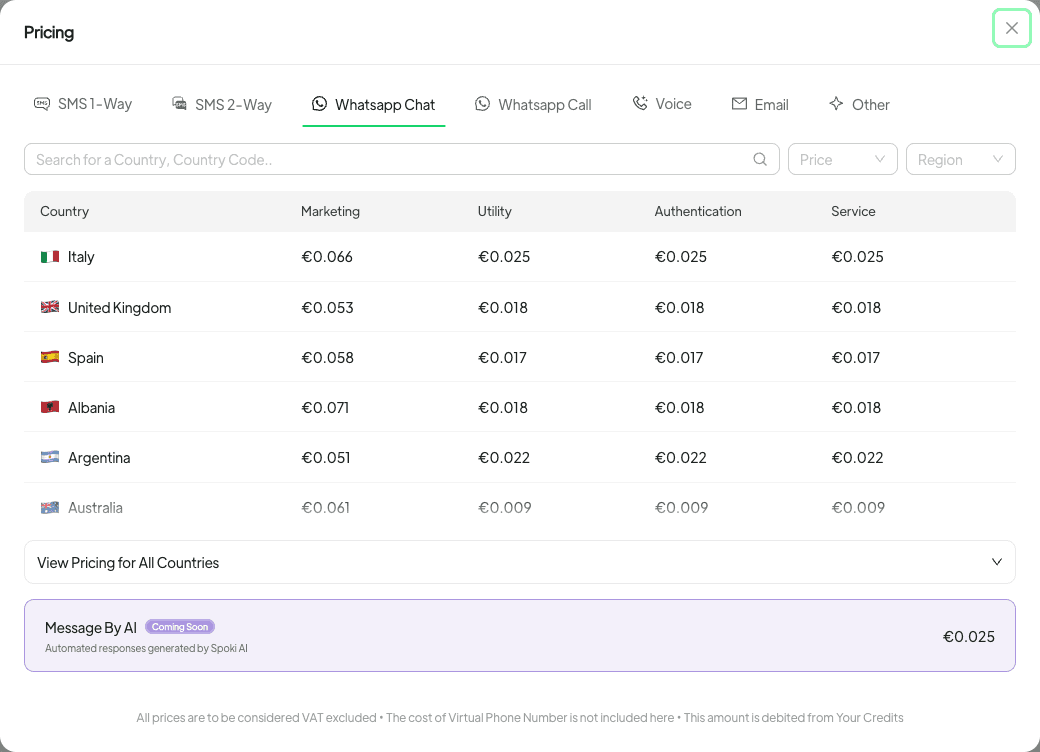
- Charges After Threshold: Once these 1,000 free messages are exhausted, subsequent service messages sent within the 24-hour window will be charged at the same rate as a utility message in the recipient’s country. This is a critical point for businesses with high volumes of customer interactions, as it directly impacts operational costs.
- New Country-Specific Pricing: The price list now includes specific service message prices for every country. Notably, Bangladesh, Iraq, Kazakhstan, Kuwait, Morocco, Nepal, Oman, Sri Lanka, and Ukraine now have their own distinct pricing, reflecting a more granular approach to global rates.
Monitoring Your WhatsApp Service Message Usage with Spoki
Effective cost management starts with robust monitoring. Spoki provides intuitive tools to help you track your service message consumption, ensuring you stay informed and avoid unexpected charges.
Real-time Usage Tracking
Within Spoki, you can easily monitor how many free service messages each of your WhatsApp numbers has remaining. Navigate to Channels → WhatsApp. Here, in the numbers list and within each number’s detailed view, you’ll find an up-to-date count of your remaining free messages. This transparency is crucial for proactive management.
Analytics and Low Usage Warnings
Spoki’s Analytics feature goes a step further by providing proactive warnings. When a number’s free service message usage drops below 10% of its monthly allowance, Spoki will notify you. This early warning system allows you to adjust your communication strategy, consider upgrading your plan, or explore other options before incurring additional costs.
Impact on Different Business Plans
The new pricing structure has specific implications depending on your Spoki plan.
Free Plan Considerations
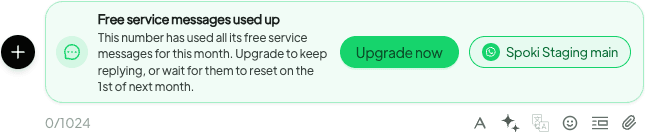
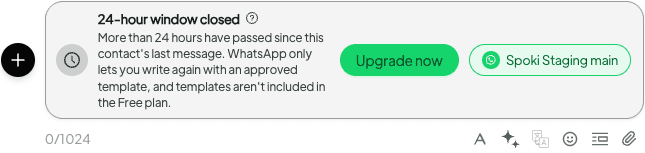
For businesses operating on the Free plan, it’s important to note a key restriction: if a number exhausts all its free service messages, it will be unable to reply to customers until the next month or until you upgrade your plan. This limitation underscores the importance of monitoring usage and planning accordingly. Additionally, template messages are not included in the Free plan, meaning any proactive outreach beyond the 24-hour window would require an upgrade.
Optimizing for Paid Plans
Businesses on paid Spoki plans will find greater flexibility. While the 1,000 free service messages still apply, exceeding this limit will simply result in charges at the standard utility message rate. This allows for continuous customer communication without interruption, making paid plans ideal for businesses with higher customer interaction volumes or those requiring consistent, uninterrupted support.
Practical Strategies for Managing WhatsApp Service Message Costs
Adapting to these changes requires a strategic approach to your WhatsApp communication. Here are practical tips to help you manage costs effectively while maintaining excellent customer service.
Leveraging WhatsApp Automation and Chatbots
The most effective way to manage service message costs is through intelligent automation. Spoki’s WhatsApp Business API integration allows you to deploy sophisticated chatbots that can handle a significant portion of customer inquiries without human intervention.
- Automated FAQs: Design chatbots to answer frequently asked questions instantly. This reduces the need for human agents to send replies within the 24-hour window, preserving your free message quota.
- Self-Service Options: Guide customers to self-service portals, knowledge bases, or product documentation through automated messages. This empowers customers to find solutions independently.
- Lead Qualification: Use chatbots to qualify leads and gather essential information before escalating to a human agent. This ensures that human interaction is focused and efficient, reducing unnecessary back-and-forth.
Optimizing Human Agent Workflow
When human agents are involved, efficiency is key to minimizing message count.
- Comprehensive Replies: Train agents to provide comprehensive answers in a single message whenever possible, reducing the need for multiple follow-up replies within the 24-hour window.
- Proactive Information Sharing: Anticipate customer needs and provide relevant information upfront. For example, if a customer asks about an order, include tracking information, return policy links, and estimated delivery times in the initial response.
- Template Usage: For common scenarios, utilize pre-approved message templates. While templates are not free on the Free plan, they can streamline communication on paid plans and ensure consistent, efficient responses.
Strategic Use of the 24-Hour Window
Understand when and how to best utilize the free 24-hour window.
- Prioritize Critical Interactions: Focus your free service messages on critical customer support issues, sales inquiries, and time-sensitive communications that require immediate human attention.
- Shift Non-Urgent Communication: For non-urgent updates or marketing messages, consider using WhatsApp template messages (which are always paid, but allow for proactive outreach outside the 24-hour window) or other communication channels.
Use Cases for WhatsApp Automation with Spoki
Spoki enhances your WhatsApp Business API capabilities, allowing you to implement advanced automation strategies that save costs and improve customer experience.
Customer Support Automation
Imagine a customer inquiring about their order status. Instead of a human agent typing out a reply, a Spoki-powered chatbot can instantly retrieve the order details from your CRM and provide an update, all within the 24-hour window, potentially using one of your free messages. If the query is complex, the chatbot can gather initial information and then seamlessly hand over to a human agent, who can then provide a concise, comprehensive reply.
Sales and Lead Generation
For businesses in e-commerce, Spoki can automate lead qualification. A customer clicks on a WhatsApp ad, and a chatbot greets them, asking about their product preferences. Based on their responses, the chatbot can recommend products, answer common questions about features or pricing, and even guide them through the purchase process. This reduces the need for human intervention in initial stages, saving service messages for high-value interactions.
Marketing and Engagement
While service messages are primarily for customer replies, Spoki can help manage the entire customer journey. For example, after a customer makes a purchase, you can send an automated order confirmation (a utility message). If the customer replies with a question about their delivery, Spoki’s automation can handle the response, optimizing your use of the free service message quota.
Integrating Spoki for Seamless Operations
Spoki is designed to integrate smoothly with your existing business tools, enhancing your WhatsApp communication without disrupting your workflow.
CRM Integration
Connecting Spoki with your CRM (Customer Relationship Management) system is crucial. This allows for a unified view of customer interactions, ensuring that both automated and human-agent replies are informed by past conversations and customer data. This integration streamlines follow-ups and personalizes communication, making every message more effective.
Data-Driven Decisions
Spoki’s analytics provide valuable insights into message volumes, response times, and customer satisfaction. By analyzing this data, businesses can identify bottlenecks, optimize chatbot flows, and refine their communication strategies to make the most of their free service messages and minimize paid ones.
Looking Ahead: Adapting to WhatsApp’s Evolving Landscape
The changes to WhatsApp service message pricing reflect Meta’s ongoing evolution of the WhatsApp Business Platform. Businesses that embrace automation, monitor their usage diligently, and strategically plan their communication will be best positioned to thrive in this new environment.
Spoki is committed to providing the tools and insights you need to navigate these changes successfully. By leveraging Spoki’s robust automation capabilities, real-time analytics, and seamless integrations, you can continue to deliver exceptional customer experiences on WhatsApp while maintaining cost efficiency.
For more detailed information on how to maximize your WhatsApp Business API usage, explore our WhatsApp Business API Documentation. To understand the full range of features and plans Spoki offers, visit Spoki Pricing Plans. Stay updated with the latest enhancements by checking our Product Updates.
Conclusion: Optimize Your WhatsApp Communication with Spoki
The upcoming changes to WhatsApp service message pricing present both challenges and opportunities for businesses. By understanding the new structure, diligently monitoring your usage with Spoki’s tools, and implementing smart automation strategies, you can continue to leverage WhatsApp as a powerful channel for customer engagement and support without incurring excessive costs. Spoki empowers you to make informed decisions, streamline your communication, and ensure that every message delivers value.
Start for free with Spoki — no credit card required.