Build WhatsApp Automations from Chat with Spoki (v19.10.0)
Content
In today’s fast-paced digital landscape, marketing managers, business owners, and e-commerce operators are constantly seeking more efficient ways to engage with customers. WhatsApp Business has emerged as a powerful channel for direct communication, but building effective automations can often feel like a complex task, requiring intricate visual workflows and significant time investment. What if you could simply tell your platform what you want to achieve, and it builds the automation for you? This is precisely what Spoki’s latest update (v19.10.0) delivers, revolutionizing how you build WhatsApp automations. Say goodbye to cumbersome drag-and-drop interfaces and hello to intuitive, chat-driven automation creation. Spoki now allows you to articulate your desired customer journeys directly in the Dashboard chat, making automation more accessible and streamlined than ever before.
The Evolution of Automation: From Canvas to Conversation
Traditionally, creating robust WhatsApp automations involved navigating complex visual canvases, connecting nodes, and meticulously configuring each step. While powerful, this approach could be time-consuming and presented a steep learning curve for those new to automation. Spoki’s v19.10.0 update fundamentally changes this paradigm by introducing a conversational interface for automation building.
Imagine wanting to set up a welcome sequence for new WhatsApp contacts. Instead of manually adding a trigger, then a message step, then a delay, and finally a tag, you can now simply describe your desired flow in plain language within the Spoki Dashboard chat. For example, you might type: “When someone writes for the first time, send the welcome template, wait a day, then tag them as a lead.” Spoki interprets this natural language input and constructs the entire automation for you, complete with triggers, steps, and connections.
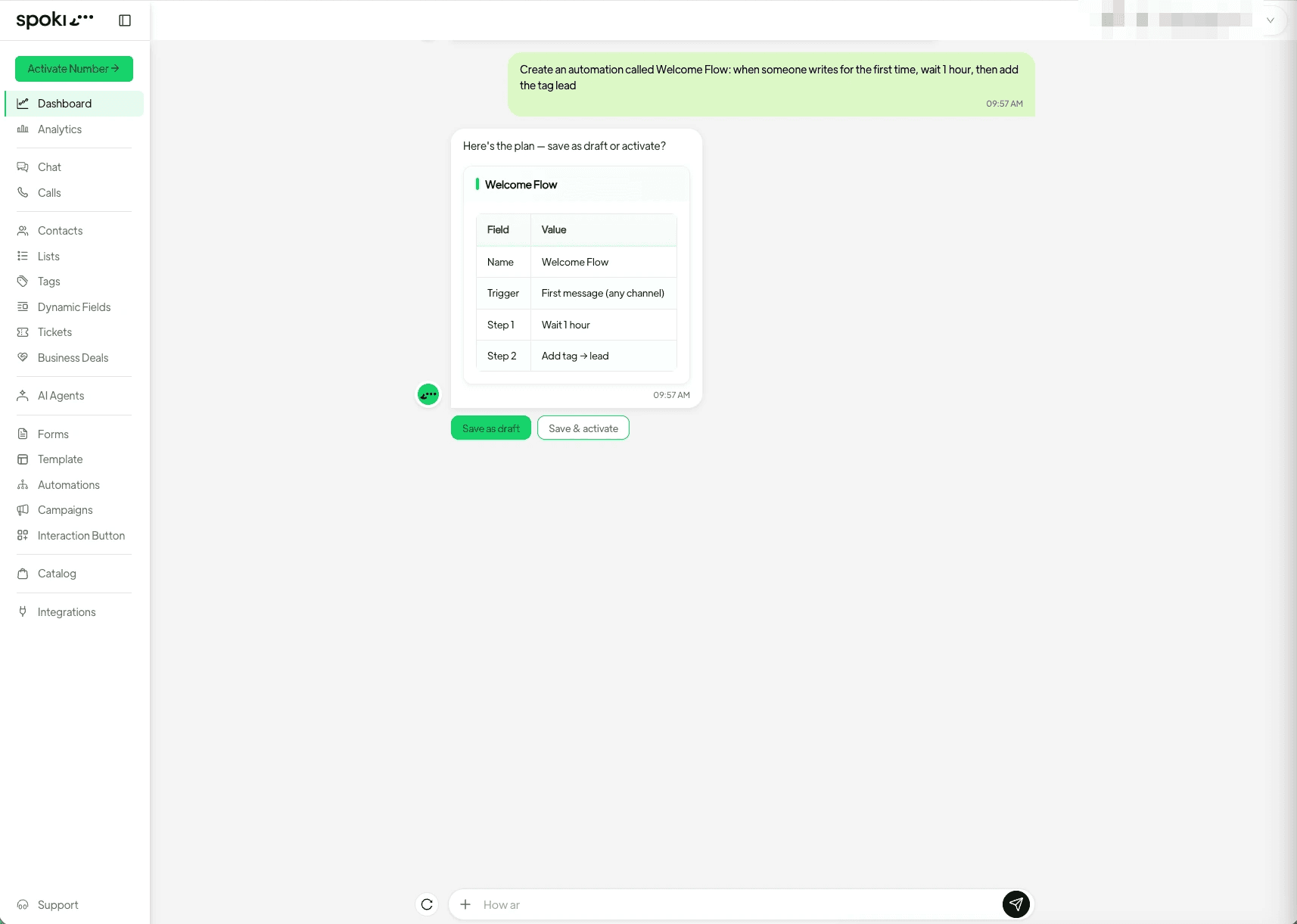
This innovative approach significantly reduces the time and effort required to deploy sophisticated WhatsApp marketing strategies. It democratizes automation, making it accessible to anyone who can articulate their business needs, regardless of their technical proficiency.
Practical Examples: Building Automations with Chat
Let’s dive into some practical scenarios where this chat-driven automation building can transform your WhatsApp Business operations.
Example 1: Onboarding New Leads
Scenario: You want to greet new contacts who message your WhatsApp Business number, provide them with essential information, and categorize them for future engagement.
Chat Command: “When a new contact messages us, send them our ‘Welcome to Spoki’ template, wait 2 hours, then send a message asking about their main interest, and finally tag them as ‘New Lead – Engaged’.”
Spoki’s Action: Spoki will create an automation with:
- A ‘New Contact’ trigger.
- A ‘Send Template Message’ step using your specified template.
- A ‘Wait’ step for 2 hours.
- A ‘Send Text Message’ step with your follow-up question.
- A ‘Tag Contact’ step, assigning the ‘New Lead – Engaged’ tag.
Spoki then presents this automation to you for confirmation before it goes live, ensuring you have full control.
Example 2: Abandoned Cart Recovery
Scenario: An e-commerce customer adds items to their cart but doesn’t complete the purchase. You want to send a reminder via WhatsApp.
Chat Command: “When a contact abandons their cart, wait 30 minutes, then send them the ‘Abandoned Cart Reminder’ template with a link to their cart, and if they still haven’t purchased after 24 hours, send a final reminder with a discount code.”
Spoki’s Action: This command will generate a more complex automation:
- An ‘Abandoned Cart’ trigger (assuming integration with your e-commerce platform).
- A ‘Wait’ step for 30 minutes.
- A ‘Send Template Message’ step for the initial reminder.
- A ‘Conditional Split’ based on purchase status after 24 hours.
- If ‘Not Purchased’, another ‘Send Template Message’ step with a discount code.
This demonstrates Spoki’s ability to handle conditional logic and branching paths directly from your chat description, making sophisticated recovery sequences straightforward to implement.
Example 3: Customer Support Follow-up
Scenario: After a customer support interaction, you want to send a satisfaction survey and offer further assistance.
Chat Command: “After a support ticket is closed, send the ‘Customer Satisfaction Survey’ template, wait 48 hours, and if they haven’t responded, send a message offering direct assistance from a human agent.”
Spoki’s Action: Spoki will construct an automation that triggers on ticket closure, sends a survey, waits, and then conditionally offers human agent intervention based on the survey response status.
The power here lies in the simplicity. You describe the desired outcome, and Spoki handles the intricate step-by-step construction, freeing you to focus on your overall marketing strategy rather than the mechanics of automation building.
Managing and Modifying Automations with Ease
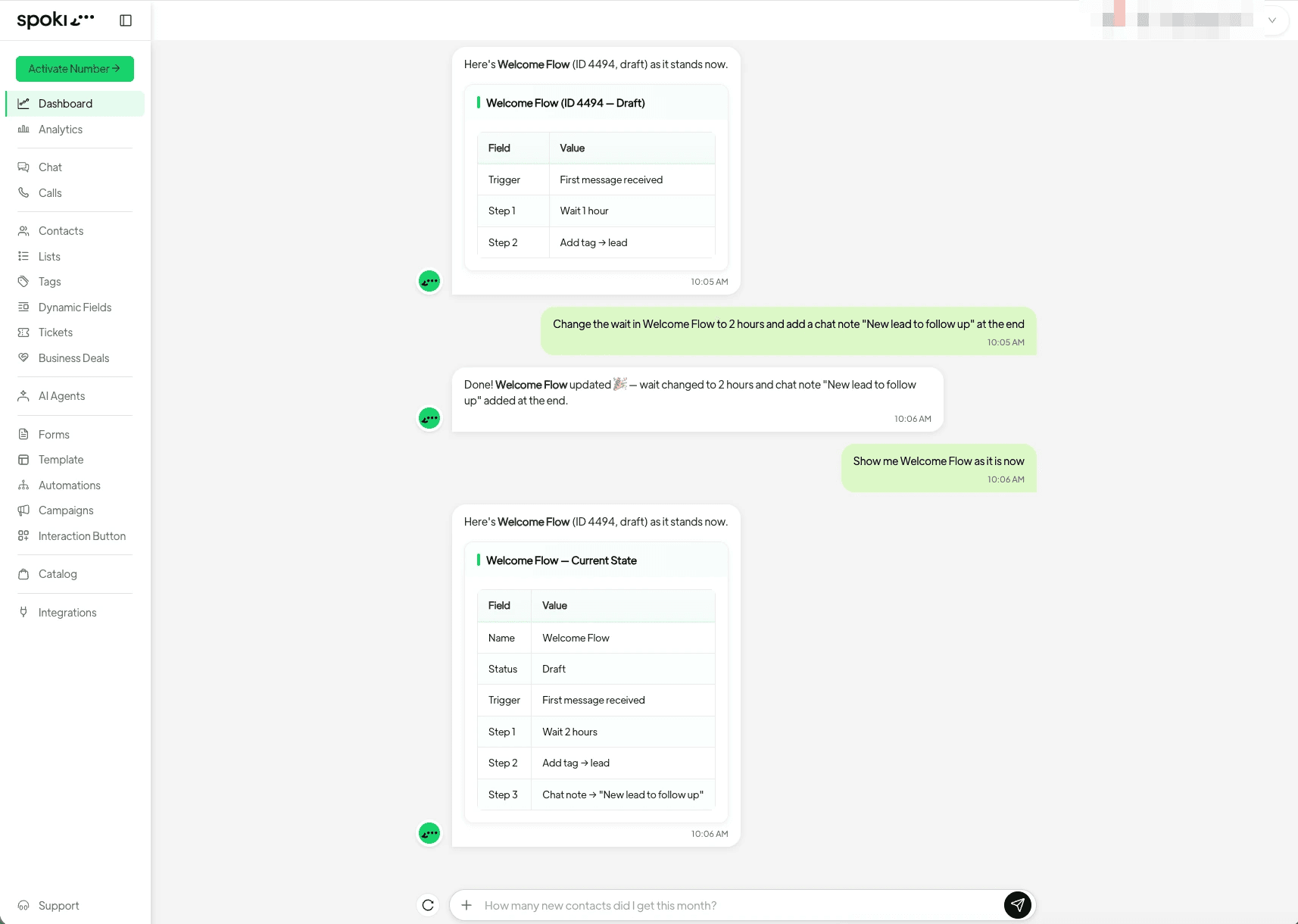
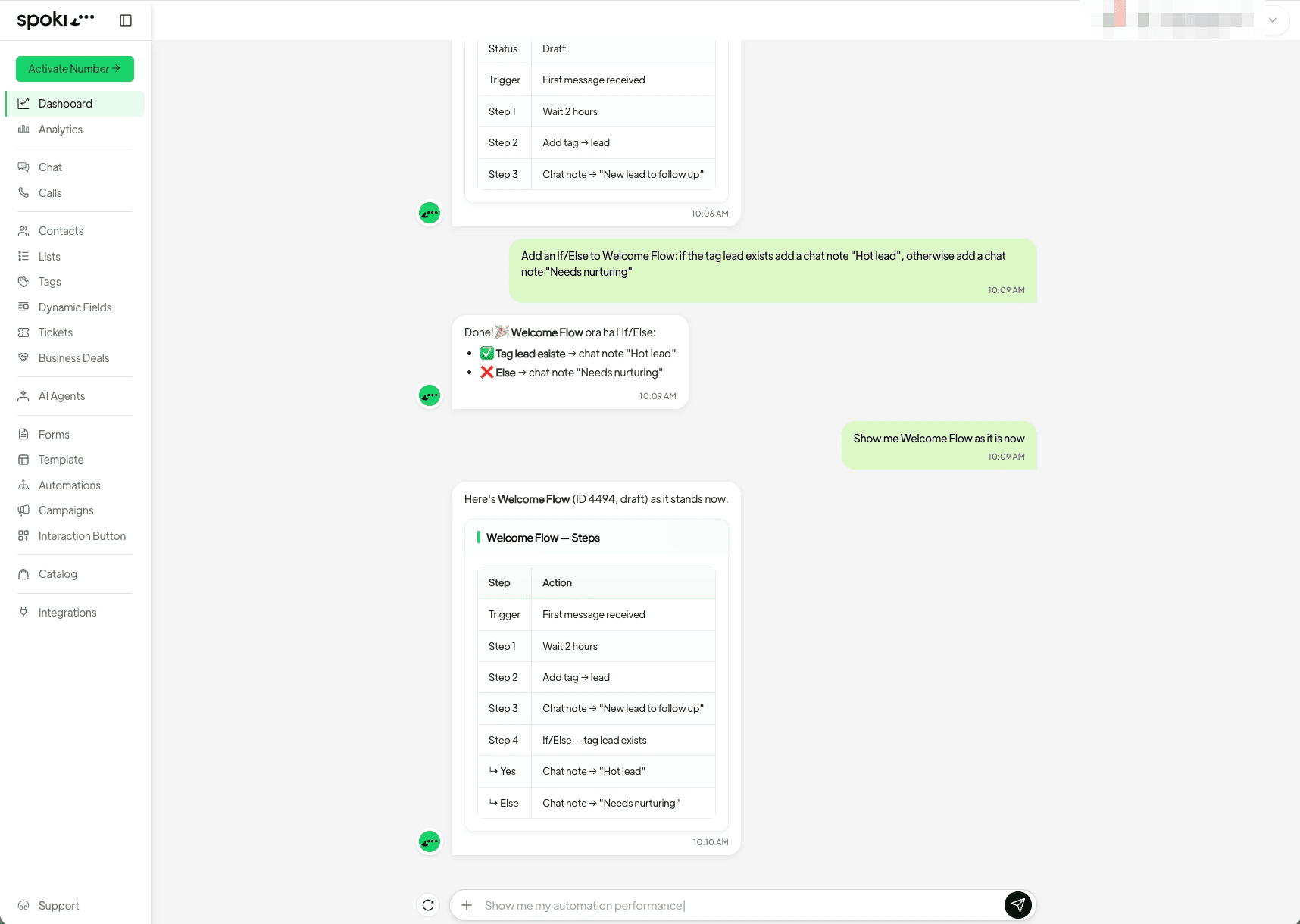
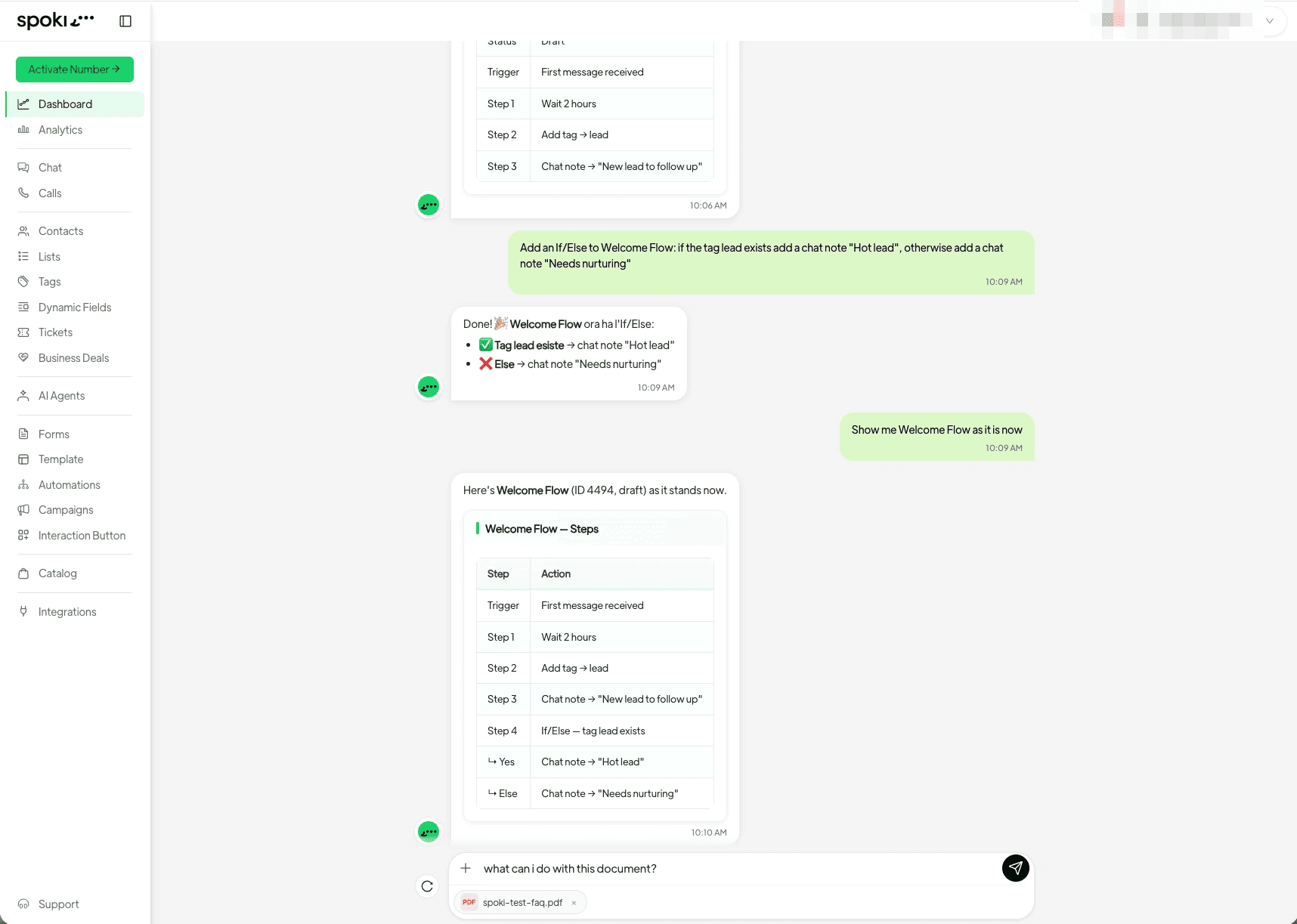
The benefits of chat-driven automation extend beyond initial creation. Modifying existing automations is just as intuitive. Need to add a step, reorder them, edit what a step does, rename it, move it to a folder, or even stop contacts running through it? All these actions can be performed by simply describing the changes in the Spoki Dashboard chat.
For instance, if you want to add a new step to your welcome sequence, you might type: “In the ‘New Lead Welcome’ automation, after sending the welcome template, add a step to send a link to our latest blog post.” Spoki understands your intent and integrates the new step seamlessly.
This fluid modification process ensures that your WhatsApp automations remain agile and responsive to evolving business needs, without requiring you to re-engage with a visual builder every time a minor adjustment is needed.
Handling Complex Flows: Conditional Logic and Splits
Many effective WhatsApp automations require conditional logic, where different paths are taken based on customer responses or data points. Spoki’s chat interface is designed to handle these complexities with ease.
You can ask for a Yes/No condition, sending contacts down different paths based on their answer. For example, “After asking if they are interested in product updates, if ‘Yes’, tag them ‘Product Updates Opt-in’, else if ‘No’, send a message offering help with specific product categories.”
Furthermore, Spoki allows you to send each value of a field down its own path. This is incredibly useful for segmenting contacts based on their preferences or demographics. “After asking for their preferred product category, send contacts interested in ‘Electronics’ down path A, ‘Apparel’ down path B, and ‘Home Goods’ down path C.” Each of these paths can then be filled with its own unique steps, all described from the chat.
This advanced capability, accessible through simple chat commands, empowers marketing managers to create highly personalized and dynamic customer journeys without the typical overhead of visual flow builders.
Seamless File Management within Chat
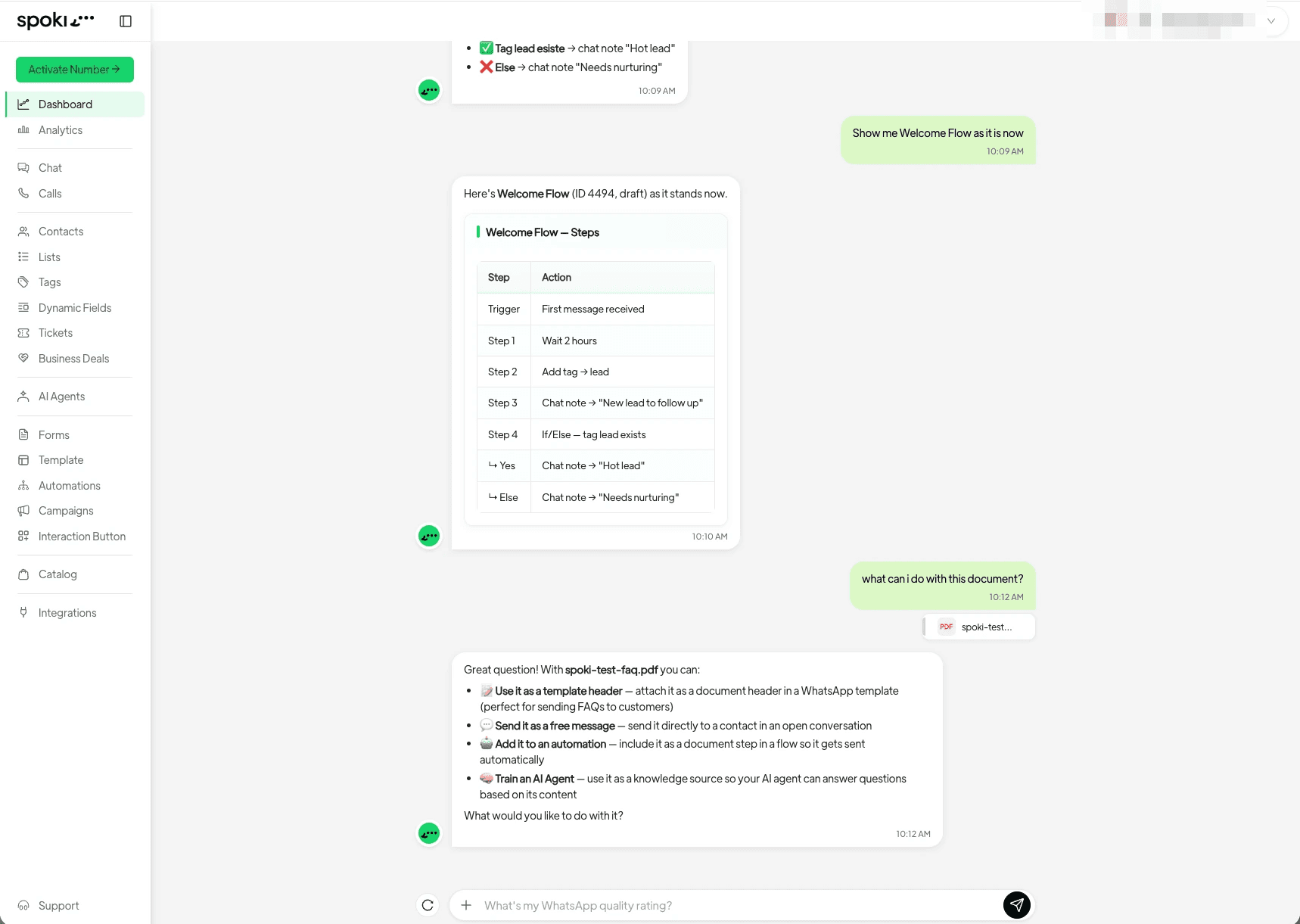
Beyond building automation steps, Spoki’s v19.10.0 update also streamlines file management directly within the chat interface. This is a significant enhancement for businesses that rely on rich media to engage their WhatsApp audience.
You can now attach an image or a document straight into the chat. Spoki intelligently recognizes the file and offers a range of actions:
- Use it as a template header: Instantly incorporate visuals into your WhatsApp message templates.
- Send it to a contact: Quickly share files with individual contacts or as part of an automation step.
- Attach it to a step: Integrate documents or images directly into specific automation actions, such as sending a product catalog or an instruction manual.
- Use it to train an AI agent: Leverage your files to enhance the knowledge base and conversational abilities of your Spoki AI agents, leading to more intelligent and helpful customer interactions.
This integrated file handling eliminates the need to switch between different interfaces or upload tools, making the entire automation and communication process more cohesive and efficient. Whether it’s a new product image for a promotional campaign or a PDF guide for customer support, managing your media assets is now as simple as a chat message.
What Happens When Chat Can’t Do It All (Yet)?
While Spoki’s chat-driven automation is incredibly powerful, there might be a few highly specialized configurations that are not yet fully supported through chat commands. In such instances, Spoki doesn’t leave you stranded. The platform intelligently recognizes when a particular request requires a more granular, visual adjustment. When this happens, Spoki will inform you and provide a direct link or navigation to the relevant section within the platform where you can complete the automation yourself.
This hybrid approach ensures that you always have a path to achieve your desired outcome, combining the speed and simplicity of chat with the comprehensive control of Spoki’s traditional interface when needed. Importantly, everything you create from chat shows up in the Automations section like any other automation, ready to open, adjust, and monitor.
Use Cases for WhatsApp Business API, Chatbots, and Automated Messaging
The ability to build WhatsApp automations from chat has profound implications for businesses leveraging the WhatsApp Business API, chatbots, and automated messaging strategies.
Enhanced WhatsApp Business API Utilization
For businesses already using the WhatsApp Business API, this feature significantly lowers the barrier to entry for creating complex message flows. Marketing managers can quickly prototype and deploy campaigns, customer service sequences, and lead nurturing flows without deep technical knowledge. This means faster time-to-market for new initiatives and greater agility in responding to market changes.
Streamlined Chatbot Development and Training
Chatbots are at the heart of efficient WhatsApp communication. With Spoki’s chat-driven automation, you can:
- Rapidly build chatbot flows: Describe a desired conversational path, and Spoki builds it.
- Integrate AI agent training: Use files uploaded directly in chat to train your AI agents, making them more knowledgeable and effective in handling customer queries.
- Create dynamic responses: Set up conditional logic for chatbots based on user input, ensuring personalized interactions.
This accelerates the development and refinement of your WhatsApp chatbots, leading to improved customer experience and reduced workload for human agents.
Optimized Automated Messaging Campaigns
Automated messaging is crucial for everything from order confirmations to promotional broadcasts. Spoki’s new feature allows you to:
- Design multi-stage campaigns: Easily create sequences of messages, delays, and actions for drip campaigns or promotional funnels.
- Personalize at scale: Implement conditional messaging based on customer data, ensuring relevant communication.
- A/B test variations: Quickly set up different message paths to test effectiveness and optimize your campaigns.
The result is more effective, targeted, and efficient automated messaging that drives engagement and conversions.
Conclusion: The Future of WhatsApp Automation is Conversational
Spoki’s v19.10.0 update marks a significant leap forward in the world of WhatsApp automation. By enabling users to build and modify entire automations simply by describing them in the Dashboard chat, Spoki eliminates traditional barriers and makes powerful automation accessible to everyone. This intuitive approach, combined with seamless file management, empowers marketing managers, business owners, and e-commerce operators to create sophisticated, personalized customer journeys with unprecedented ease.
The benefits are clear: reduced complexity, faster deployment, and greater agility in managing your WhatsApp Business communications. Whether you’re looking to onboard new leads, recover abandoned carts, provide proactive customer support, or train intelligent AI agents, Spoki’s chat-driven automation streamlines the entire process, allowing you to focus on strategic growth rather than technical execution.
Ready to experience the future of WhatsApp automation? Start for free with Spoki — no credit card required.