New Spoki Webhook Log Viewer: Total Control Over Integrations
Content
New Spoki Feature: Master Your Integrations with the Advanced Webhook Log Viewer
In the world of B2B SaaS and marketing automation, data is the fuel that keeps your business engine running. When that fuel flows smoothly between your CRM, your e-commerce platform, and your WhatsApp Business API account, your operations feel like magic. But when a connection drops or data goes missing, that magic quickly turns into a troubleshooting nightmare.
We understand that frustration. That is why we are thrilled to announce the launch of a game-changing feature for developers and marketing automation specialists alike: the Spoki Webhook Log Viewer.
Whether you are managing complex conversational flows or syncing high-volume leads, the new Webhook Log Viewer provides the transparency you need to debug instantly, optimize performance, and ensure your WhatsApp automation strategy never misses a beat. No more flying blind—it’s time to take full control of your integrations.
The Black Box Problem in Automation
Before we dive into the solution, let’s define the problem. Most modern marketing stacks rely heavily on webhooks—automated messages sent from apps when something happens. For example, when a customer purchases a product on Shopify, a webhook triggers a “Thank You” message via Spoki on WhatsApp.
However, without a proper logging tool, integrations often feel like a “black box.” You send data in, and you hope the correct action comes out the other side. If a message isn’t delivered or a contact isn’t updated in your CRM, you are often left asking:
- Did the external platform actually send the data?
- Did Spoki receive the request?
- Was the payload formatted correctly?
- Did the server return a 200 OK or a 500 Internal Server Error?
Without the Webhook Log Viewer, answering these questions requires digging into server logs, contacting support, or endless trial-and-error testing. This leads to downtime, lost leads, and fractured customer experiences.
Introducing the Spoki Webhook Log Viewer
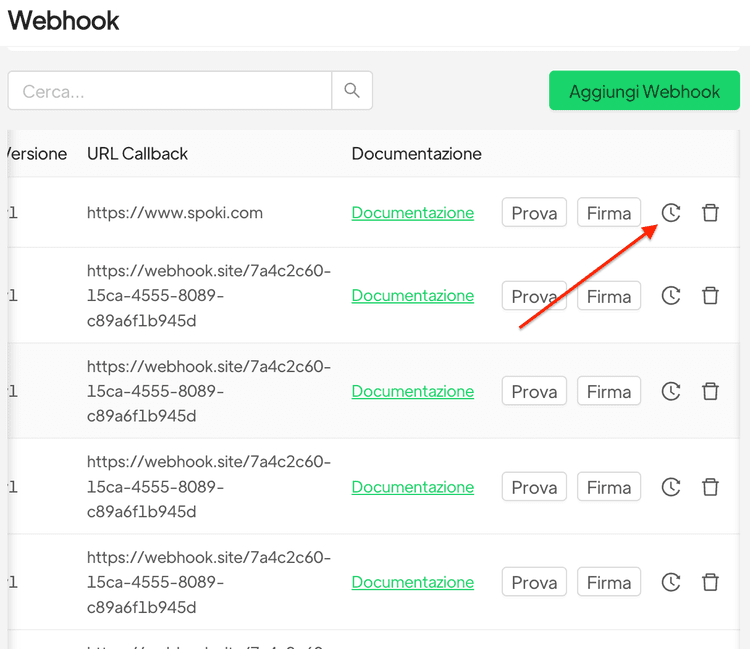
The Spoki Webhook Log Viewer solves this by giving you a real-time, granular look at every single interaction between Spoki and your third-party tools. It is designed to bridge the gap between technical reliability and marketing efficiency.
Key Capabilities at a Glance
This isn’t just a list of events; it’s a comprehensive diagnostic tool. Here is what you can do:
- Real-Time Monitoring: See incoming and outgoing webhook data as it happens.
- Payload Inspection: View the exact JSON body, headers, and parameters sent or received.
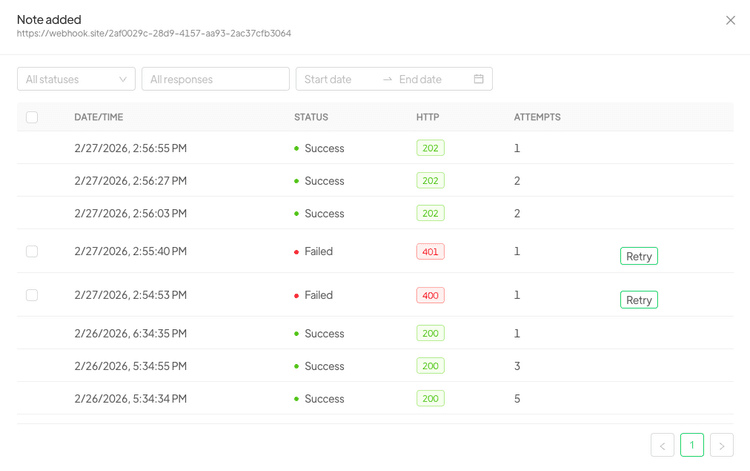
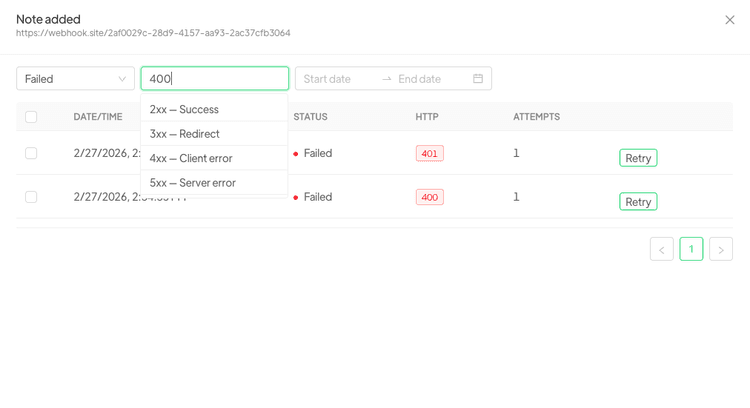
- Status Tracking: Instantly identify success (2xx) and error (4xx, 5xx) codes.
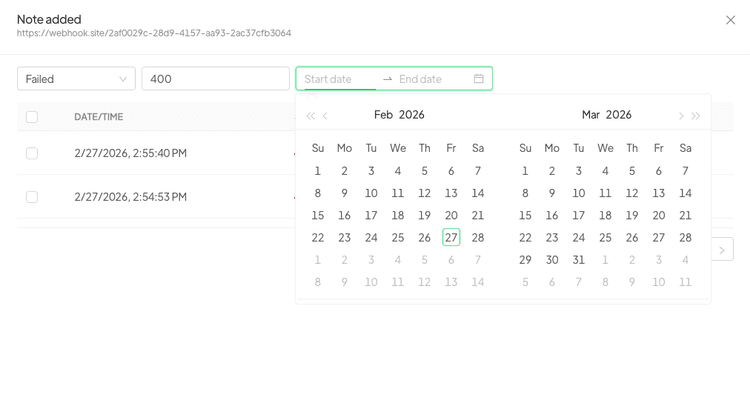
- Advanced Filtering: Search logs by date, status, or specific event types to isolate issues quickly.
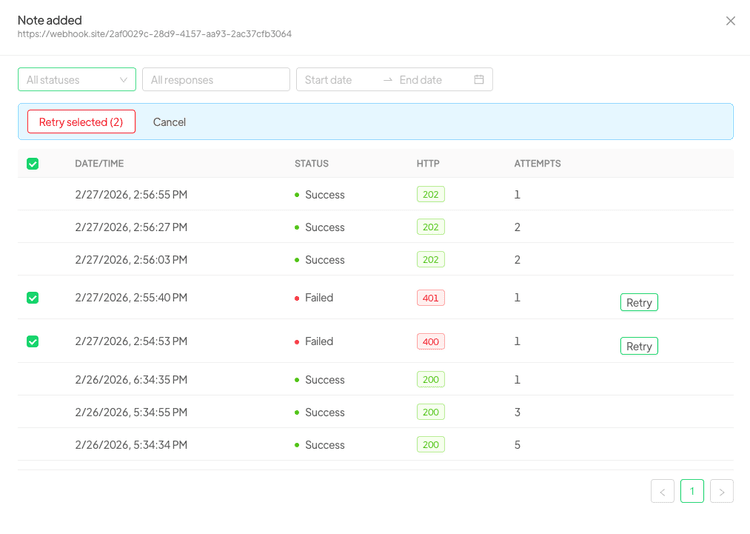
- Retry Mechanisms: (Depending on specific configuration) Understand which calls were retried and why.
Why This Matters for Your Business
You might be thinking, “I’m a Marketing Manager, not a developer. Why should I care about JSON payloads?” The answer lies in the reliability of your customer journey.
1. Drastically Reduce Downtime
When an automation fails, time is money. If your lead generation form stops syncing to WhatsApp, every minute of downtime is a potential lost sale. The Webhook Log Viewer empowers your team to identify the root cause in seconds, not days.
2. Ensure Data Integrity
Data accuracy is critical for segmentation. If a webhook fails to update a user’s tag in Spoki, you might send them the wrong campaign. By monitoring logs, you can verify that data is flowing correctly, ensuring your audience receives hyper-personalized communication compliant with WhatsApp policies.
3. Empower Your Tech Team
Developers love visibility. By providing them with a dedicated log viewer within the Spoki dashboard, you reduce the friction between marketing and IT. They can debug integrations without needing backend access to Spoki’s core infrastructure.
Deep Dive: Analyzing Webhook Payloads
Let’s get practical. How do you actually use the Webhook Log Viewer? The core value lies in inspecting the payload.
When you click on a specific log entry, the viewer expands to show the full request details. This usually includes the HTTP method (POST, GET), the URL endpoint, headers, and the body.
Understanding the Data Structure
For a typical WhatsApp automation scenario, the payload might contain the user’s phone number, the template message name, and variable parameters (like the customer’s first name). If a message fails to send, the log viewer allows you to check:
- Is the phone number format correct? (e.g., ensuring the country code is included).
- Are the variable parameters matching? (e.g., sending a string where a number is expected).
- Is the API key valid? (Checking headers for authentication errors).
Practical Use Cases in WhatsApp Automation
The Webhook Log Viewer isn’t just for fixing broken things; it’s for optimizing your workflows. Here are three scenarios where this feature becomes indispensable.
Scenario 1: Troubleshooting E-commerce Abandoned Carts
The Setup: You have connected WooCommerce to Spoki. When a user leaves items in the cart, a webhook triggers a WhatsApp reminder.
The Issue: Customers aren’t receiving messages.
The Fix: You open the Webhook Log Viewer. You see a series of 400 Bad Request errors coming from Spoki. Upon inspecting the payload, you notice that the variable for “Product Name” is exceeding the character limit allowed by the WhatsApp Business API template. You shorten the product name in your e-commerce plugin, and the status codes turn to 200 OK. Revenue stream restored.
Scenario 2: Debugging CRM Bi-Directional Sync
The Setup: You are using HubSpot. When a lead replies on WhatsApp, Spoki sends a webhook to update the contact property in HubSpot to “Engaged.”
The Issue: The status isn’t changing in HubSpot.
The Fix: The log viewer shows that Spoki is successfully sending the webhook, but receiving a 401 Unauthorized response from HubSpot. This indicates that your API token has expired. You refresh the connection, and the sync resumes instantly.
Scenario 3: Validating Chatbot Logic
The Setup: You have a complex chatbot built in Spoki that calls an external weather API to give users local forecasts based on their location.
The Issue: The bot replies, “Sorry, I can’t find that city.”
The Fix: Checking the logs reveals that the external weather API is returning a valid response, but the format of the JSON has changed (e.g., “temp_c” became “temperature_celsius”). By seeing the raw incoming data in the Webhook Log Viewer, you can adjust your Spoki dynamic variables to map the new field correctly.
Interpreting Status Codes: A Cheat Sheet
To get the most out of the Webhook Log Viewer, it helps to speak the language of HTTP status codes. Here is a quick cheat sheet relevant to your Spoki integrations:
- 200 OK: Success! The data was received and processed correctly.
- 201 Created: Success! A new resource (like a contact) was created.
- 400 Bad Request: The data sent was formatted incorrectly. Check your JSON syntax or missing required fields.
- 401 Unauthorized: Authentication failed. Check your API keys or Bearer tokens.
- 403 Forbidden: You are authenticated, but don’t have permission to perform this action (e.g., trying to message a user outside the 24-hour window without a template).
- 404 Not Found: The webhook endpoint URL is incorrect.
- 500 Internal Server Error: The receiving server crashed or had an issue. This is usually on the receiver’s end (either Spoki or your external tool).
Best Practices for Managing Spoki Integrations
With great power comes great responsibility. Now that you have visibility into your data streams, follow these best practices to maintain a healthy automation ecosystem.
1. Regular Health Checks
Don’t wait for a customer to complain. Make it a habit to check the Webhook Log Viewer weekly. Look for sporadic errors or high latency times that might indicate a developing problem.
2. Secure Your Data
Webhooks often contain Personally Identifiable Information (PII). Ensure that you are only sending necessary data and that your connected endpoints are using HTTPS. Spoki ensures encryption in transit, but it is vital to ensure your receiving servers are also secure.
3. Collaborate on Documentation
When you spot a recurring error in the logs, document it. Create a shared troubleshooting guide for your marketing and support teams. If a specific error code (like a template rejection) keeps popping up, update your internal guidelines on how to write WhatsApp templates.
The Future of Automation is Transparent
At Spoki, our mission is to make WhatsApp marketing not just effective, but effortless. We believe that technology should empower businesses, not confuse them. The introduction of the Advanced Webhook Log Viewer is a testament to our commitment to providing professional-grade tools for businesses that are serious about growth.
By removing the guesswork from your integrations, we are helping you build more robust, reliable, and scalable automation flows. This means better experiences for your customers and better results for your bottom line.
Ready to Optimize Your Workflows?
The Webhook Log Viewer is now available in your Spoki dashboard. Whether you are a seasoned developer or a marketing pro, take a moment to explore your logs today. You might discover insights about your data flow that you never knew existed.
Master your integrations. Debug with confidence. Scale with Spoki.
Explore the New Webhook Log Viewer on Spoki Today!
Log in to your account to see your data in action, or check our documentation for a step-by-step setup guide.